Staging & Preview Environments
Create staging and preview environments alongside production. Preview branches auto-delete on a timer, and promote to production with one click.
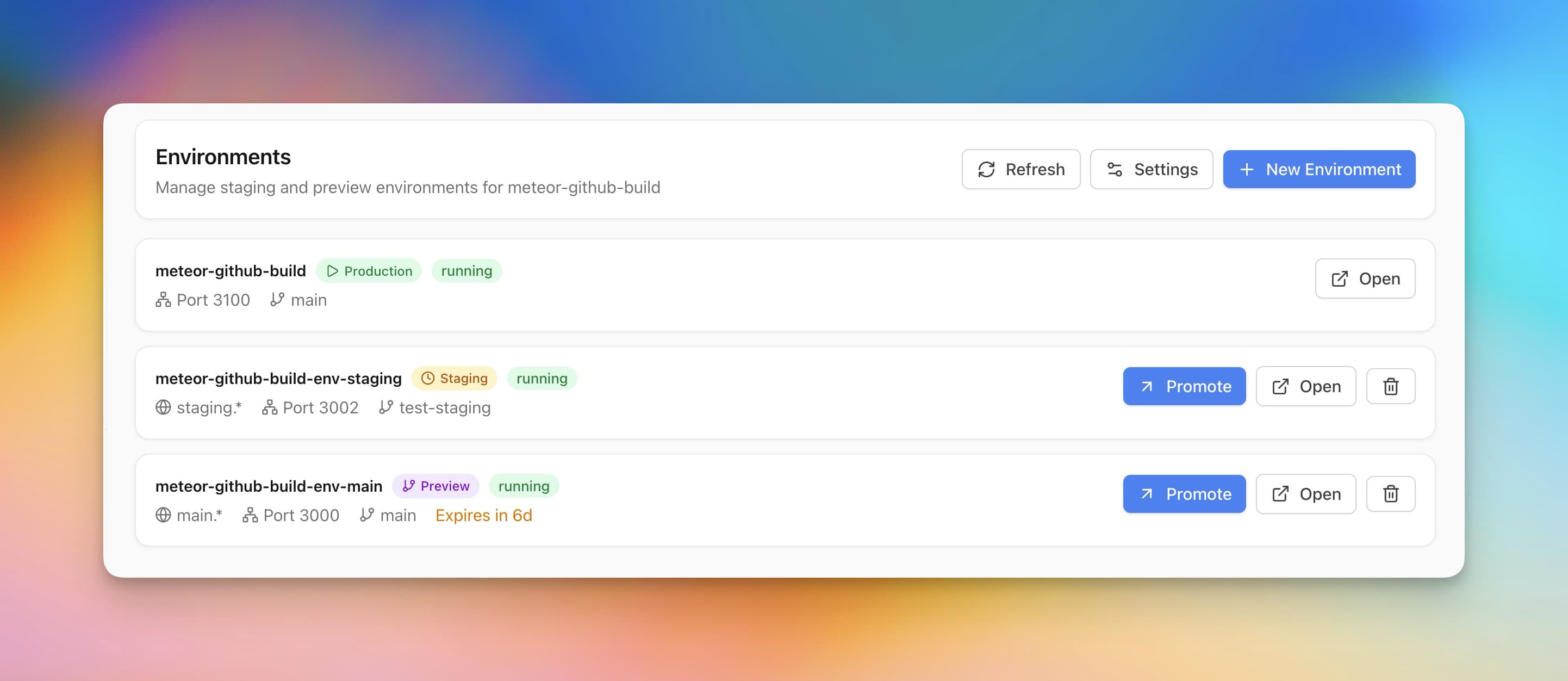
Using Staging & Preview Environments in Server Compass
Staging & Preview Environments replaces complex workflows with a few clicks. Here's the process.
Open Dashboard
Navigate to your application dashboard to see all deployed apps.
Use Staging & Preview Environments
Access Staging & Preview Environments from the application detail view.
Take Action
Apply changes and monitor results in real time.
Doing It Manually Without Staging & Preview Environments
Think Staging & Preview Environments is overkill? Here's the alternative: raw terminal commands and manual config files.
SSH into your server
Connect to your server via terminal.
ssh root@your-server-ipList all containers
See what's running (and what's crashed).
docker ps -a
# Good luck remembering which container is which
# CONTAINER ID   IMAGE          STATUS
# a1b2c3d4e5f6   myapp:v1.2.3   Up 2 days
# f6e5d4c3b2a1 myapp:v1.2.2 Exited (1) 3 days agoCheck container logs
Dig through logs to find errors.
docker logs container_name --tail 500
# Scroll through 500 lines of unformatted text
# grep for errors manually
No syntax highlighting, no search, no filtering.
Restart a container
Stop and start the container manually.
docker compose stop app
docker compose start app
# Or the nuclear option:
docker compose down && docker compose up -dRollback to previous version
Hope you tagged your images properly.
# First, find the old image
docker images | grep myapp
# Edit docker-compose.yml to use old tag
nano docker-compose.yml
# Change image: myapp:latest to myapp:v1.2.2
docker compose up -d
If you didn't tag versions... good luck.
Let Server Compass Handle It
Staging & Preview Environments isn't just faster—it's safer. No typos, no forgotten flags, no accidental disasters.
- Visual interface
- No terminal needed
- Built-in error handling
- Works on any VPS
Everything Staging & Preview Environments Offers
Everything you need for app management in one integrated tool, replacing complex CLI commands and manual configuration.
Get StartedWhy Staging & Preview Environments Matters
Server management shouldn't require a DevOps team. Staging & Preview Environments makes professional-grade app management accessible to everyone.
Complete Visibility
Staging & Preview Environments gives you a bird's-eye view of all your applications. No more guessing container states.
Instant Actions
Staging & Preview Environments puts start, stop, restart, and rollback at your fingertips with one-click controls.
Safe Operations
Staging & Preview Environments includes safety guards and confirmations to prevent accidental destructive actions.
Historical Context
Staging & Preview Environments keeps a full audit trail so you always know what changed and when.
Common Questions About Staging & Preview Environments
Common questions about Staging & Preview Environments in Server Compass
How do I access Staging & Preview Environments in Server Compass?
Staging & Preview Environments is available in the App Management section of Server Compass. Simply connect to your server, navigate to App Management, and you'll find Staging & Preview Environments ready to use. No additional setup or plugins required.
Does Staging & Preview Environments require any server-side installation?
No. Server Compass operates as a desktop application that connects to your server via SSH. Staging & Preview Environments works through this connection without installing any agents or packages on your server (except the optional monitoring agent for resource tracking).
Is Staging & Preview Environments included in all Server Compass plans?
Yes. Every Server Compass feature, including Staging & Preview Environments, is included with the one-time $29 payment. There are no tier restrictions, add-ons, or per-server fees. You get all 152+ features for all your servers.
Can I use Staging & Preview Environments with any VPS provider?
Staging & Preview Environments works with any VPS or dedicated server that supports SSH access and Docker. This includes DigitalOcean, Hetzner, Vultr, Linode, AWS EC2, Google Cloud, Azure, and any other provider. It also works with local servers and homelab setups.
What makes Staging & Preview Environments different from command-line alternatives?
Staging & Preview Environments provides a visual, intuitive interface that replaces complex CLI commands and configuration files. You get real-time feedback, safety confirmations, and a consistent experience across all your servers without memorizing syntax or writing scripts.
More App Management Features
Explore other app management capabilities in Server Compass
Application Dashboard
View all deployed applications with real-time status indicators. Switch between grid and table view for your preferred workflow.
Grid & Table View
Toggle between visual grid cards and compact table view. See container status, uptime, and quick actions at a glance.
Container Health Monitoring
Real-time container status with uptime tracking, health check indicators, and resource usage per container.
Zero-Downtime Deployment
Blue-green deployment keeps the old container serving while the new one is built and health-checked, then switches traffic over. Progress appears the moment you press Redeploy, the deployment is recorded in history right away with its commit, and a deploy that passes 45 minutes stops with a message pointing you at the logs.
Try Staging & Preview Environments Today
Download Server Compass and get access to Staging & Preview Environments along with 151 other features. One-time $29 payment. No subscriptions. No per-server fees.