

Server Compass vs NeonDB
Compare full-stack VPS deployment with self-hosted databases against NeonDB's serverless Postgres. Choose complete infrastructure ownership or managed serverless database.
Server Compass column checked against v1.45.0 · Updated
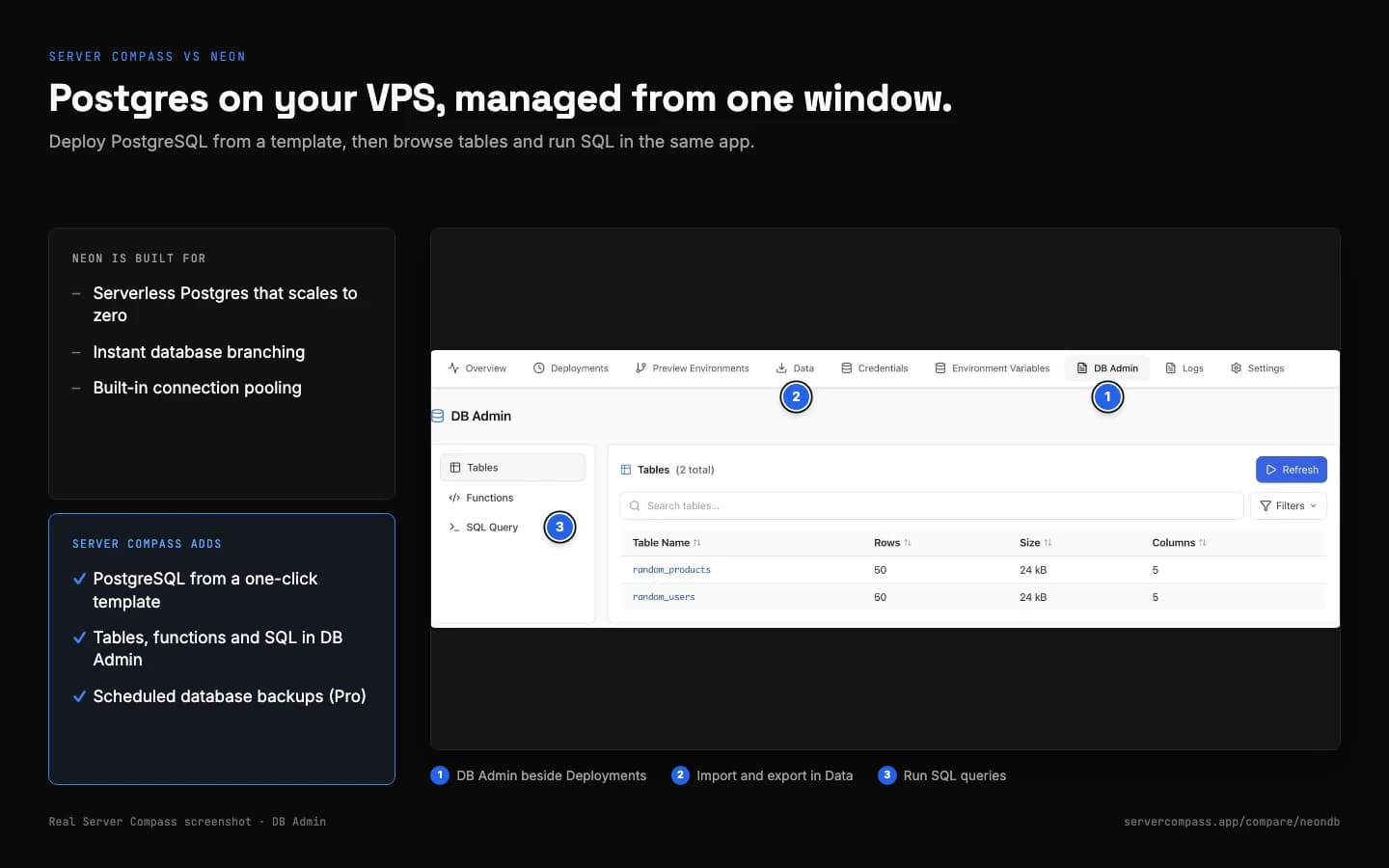
Pick Neon for serverless Postgres with branching and scale-to-zero. Pick Server Compass for an always-on Postgres on your own VPS, managed and backed up from the desktop.
- PostgreSQL, TimescaleDB and more from templates
- DB Admin for tables, functions and SQL
- Database dumps to S3, SFTP or pCloud on a schedule (Pro)
Feature Comparison
| Feature | Server Compass | NeonDB |
|---|---|---|
| Platform scope | Full-stack (apps + databases) | Postgres + Auth, Functions, Storage |
| App support | Any app via Docker + 420+ templates | Node.js Functions (APIs, no websites) |
| Database hosting | Self-hosted on VPS | Serverless cloud |
| Infrastructure ownership | ||
| Database options | PostgreSQL, MySQL, MongoDB, Redis + more | Postgres only |
| CSV import/export | Per table (SQL engines) | CSV/JSON export in console |
| SSH access | Full terminal | |
| File browser | ||
| Cron jobs | Visual management | Scheduled Functions + pg_cron |
| Application deployment | Docker, Compose, Git or image | Neon Functions (Node.js) |
| Storage limits | VPS disk size | 1GB/project free → $0.35/GB-mo |
| Branching | Not built in | Instant branches |
| Pricing model | One-time + VPS | Free tier + usage-based |
| Connection pooling | DIY | Built-in |
Pricing Comparison
Server Compass
- Desktop app (lifetime)
- Self-hosted PostgreSQL, MySQL, Supabase
- Unlimited databases on VPS
- CSV import/export
- No storage fees (VPS disk)
- Deploy apps + databases together
- Pay only VPS ($5-20/mo)
NeonDB
- Free: 100 projects, 1GB storage each
- Launch: pay as you go, no minimum
- Storage: $0.35/GB-month
- Compute: $0.106/CU-hour when active
- Scale: $0.222/CU-hour, 30-day restore
- Functions + Storage, no website hosting
When to Choose Each Platform
Choose Server Compass if...
- You need full-stack deployments (apps + databases)
- You want complete database control
- You need CSV import/export tools
- You want to avoid database vendor lock-in
- You need multiple database types (Postgres, MySQL)
- You prefer one-time costs
- You need SSH access to database server
- You want unlimited storage (VPS-limited)
Choose NeonDB if...
- You want serverless Postgres with Auth and Functions
- You want serverless scaling
- You need instant database branching
- You prefer managed backups and monitoring
- You want pay-per-compute pricing
- You need Neon-specific features
- You want zero database management
Read More
Frequently Asked Questions
How are databases backed up?
Server backups find MySQL, MariaDB, PostgreSQL and MongoDB on the server and dump them to S3-compatible storage, SFTP or pCloud, hourly, daily, weekly or monthly. Schedules run from the desktop app, so it needs to be running, and storage destinations are part of Pro.
What is the difference between Server Compass and NeonDB?
Server Compass is a desktop app that deploys and manages apps on servers you own, over SSH, with no control panel running on them. The comparison table on this page shows where NeonDB works differently. Server Compass is free for one server, and Pro is $29 one-time; you also pay your VPS provider, typically $5-20/month.
Is Server Compass cheaper than NeonDB?
It depends on how you use NeonDB. Server Compass is free for one server, and Pro is $29 one-time for unlimited servers; after that you only pay for your VPS, typically $5-20/month. NeonDB pricing: Launch and Scale bill compute and storage used, with no monthly fee. Costs grow with usage.
Can I migrate from NeonDB to Server Compass?
Usually, yes. Anything that runs in Docker can run on your VPS with Server Compass, and there are 420+ one-click templates. Built-in migration covers Coolify, Dokploy, RunCloud, Dockge, EasyPanel (preview) and Render, and you can use any VPS provider, such as DigitalOcean, Hetzner or Linode.
Does Server Compass have the same features as NeonDB?
Server Compass covers the core deploy workflow: one-click templates, Git and image deploys, automatic SSL, environment variables, logs and rollbacks. Because the apps run on your own server, it also gives you an SSH terminal, a file browser, cron jobs and security tools.
Which should I choose: Server Compass or NeonDB?
Choose Server Compass if you want to own your servers, avoid vendor lock-in, work over SSH and pay once for the tool. Choose NeonDB if the reasons listed under "Choose NeonDB if..." on this page match how you work.
Ready to Own Your Infrastructure?
Download Server Compass and start deploying on your own VPS with the same polished experience you expect from premium platforms.
Looking beyond NeonDB? See the best NeonDB alternative for self-hosting