January 29, 2026
Lock Down Your Domains: Security Headers, IP Allowlists, and Rate Limiting
Configure HSTS, frame protection, Basic Auth, IP allowlists, and rate limiting per domain. Plus Force HTTPS toggle and WWW redirect with DNS verification.
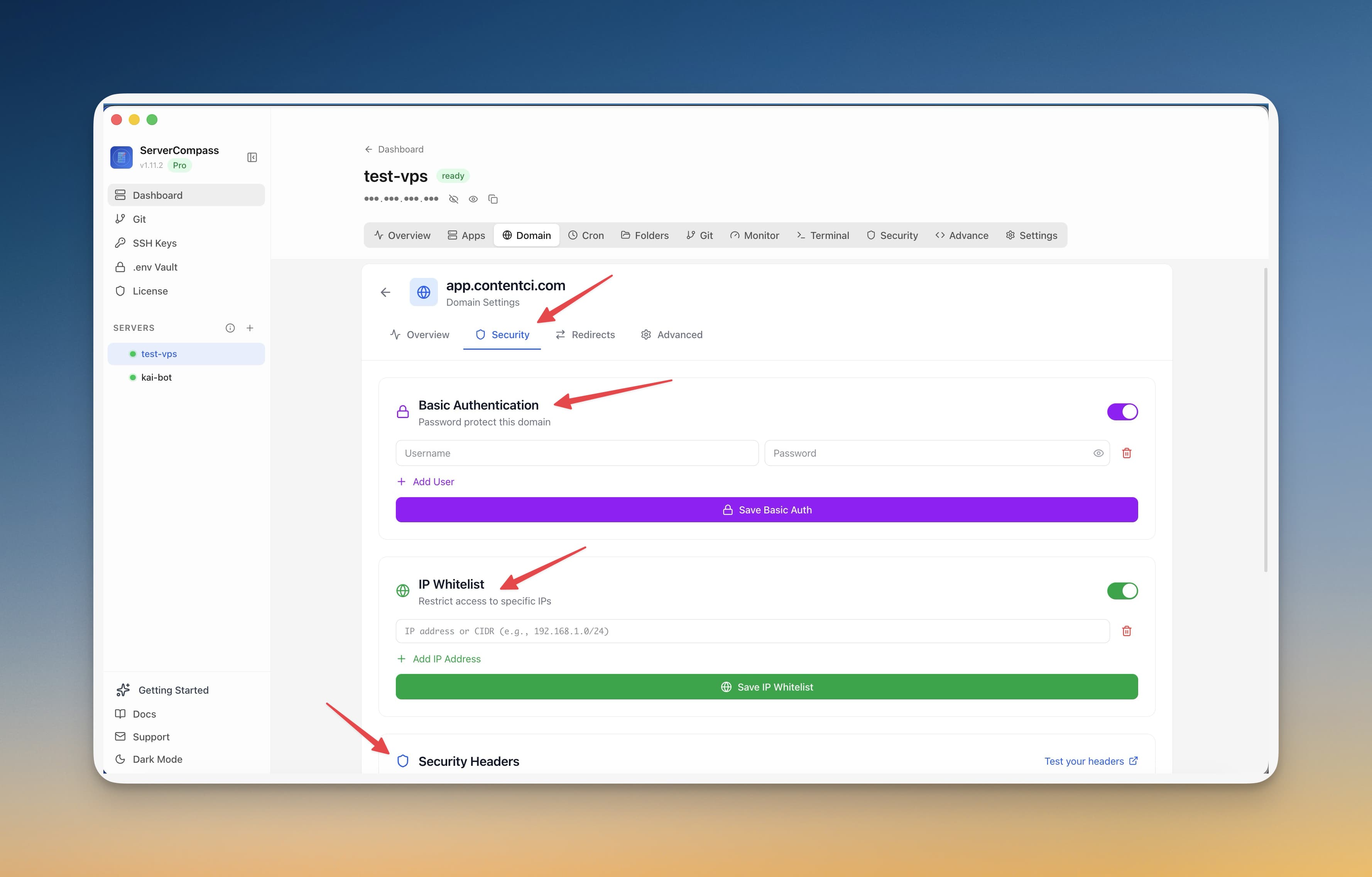
You deploy your app, set up a domain, and SSL is working. Job done, right? Not quite. Without security headers, your app is vulnerable to clickjacking. Without rate limiting, a bot can hammer your API. Without IP restrictions, your staging environment is public to the entire internet.
Server Compass v1.7.4 redesigns the Domain Settings panel with three tabs—Overview, Security, and Redirects—giving you per-domain control over everything that matters.
Security Headers Configuration
Enable critical security headers with toggles instead of editing Traefik middleware YAML:
- HSTS (Strict-Transport-Security) — forces browsers to use HTTPS, preventing downgrade attacks
- Frame protection (X-Frame-Options) — blocks your site from being embedded in iframes, preventing clickjacking
- Content-Type sniffing protection — prevents browsers from MIME-type guessing
- Force HTTPS — per-domain toggle that redirects all HTTP traffic to HTTPS automatically
Basic Auth and IP Allowlists
Need to restrict access to a staging environment or admin panel? Add Basic Auth with a username and password—no middleware configuration files, just fill in the fields. Or lock it down further with an IP allowlist so only your office or VPN can reach it.
This is especially useful for staging environments, internal dashboards, and admin panels that should never be publicly accessible.
Rate Limiting Controls
Protect your API endpoints from abuse with per-domain rate limiting. Set the request limit and time window, and Traefik handles enforcement at the proxy level—before requests even reach your application.
SSL Certificate Status Display
The Overview tab now shows your SSL certificate details at a glance—issuer, expiration date, and renewal status. No more guessing whether auto-renewal is working.
WWW Redirect with DNS Checks
Set up www-to-non-www redirects (or vice versa) with automatic DNS verification. Server Compass checks that both the root domain and www subdomain resolve correctly before configuring the redirect, preventing broken redirect loops.
Secure Your Domains
Every domain you add in Server Compass now comes with enterprise-grade security controls. No Traefik middleware files, no YAML debugging. Try Server Compass and lock down your domains in minutes.
From across the StoicSoft network
Hand-curated reads on the same topic from sister sites in the StoicSoft family.