August 20, 2026
Both Machines Changed? Merge Your Sync Instead of Overwriting It
When both machines change your Server Compass data, you no longer have to pick one to overwrite. Review the differences, keep what matters from each side, and apply a merged result — nothing is overwritten until you say so.
You run Server Compass on more than one machine — a laptop when you're out, a desktop at your desk — and you keep them in sync through your own encrypted cloud storage. It's convenient right up until both machines change. You add a server from the laptop on Monday. On Tuesday you rename an app and update its environment variables from the desktop. On Wednesday you go to sync, and Server Compass tells you both sides have moved.
Until now, that left you with one blunt choice: overwrite this device with the remote snapshot, or overwrite the remote with this device. Whichever way you went, the other side's work was gone. And because sync is a mirror, not a backup, that overwrite propagated to every device the moment you pushed — no staging, no undo. The safe move was to stop syncing and reconcile everything by hand, which defeats the point of having sync at all.
What changed
When both this device and the remote snapshot have changed, Server Compass no longer forces the all-or-nothing choice. It stops, shows you exactly what differs, and lets you decide item by item — nothing is overwritten until you apply. You keep the servers you added here, pull in the app you edited over there, and resolve the handful of things that changed on both sides field by field. The old overwrite-everything path is still one button away when that's genuinely what you want.
How it works in practice
Server Compass flags the conflict instead of guessing
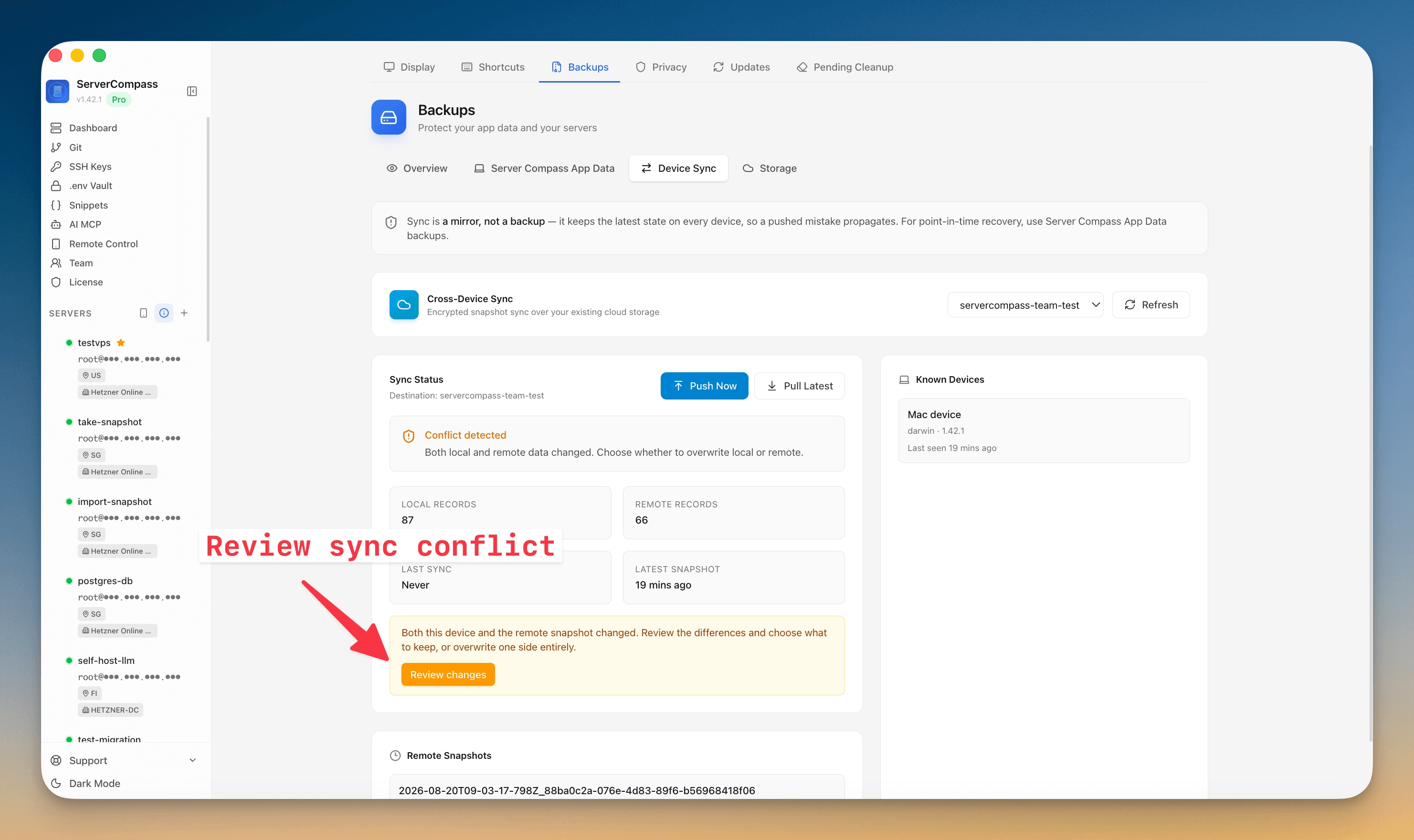
Open Backups → Device Sync. When both your local data and the remote snapshot have changed since the last sync, the Sync Status card shows Conflict detected and spells out the counts — how many records live on this device versus in the remote snapshot — so you can see the collision before you touch anything. Instead of a force-overwrite prompt, you get a Review changes button.
See exactly what differs, in three buckets
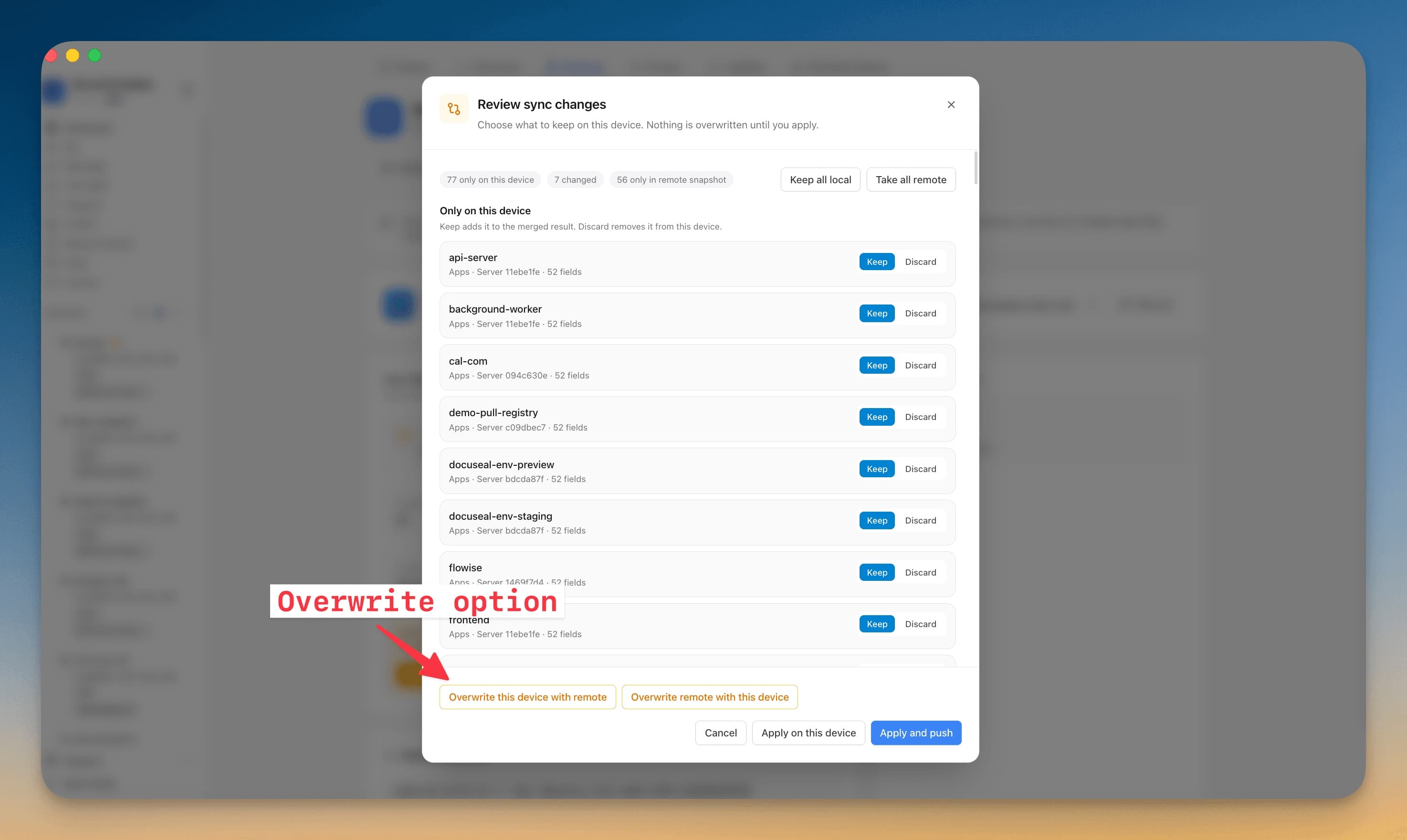
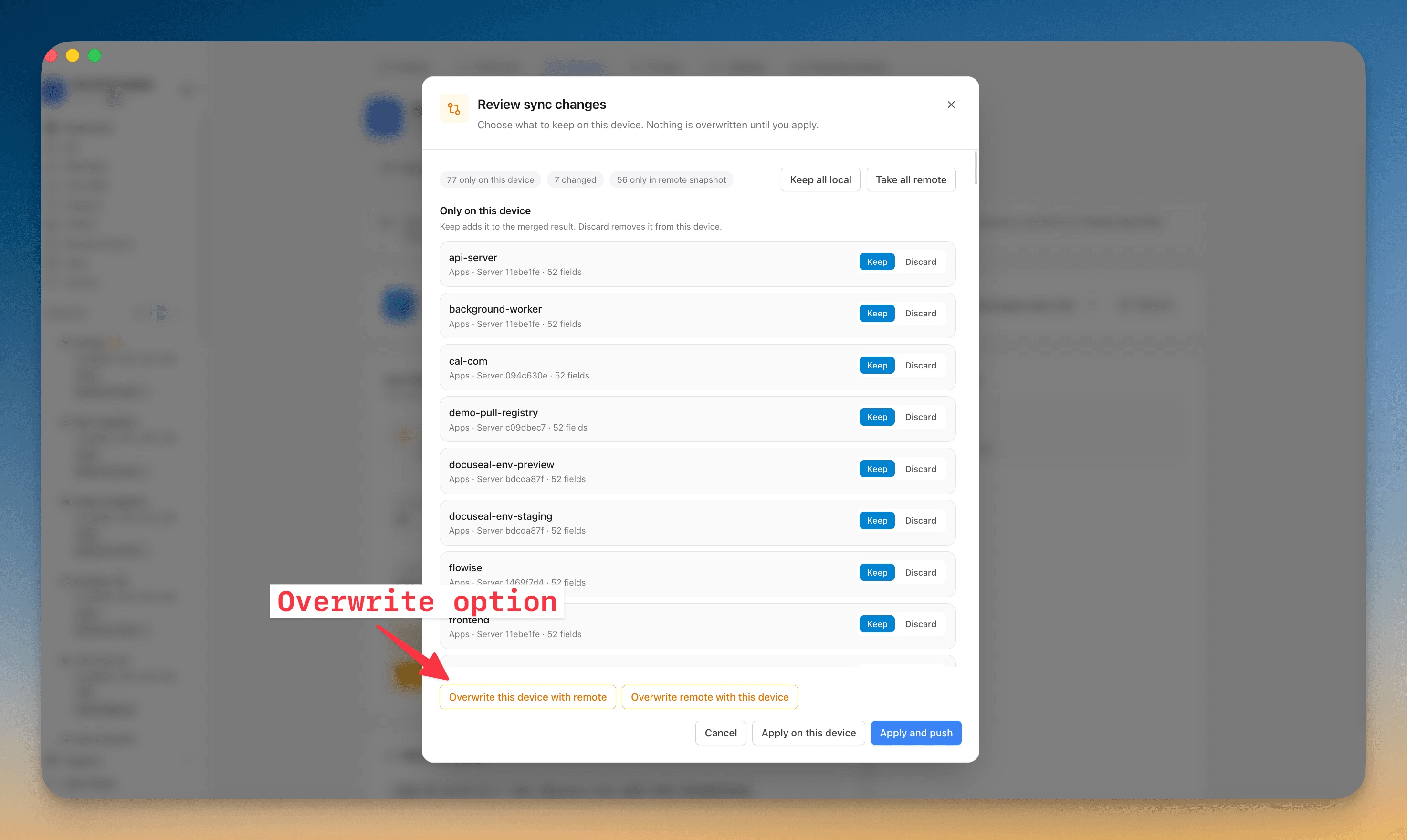
Review changes opens the Review sync changes dialog, headed by a plain reminder: choose what to keep on this device; nothing is overwritten until you apply. Across the top, three counts summarize the collision — how many items exist only on this device, how many changed on both sides, and how many exist only in the remote snapshot. Below that, the same three buckets are laid out as lists you can work through one row at a time.
Keep or discard, one item at a time
Each bucket does exactly what you'd expect:
- Only on this device — a server, app, or domain you created here that the remote hasn't seen. Keep adds it to the merged result; Discard drops it from this device.
- Changed on both — the tricky case. Choose Keep this device or Use remote, and click the row to open a field-by-field comparison with a This device column next to a Remote column, so you can see precisely what diverged — a changed port, a rewritten env value — before you pick a side.
- Only in the remote snapshot — something another machine added. Use remote brings it onto this device; Skip leaves it off.
When the differences are lopsided, two shortcuts save the clicking: Keep all local treats your machine as the source of truth, and Take all remote accepts the snapshot wholesale — but now as a reviewed decision rather than a blind overwrite.
Apply on this device — or apply and push
Because nothing is committed until the end, you can move through the whole list, change your mind, and only then decide how far the result travels. Apply on this device writes the merged result locally and leaves the remote alone. Apply and push writes it back to your cloud storage so your other machines converge on the same reconciled state the next time they pull. And if you decide mid-review that you don't want to merge at all, Overwrite this device with remote and Overwrite remote with this device are right there in the same dialog — the old behavior, kept as an explicit option instead of the only one.
Before vs after
| The old all-or-nothing path | Reviewing sync changes |
|---|---|
| Both sides changed → pick one machine to win | Both sides changed → review the differences first |
| The losing machine's new work is discarded | Keep what you added here and pull in what changed there |
| No visibility into what actually differed | Field-by-field comparison for anything changed on both |
| Overwrite propagates instantly, no undo | Nothing is overwritten until you apply |
| Reconcile by hand or lose data | Merge in one pass, then apply and push |
Who benefits most
The laptop-and-desktop solo user. If you switch machines through the day, both sides drift constantly. Reviewing changes means a stray edit on one machine no longer costs you a real change on the other — you merge and move on.
Teams sharing a workspace. When more than one person's Server Compass feeds the same snapshot, conflicts are normal, not exceptional. Per-item review lets each sync fold in everyone's additions instead of one push flattening the rest.
Anyone setting up a second machine. A fresh install used to look like a giant conflict — hundreds of built-in templates read as "your data" and demanded a force overwrite. Now a blank device is treated as empty: it can Pull Latest without adding a server first, the built-in template catalog is no longer counted as your data, and the first real sync is a clean merge rather than a standoff.
Try it
Update to the latest Server Compass, open Backups → Device Sync, and the next time both machines have changed you'll get Review changes instead of a force prompt. Keep what matters from each side, apply, and push — and if you ever want the fast, wholesale overwrite, it's still one click away. The difference is that now it's your choice, made after you've seen exactly what's at stake.