July 19, 2026
Move Your EasyPanel Apps to Your Own VPS — Without Taking the Old One Down
Server Compass v1.33.0 connects over your existing SSH login, takes a read-only inventory of your EasyPanel projects, and copies supported apps plus their MySQL, MariaDB, and PostgreSQL data into isolated staging — while EasyPanel keeps serving traffic.
You moved to EasyPanel because it made Docker feel manageable. A tidy dashboard, a few clicks, and your Ghost blog, your WordPress site, and that little static page were all running behind clean domains. No hand-written compose files, no wrestling with Traefik labels at midnight.
Then the reasons to move on started stacking up. Maybe you want a server you own end to end. Maybe you're consolidating three boxes into one. Maybe you just want your apps managed by the same tool you use for everything else. Whatever the reason, the moment you actually plan the move, the same cold thought shows up: those apps are live. Real visitors are hitting them right now. The WordPress database has orders in it. Copy the wrong folder, dump a database at the wrong moment, or point a domain at a half-built box, and you don't have a migration — you have an outage.
So the move keeps sliding to "some quiet weekend" that never comes.
What changed
Server Compass v1.33.0 introduces Migrate from EasyPanel — a guided way to move your EasyPanel apps and their databases onto a VPS you control, without stopping EasyPanel or touching your live data.
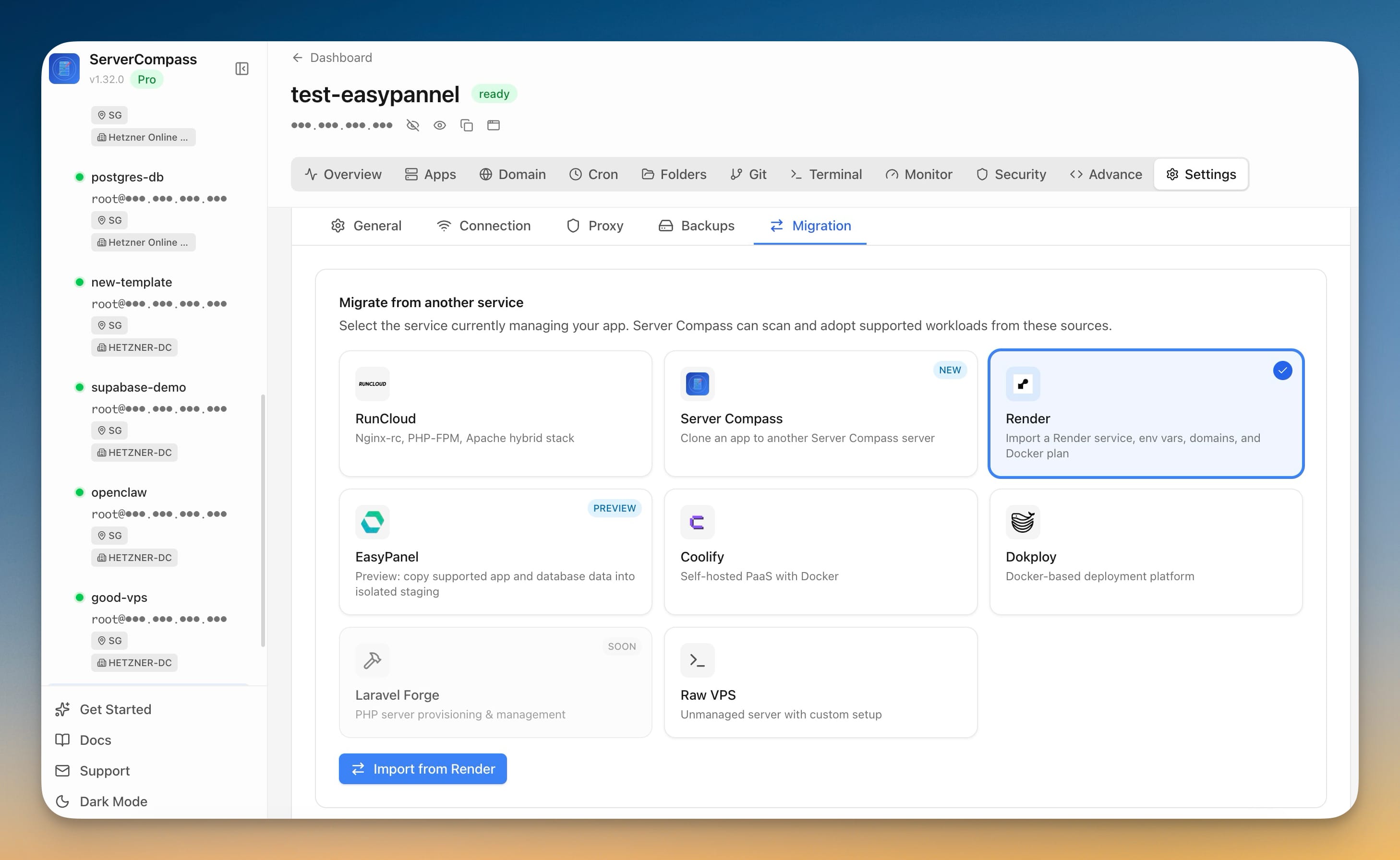
You start a Server Migration, pick EasyPanel as the source, and Server Compass connects over the SSH login you already use. It takes a read-only inventory of your EasyPanel projects — services, domains, environment variables, ports — and then copies each supported app into isolated staging on unused ports. Your current setup keeps serving traffic the entire time. Nothing is switched over until you decide it is.
This first release is a preview: it's built to stage your apps safely so you can inspect the copied result today. Flipping production traffic to the migrated apps is the next step on the roadmap.
How it works in practice
The whole thing runs as a six-step wizard — Select Source, Scan Server, Review Apps, Deploy & Migrate, Other Items, and Review & Clean Up — so you always know where you are and what happens next.
See exactly what will move, before anything changes
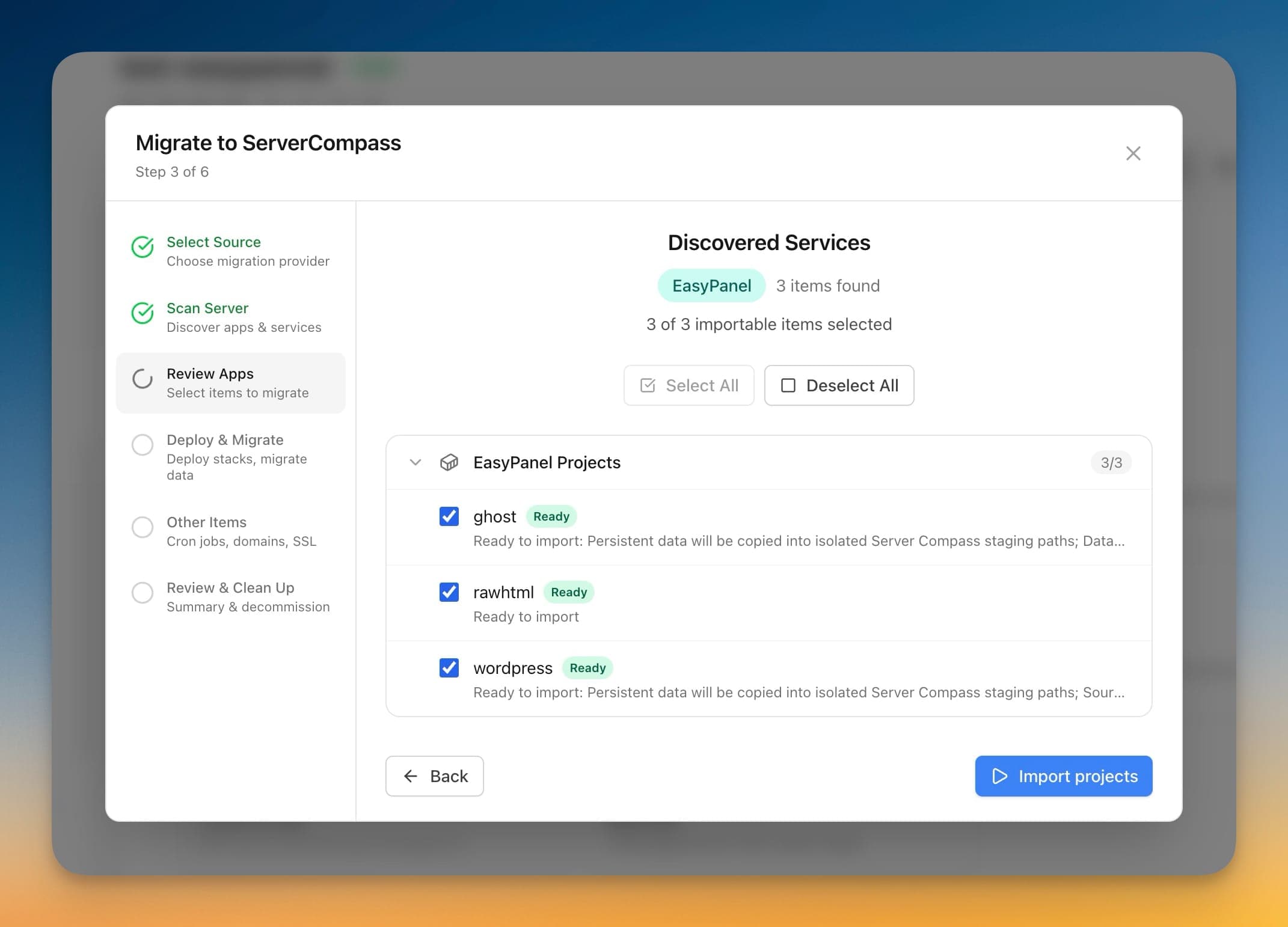
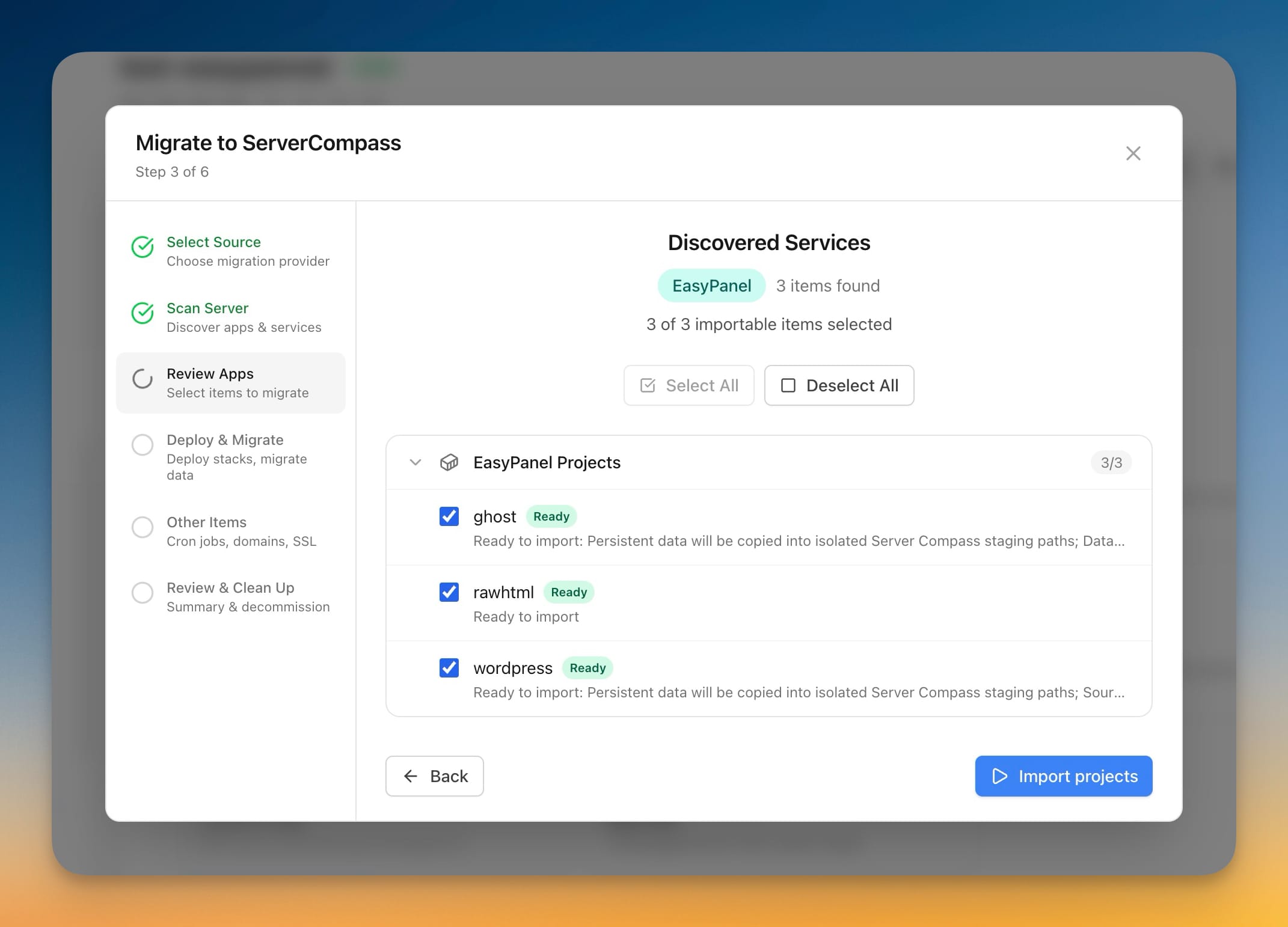
After you choose EasyPanel and run the scan, Server Compass shows you a Discovered Services list: every EasyPanel project it found, each labelled so there are no surprises. A project is marked Ready when it can be imported cleanly, or flagged for review, snapshot-only, or blocked when it needs a closer look. You pick exactly which ones to bring across — select all, or just the app you care about today.
This is the part that turns a scary migration into a boring one. Instead of guessing what's on the server, you're reading a checklist of what's about to happen.
Bring the database along — and verify it
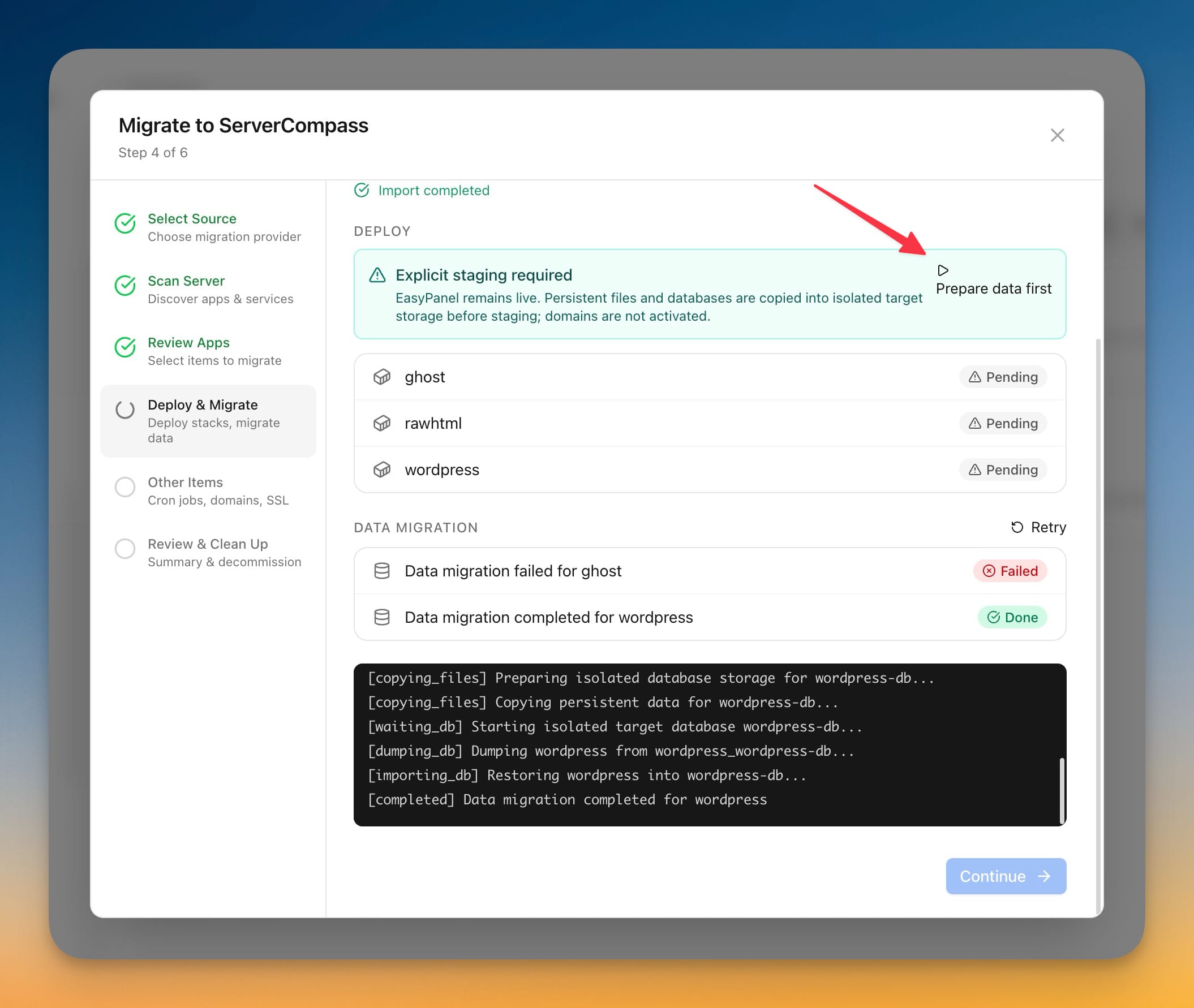
Copying an app's files is the easy half. The half that actually keeps you up at night is the data. Migrate from EasyPanel copies your MySQL, MariaDB, and PostgreSQL data into the staged app and verifies it landed, so you can confirm the migration worked before you rely on it.
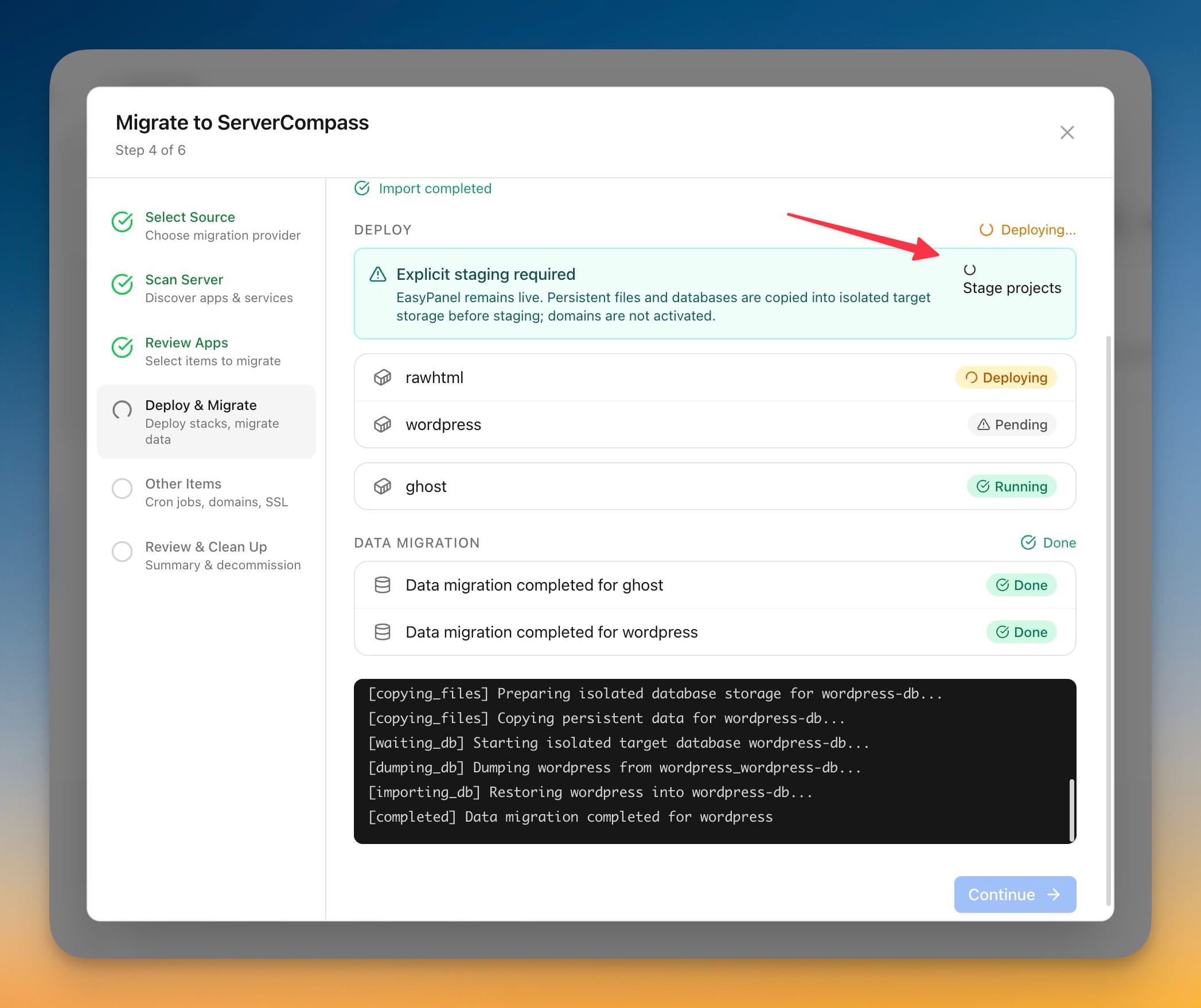
Because this is explicit staging, Server Compass is careful about the order: EasyPanel stays live, persistent files and databases are copied into isolated target storage, and domains are deliberately not activated. You'll see a clear "Prepare data first" prompt rather than the tool quietly reaching for your live setup. Under the hood it walks through copying files, starting an isolated target database, dumping the source, and restoring into the staged copy — each step reported in plain language as it runs.
Watch it come up in staging
Once staging kicks off, each project deploys onto its own unused port and you watch it move from Pending to Deploying to Running, with data migration marked Done alongside it. Your apps are now standing up on the new server in isolation — reachable for you to inspect, invisible to the outside world, and completely separate from what EasyPanel is still serving.
If one project's data migration hits a snag, it's called out on its own line with a Retry option, so a single hiccup doesn't force you to restart the whole run.
Your secrets never end up in a log
Environment variables are where migrations quietly leak. Migrate from EasyPanel encrypts each value the moment it's read, and those values never show up in logs, error messages, or on screen. The stuff that would ruin your week if it landed in a screenshot stays sealed.
Before vs after
| Moving off EasyPanel by hand | Migrate from EasyPanel |
|---|---|
| SSH in and hunt down every project's files and volumes yourself | One read-only scan lists every project and labels what's ready |
| Dump and restore each database manually, hoping the versions line up | MySQL, MariaDB, and PostgreSQL data copied into staging and verified |
| Take the old app down (or risk data drift) while you copy | EasyPanel keeps serving traffic; nothing is stopped |
| Copy env vars around in plaintext and pray none leak | Values encrypted on read, never printed to logs or screen |
| Find out it's broken after you've already cut the domain over | Inspect the fully staged result before any cutover |
Who benefits most
People outgrowing a managed panel. If you're bumping into EasyPanel's ceiling — pricing, resource limits, or just wanting full control of the box — this gets your apps onto your own VPS without a rebuild-from-scratch project.
Anyone consolidating servers. Running apps across a couple of EasyPanel boxes and want them under one roof? Stage them side by side on the target server and confirm each one before you commit.
The cautious operator with live data. If your apps have real users and a real database, the isolated-staging model is built for you: you get to see the migrated copy working before it ever touches production traffic.
Try it
Update to Server Compass v1.33.0, open a server, and start a Server Migration — you'll find EasyPanel waiting in the source picker, now alongside Render, RunCloud, Coolify, and Dokploy with their real logos. Scan, review what's ready, and stage a project into isolation. You'll be able to inspect the whole thing running on your own VPS before you decide anything is permanent — which is exactly how a migration should feel.