February 24, 2026
Staging and Preview Environments: Test Before You Ship to Production
Deploy staging environments for QA and preview environments for feature branches alongside production. One-click promote, auto-delete timers, and full activity logs with sensitive data redaction.
You've built a feature and it works on your machine. Now what? Deploy it straight to production and hope for the best? Or spend an hour setting up a separate server with its own Docker stacks, environment variables, and domain just to test it?
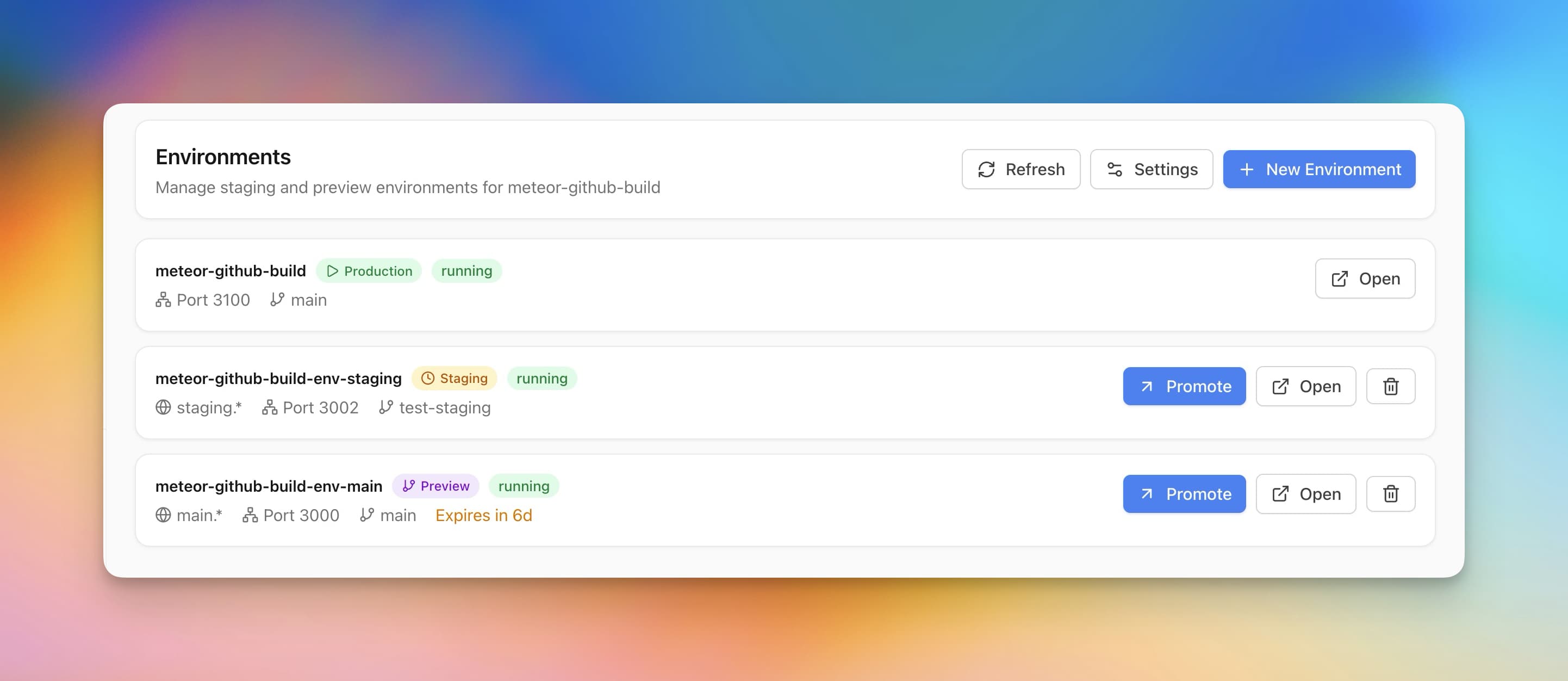
Server Compass v1.14.0 adds staging and preview environments—separate instances of your app running on the same server, each with its own port, environment variables, and lifecycle.
Staging Environments
Long-lived environments for QA and integration testing. A staging environment runs alongside your production app with its own configuration. Test database migrations, verify API changes, run automated tests—all on a dedicated instance that mirrors production.
Preview Environments
Temporary environments tied to feature branches. Deploy a preview for PR review, share the URL with your team, and let it auto-delete after 1 to 90 days. No cleanup needed—expired previews are removed automatically.
Instant Access via Port
Each environment gets its own port, accessible immediately without domain configuration. Server Compass scans your server and suggests an available port automatically. When you're ready, add a subdomain like staging.yourapp.com.
One-Click Promote to Production
Tested everything in staging? Promote to production with a single click. Server Compass handles the zero-downtime switch—your staging config becomes the new production config, and traffic switches instantly.
Flexible Environment Variables
Each environment gets its own environment variables. Copy from production as a starting point, customize for staging (different database, debug mode enabled), or import from your .env Vault.
Activity Logs: See Every Server Command
Also new in this release: a complete log of every command Server Compass runs on your server. Filter by operation type, search across commands and output, and audit exactly what happened during each deployment.
Sensitive data is automatically redacted — passwords, tokens, SSH keys, and secrets are masked in logs so you can share them safely for debugging.
Before vs After
Workflow
Before
After
Test a feature branch
Set up separate server or merge to main
Click "Create Preview Environment"
QA before production
Deploy to production and test live
Test in staging, then promote
Clean up test environments
Remember to delete manually
Auto-delete after timer expires
Audit server commands
Check bash history via SSH
Searchable activity log with redaction
Ship with Confidence
Staging and preview environments bring the workflow you know from Vercel and Railway to your own VPS. Try Server Compass and test before you ship.
Related in the StoicSoft network
If you're self-hosting on a VPS or working through a deployment guide like the one above, DeployToVPS is the StoicSoft network's handbook for VPS deployment recipes — docker-compose, nginx, traefik, and common app self-hosts.
From across the StoicSoft network
Hand-curated reads on the same topic from sister sites in the StoicSoft family.