Kubernetes on Your Server
Server Compass now finds the Kubernetes cluster on your server, or installs single-node k3s after a preflight, and gives you a Kubernetes tab to watch workloads, read pod logs, scale, roll back and apply manifests without typing kubectl. The Overview also shows every disk on the server and can mount an attached volume, and AI agents can run long commands in the background over MCP.
Download v1.46.0
Get this version from GitHub Releases
What's Changed
New Features
20- A Kubernetes tab for servers that run a cluster — Server Compass detects k3s, k0s, MicroK8s and kubeadm over SSH and shows Workloads, Pods, Services & Ingress, Nodes and Namespaces, with a namespace filter and search by name
- Needs attention lists each problem — a node not ready, a workload still rolling out, a pod that is failing or pending — and jumps to the pods behind it; k3s system add-ons stay out of the list until you turn on Show add-ons
- View logs for any pod, with find in logs, line wrapping, refresh and download
- Day-to-day operations without kubectl — restart a workload, scale a Deployment or StatefulSet (the dialog shows the exact
kubectl scalecommand), roll back to a previous revision, or delete a pod - Apply manifest — paste YAML, run a server-side dry run, then apply it to the cluster; Open kubectl shell jumps to the Terminal tab with KUBECONFIG already set
- Install single-node k3s from the app — a preflight checks root access, capacity, ports 6443 and 10250, the firewall and your reverse proxy before anything is installed
- k3s's bundled Traefik is turned off whenever your server's proxy already owns ports 80/443, so your existing domains keep working; with UFW on, the install adds the rules pods need to reach cluster DNS and opens port 6443 only if you ask for remote kubectl
- Uninstall k3s removes the cluster and the firewall rules the install added, after you type the server name to confirm
- Connect an existing cluster — point Server Compass at a kubeconfig already on the server; it is checked against the cluster before it is saved
- A way in from Server Settings — the new Kubernetes card shows whether a cluster was found and opens the Kubernetes tab, where a server without one can install k3s or connect a kubeconfig
- Kubernetes tools over MCP — AI agents can read the cluster overview, resources, pod logs and rollout status and history (Read); restart, scale, delete pods and roll back (Operate); and apply manifests (Deploy). Installing and uninstalling k3s stays in the app
- See every disk on the server, not just the root filesystem — the Overview's new Disks & Storage section groups partitions and mount points under each physical disk, with totals for disks, size, mounted and not mounted
- The Disk card says how many disks the server has and how many are not mounted; snap loop devices, tmpfs and other pseudo filesystems are hidden, with a toggle to show them
- Mount an attached volume from the app — Mount… picks the partition and mount path and can add it to /etc/fstab by UUID with
nofail, so the server still boots if the volume goes missing - A blank disk can be formatted as ext4 or xfs after you type its name to confirm; Server Compass refuses to mount over the root disk or a disk that is already in use, and Ignore hides a disk you don't plan to use
run_commandhandles long commands over MCP — it waits up totimeoutSeconds(120 by default, up to 900); passbackground: truefor restarts, builds or anything withsleep, then follow it with the newget_command_jobtool- Fix a denied MCP call from Activity — a denied row shows the reason and a Create a token with button that opens the token form prefilled with that token's settings plus the missing tier
- Pre-approve Server Compass tools in Claude Code — the Claude Code setup includes an optional settings.json snippet for the read-only tools, so Claude Code stops asking before each read
- New templates: LibreNMS and Wazuh (Monitoring & Observability) — LibreNMS auto-discovers switches, routers and servers over SNMP with graphs, alerting and SNMP trap handling; Wazuh is an open-source SIEM and XDR with threat detection, file integrity monitoring and vulnerability detection through lightweight agents
- New template: Enclosed (Storage & File Management) — share end-to-end encrypted notes and files that self-destruct after reading or after a set time
Improvements
10- Disk alerts for any filesystem — Disk Usage alert rules can watch a specific mount such as
/mnt/data, not just root - Disk history per filesystem — when a server has more than one filesystem, Metrics History lets you pick which one the Disk column shows
- Denied MCP calls say exactly what to fix — when a token lacks a tier or a server, the agent is told to create a new token on the AI MCP page, not to change its own permission settings; blocked commands name the rule they matched
- Containers on
network_mode: hostshow up as containers — Unmanaged Apps lists them by container name with a host network badge and the ports they listen on, instead of as barepython3ornodeprocesses; host-network containers that belong to your Server Compass stacks no longer appear as unmanaged - Kubernetes pods fold into one row in Unmanaged Apps — listeners owned by a cluster show as a single Kubernetes workloads row that opens the Kubernetes tab, and system ports such as 6443 and 10250 are recognized as Kubernetes services
- Domain changes leave the rest of the stack running — adding or removing a domain recreates only the services that carry it, so databases and other services in the stack are not restarted
- Add a domain to a stopped app — the domain is saved and goes live when you start the app; Let's Encrypt issues the certificate then
- Subscription wording for All Access keys — the Software Update dialog and the Free vs Pro table show "Paid through", "Updates included while you subscribe" and Renew Subscription instead of lifetime-license copy
- Pre-deploy errors lead with the reason — when a template's setup step fails, the error says why it stopped and the full output stays in the deploy log
- Long error messages wrap in the Add Domain and Remove Domain dialogs instead of running off the edge
Bug Fixes
5- Fixed Unmanaged Apps finding nothing on servers without GNU awk, such as many stock Debian and Ubuntu installs — the port scan now works with any awk
- Fixed adding or removing a domain failing with "port is already allocated" — stopped services are no longer started along the way, and if a port is still taken, your setup is restored and the error names the container holding it
- Fixed tunnels deleted in the Cloudflare dashboard getting stuck on "Authentication error" — they now show Deleted in Cloudflare, and Remove from Server Compass clears them so you can create or adopt a new tunnel
- Fixed the app link opening a helper port on multi-container apps — the link now opens the app's web UI port instead of a UDP or agent port published by another container
- Fixed the Deploy automatically on push switch drawing its knob out of place
Screenshots
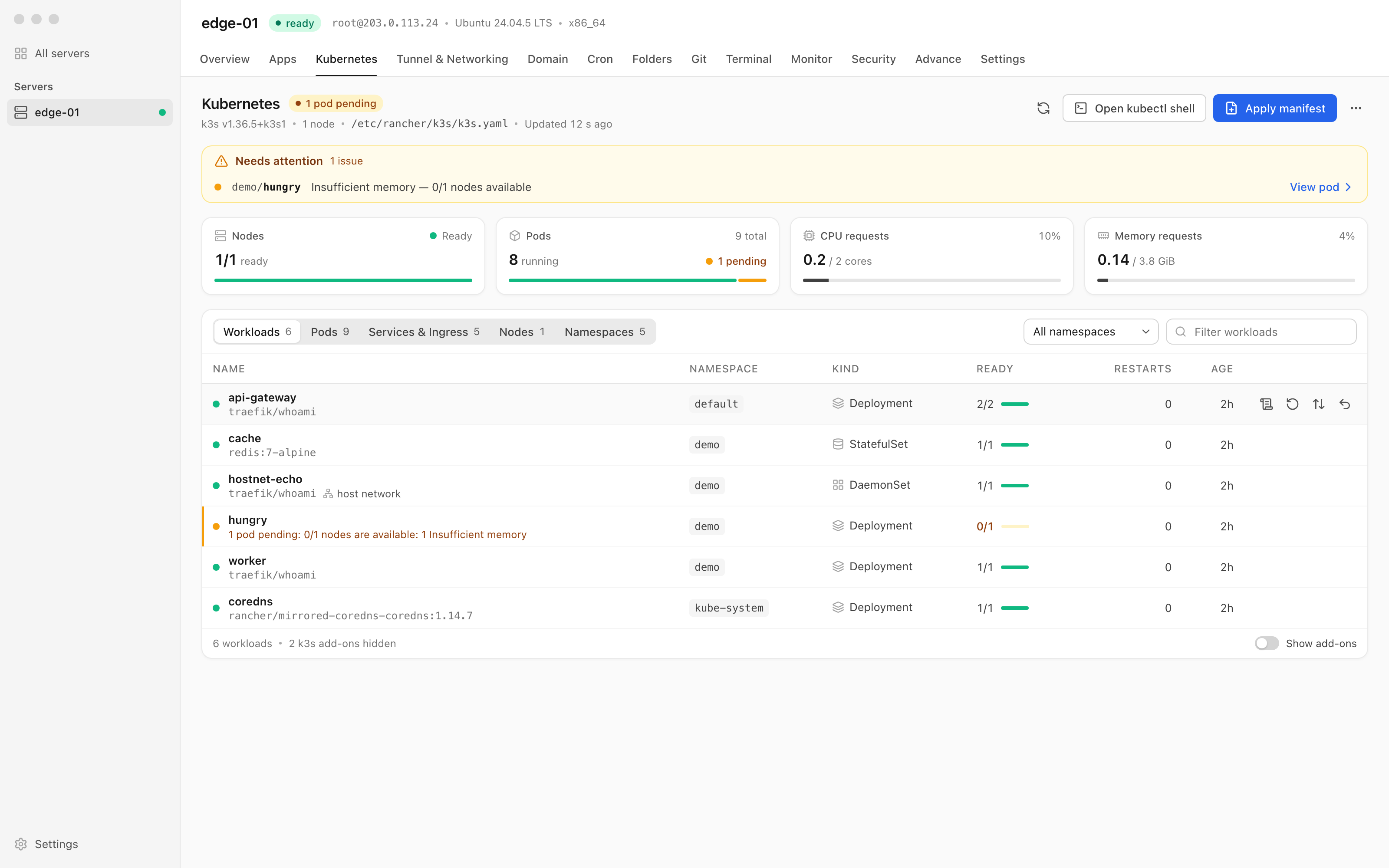
Kubernetes tab for a k3s server with a Needs attention banner for a pending pod, node, pod, CPU and memory cards, and the Workloads list
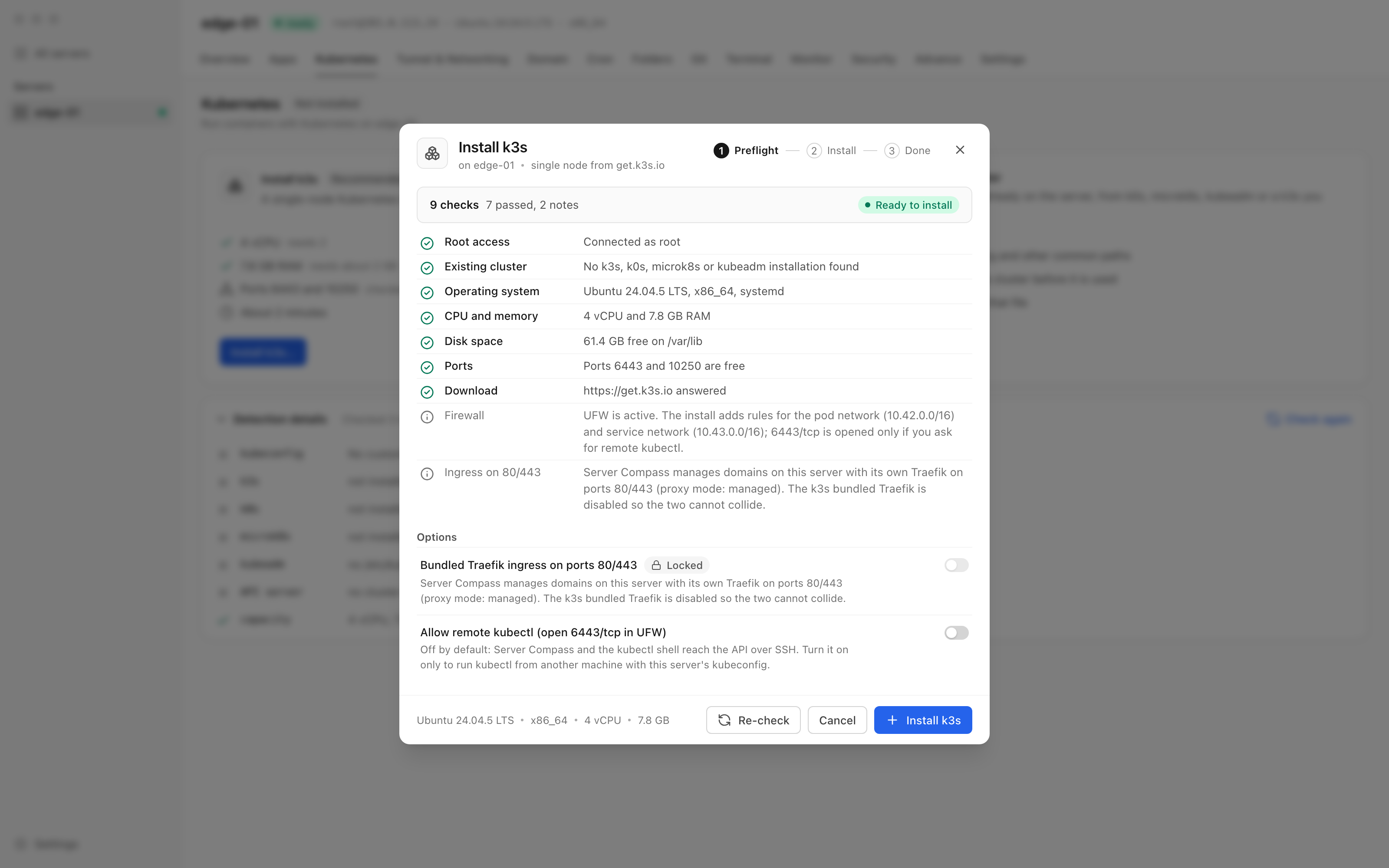
Install k3s dialog with nine preflight checks, the bundled Traefik option locked off and the remote kubectl option off by default
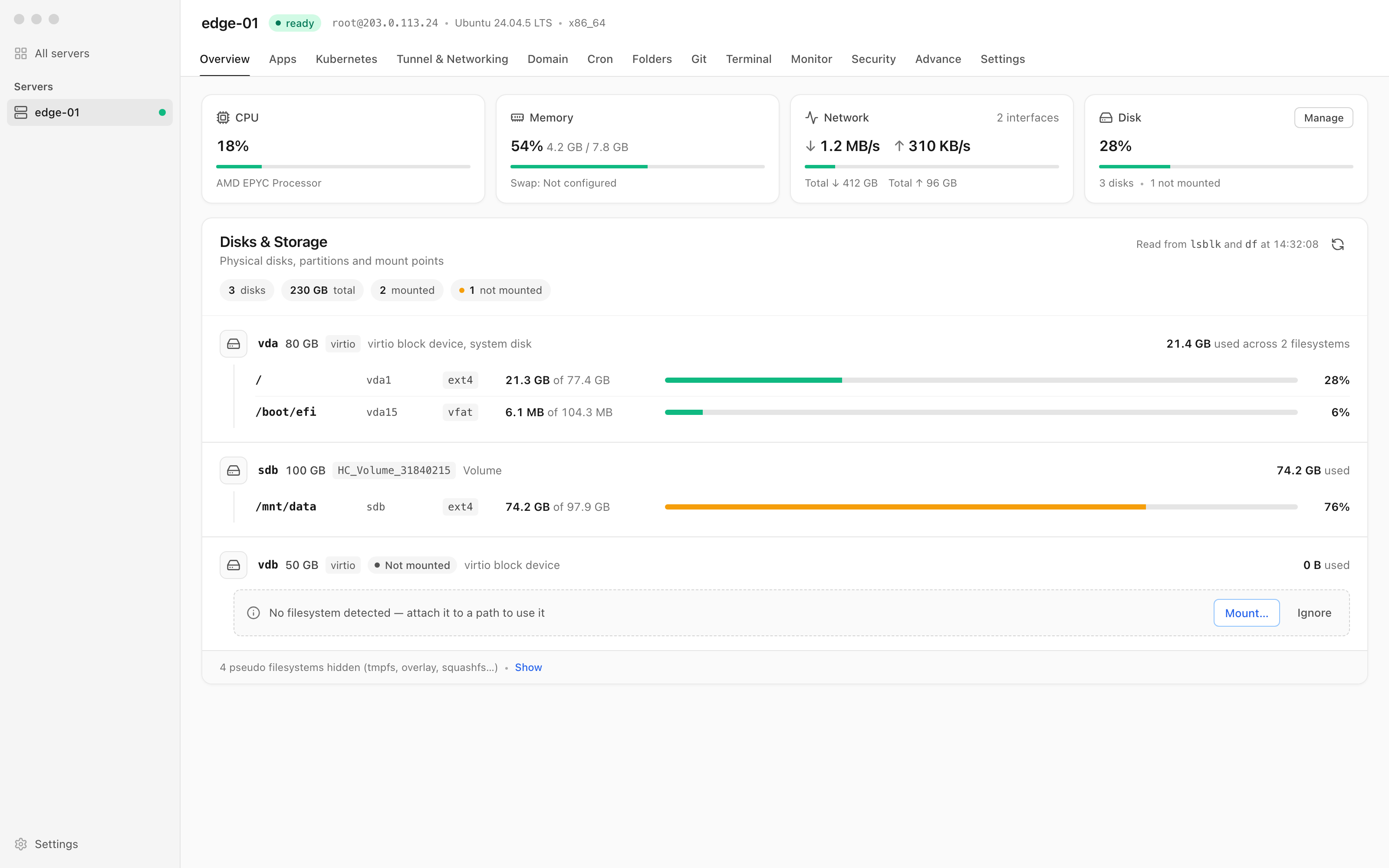
Disks & Storage on the server Overview grouping mount points under three disks, with an unmounted 50 GB volume offering Mount… and Ignore
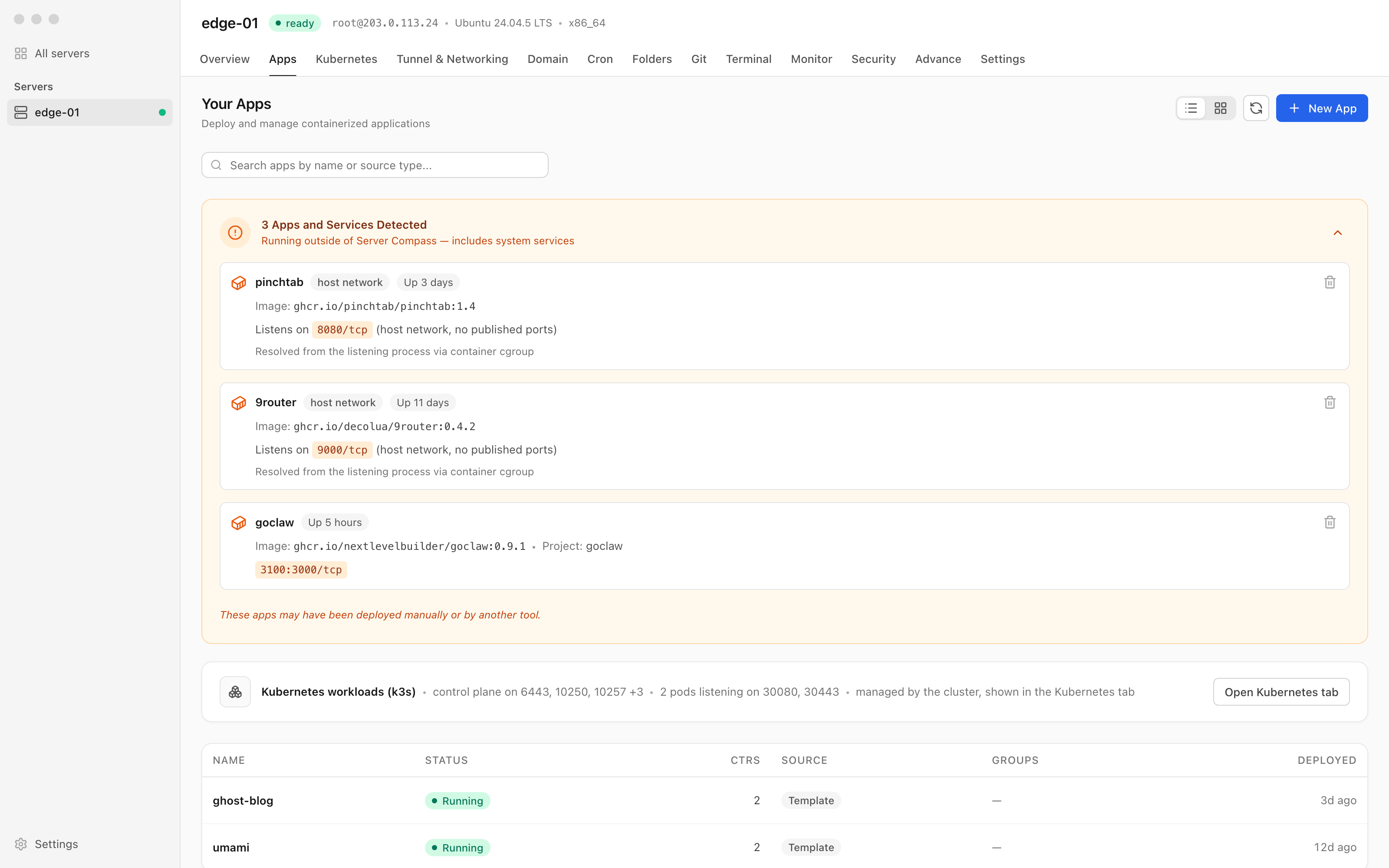
Unmanaged apps listing host-network containers by name with the ports they listen on, above a Kubernetes workloads (k3s) row with Open Kubernetes tab