Configuring Trust Proxy Headers
Configure Traefik to trust forwarded headers from upstream proxies so your apps see real visitor IPs.
Why trust proxy headers?
When your server sits behind a reverse proxy like Cloudflare, AWS ALB, or a load balancer, your applications see the proxy's IP address instead of the real visitor's IP. This breaks:
- Rate limiting — all requests appear to come from one IP
- Geolocation — location data is wrong
- IP block lists — you can't block individual visitors
- Audit logs —
request.ipreturns the proxy IP
Trust Proxy Headers tells Traefik to read the real client IP from forwarded headers (X-Forwarded-For, X-Real-IP).
Using provider presets
Server Compass includes built-in presets for common providers:
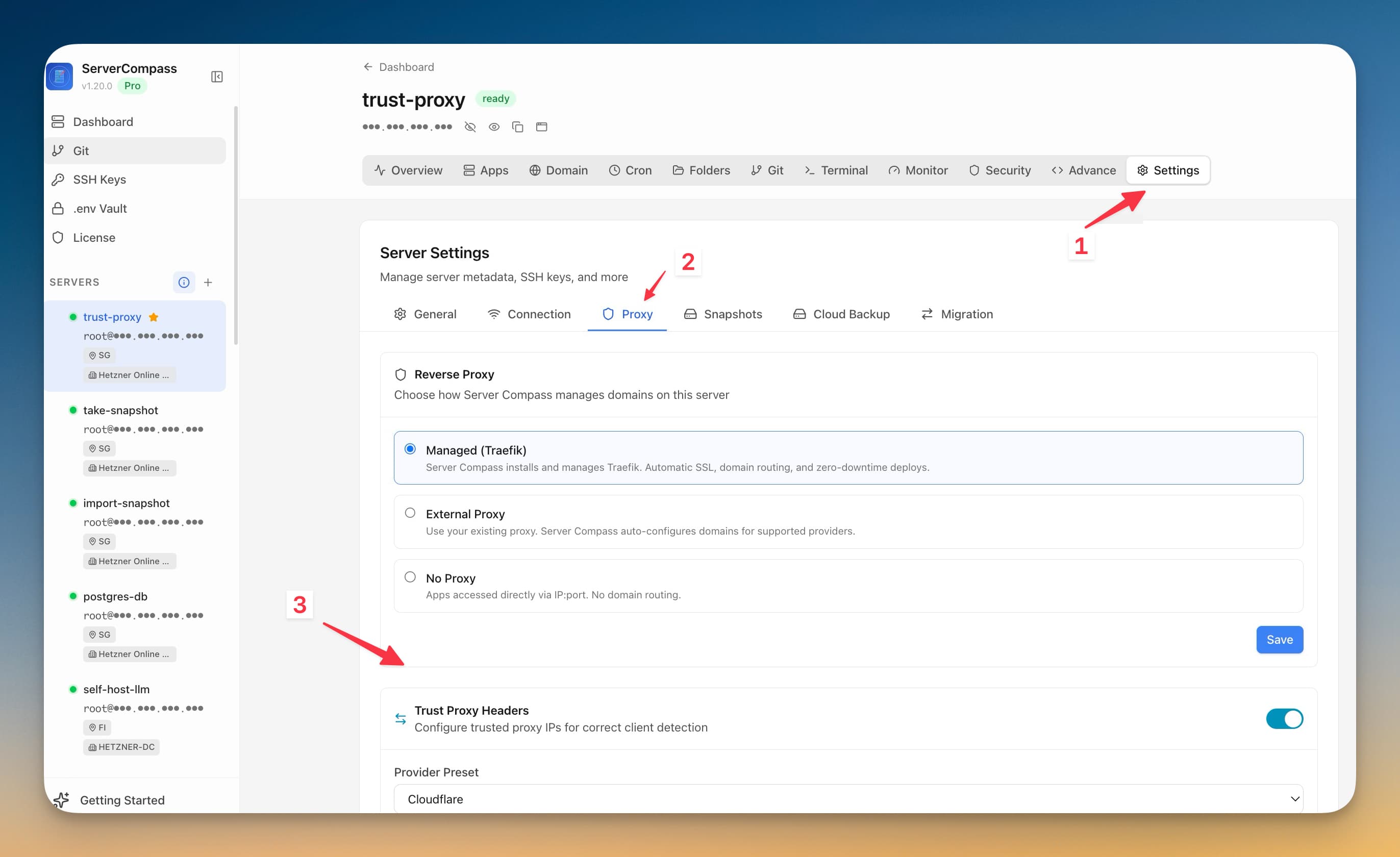
- Go to Server Settings > Proxy tab
- Open the Trust Proxy Headers section
- Select a preset from the dropdown:
- Cloudflare — auto-fills all Cloudflare IPv4/IPv6 CIDR ranges
- AWS ALB/ELB — enter your VPC CIDR (e.g.,
10.0.0.0/16) - DigitalOcean Load Balancer — enter your VPC CIDR
- Hetzner Load Balancer — enter your private network CIDR
- Custom — manually add trusted IP ranges
- Click Save — Traefik restarts automatically
PROXY Protocol (advanced)
For load balancers like AWS NLB or HAProxy that use PROXY Protocol instead of HTTP headers:
- Expand the Proxy Protocol section
- Enable PROXY Protocol
- Add the trusted IP ranges for your load balancer
- Save — Traefik is configured to accept PROXY Protocol on both HTTP and HTTPS entrypoints
Safety and rollback
Server Compass protects against misconfiguration:
- Automatic backup —
traefik.ymlis backed up before every change - Health check — after restarting Traefik, Server Compass verifies the container is running
- Auto-rollback — if Traefik fails to start, the backup is restored and Traefik is restarted with the previous config
- Insecure mode warning — "Trust All Sources" is flagged as development-only and vulnerable to IP spoofing
Screenshots
Frequently Asked Questions
Do I need trust proxy headers if I use Cloudflare?
Yes. Without it, your apps see Cloudflare's IP addresses instead of your visitors' real IPs. Select the Cloudflare preset to automatically trust all Cloudflare IP ranges.
What happens if I enter wrong IP ranges?
Server Compass creates a backup before every change and auto-rolls back if Traefik fails to start. You can always re-edit the settings.
Video Tutorials
Related Features
Trust Proxy Headers
Configure Traefik to trust forwarded headers from upstream proxies so apps see real visitor IPs. Built-in presets for Cloudflare, AWS ALB, DigitalOcean, and Hetzner with automatic rollback on failure.
Visual Domain Management
Add and configure domains with an intuitive UI. Built-in Traefik reverse proxy handles routing and load balancing.
Ready to try Server Compass?
Download the app and deploy your first application in under 5 minutes.
Download Server Compass