SFTP & pCloud Backup Destinations
Send app and server backups to an SFTP/SSH server or a pCloud account in addition to S3-compatible storage. Each destination is set up with a guided form, a tested connection, and AES-256-GCM encrypted backups.
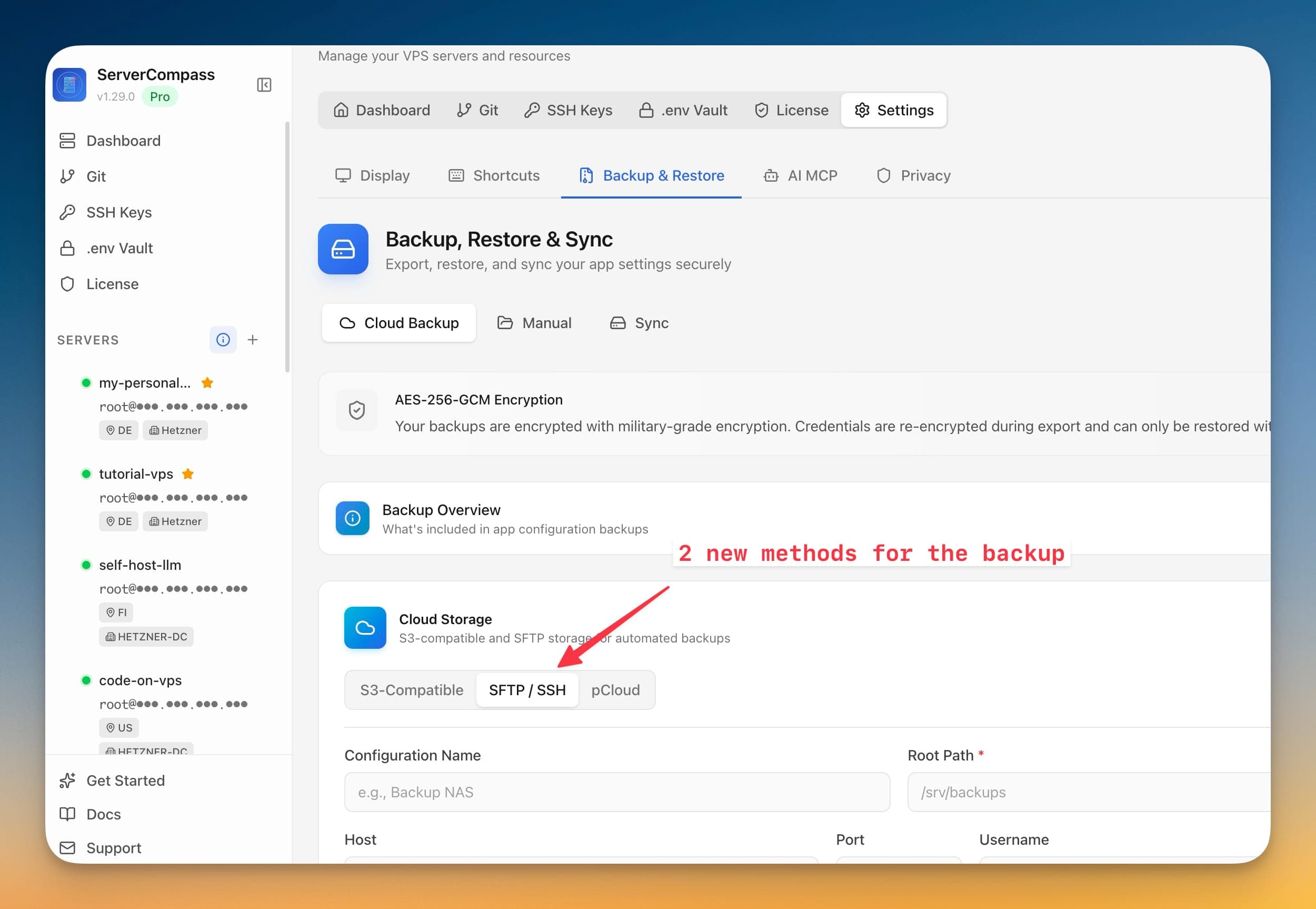
SFTP & pCloud Backup Destinations: Step by Step
No documentation needed. SFTP & pCloud Backup Destinations guides you through each step visually.
Open Server Dashboard
Navigate to the Server Management section.
Access SFTP & pCloud Backup Destinations
Open SFTP & pCloud Backup Destinations from the server overview panel.
View & Manage
Review server information and take management actions through the UI.
Life Without SFTP & pCloud Backup Destinations
Here's what developers do without SFTP & pCloud Backup Destinations: open terminal, SSH in, type commands, hope nothing breaks.
SSH into server
Connect to check server status.
ssh root@your-server-ipCheck system info
Gather server details.
# OS info
cat /etc/os-release
uname -a

# CPU info
lscpu | head -20

# Memory
free -h

# Disk
df -h

# Now remember all these commands for every serverUpdate packages
Keep system up to date.
apt update
apt upgrade -y
# Wait 10 minutes
# Hope nothing breaks
# Reboot if kernel updated
reboot
Updates can break things. No rollback button.
Manage services
Check and control services.
systemctl status docker
systemctl status nginx
# Check each service one by one
# No unified dashboardLife's Too Short for Terminal Commands
Stop copy-pasting commands from Stack Overflow. SFTP & pCloud Backup Destinations gives you a proper interface for server management.
- One-click actions
- Real-time feedback
- Automatic backups
- Zero CLI knowledge required
SFTP & pCloud Backup Destinations: Full Feature List
Everything you need for server management in one integrated tool, replacing complex CLI commands and manual configuration.
Get StartedThe Power of SFTP & pCloud Backup Destinations
Server management shouldn't require a DevOps team. SFTP & pCloud Backup Destinations makes professional-grade server management accessible to everyone.
At-a-Glance Monitoring
SFTP & pCloud Backup Destinations shows CPU, RAM, disk, and network metrics in a single dashboard view.
Quick Actions
SFTP & pCloud Backup Destinations provides one-click package updates, Docker setup, and system configuration.
Multi-Server Support
SFTP & pCloud Backup Destinations manages unlimited VPS servers from one application with saved connections.
Resource Trending
SFTP & pCloud Backup Destinations tracks resource usage over time so you can plan capacity and identify bottlenecks.
SFTP & pCloud Backup Destinations: Frequently Asked
Common questions about SFTP & pCloud Backup Destinations in Server Compass
How do I access SFTP & pCloud Backup Destinations in Server Compass?
SFTP & pCloud Backup Destinations is available in the Server Management section of Server Compass. Simply connect to your server, navigate to Server Management, and you'll find SFTP & pCloud Backup Destinations ready to use. No additional setup or plugins required.
Does SFTP & pCloud Backup Destinations require any server-side installation?
No. Server Compass operates as a desktop application that connects to your server via SSH. SFTP & pCloud Backup Destinations works through this connection without installing any agents or packages on your server (except the optional monitoring agent for resource tracking).
Is SFTP & pCloud Backup Destinations included in all Server Compass plans?
Yes. Every Server Compass feature, including SFTP & pCloud Backup Destinations, is included with the one-time $29 payment. There are no tier restrictions, add-ons, or per-server fees. You get all 152+ features for all your servers.
Can I use SFTP & pCloud Backup Destinations with any VPS provider?
SFTP & pCloud Backup Destinations works with any VPS or dedicated server that supports SSH access and Docker. This includes DigitalOcean, Hetzner, Vultr, Linode, AWS EC2, Google Cloud, Azure, and any other provider. It also works with local servers and homelab setups.
What makes SFTP & pCloud Backup Destinations different from command-line alternatives?
SFTP & pCloud Backup Destinations provides a visual, intuitive interface that replaces complex CLI commands and configuration files. You get real-time feedback, safety confirmations, and a consistent experience across all your servers without memorizing syntax or writing scripts.
More Server Management Features
Explore other server management capabilities in Server Compass
Server Overview Dashboard
At-a-glance view of CPU, RAM, and disk usage. See OS info, auth method, location, and provider details.
Resource Monitoring
Real-time CPU, memory, and disk usage graphs. Track resource trends and identify bottlenecks.
System Packages
List and manage installed APT packages, update individual ones, or run a system-wide upgrade. Install Recommended covers the baseline a server needs — including sudo and jq — and an Available Packages section installs optional software like Caddy with its repository set up for you.
Port Management
View all open ports and the services using them. Identify conflicts and manage port allocations.
Try SFTP & pCloud Backup Destinations Today
Download Server Compass and get access to SFTP & pCloud Backup Destinations along with 151 other features. One-time $29 payment. No subscriptions. No per-server fees.