Visual Cron Scheduler
Create and manage cron jobs with a visual interface. No need to memorize cron syntax ever again.
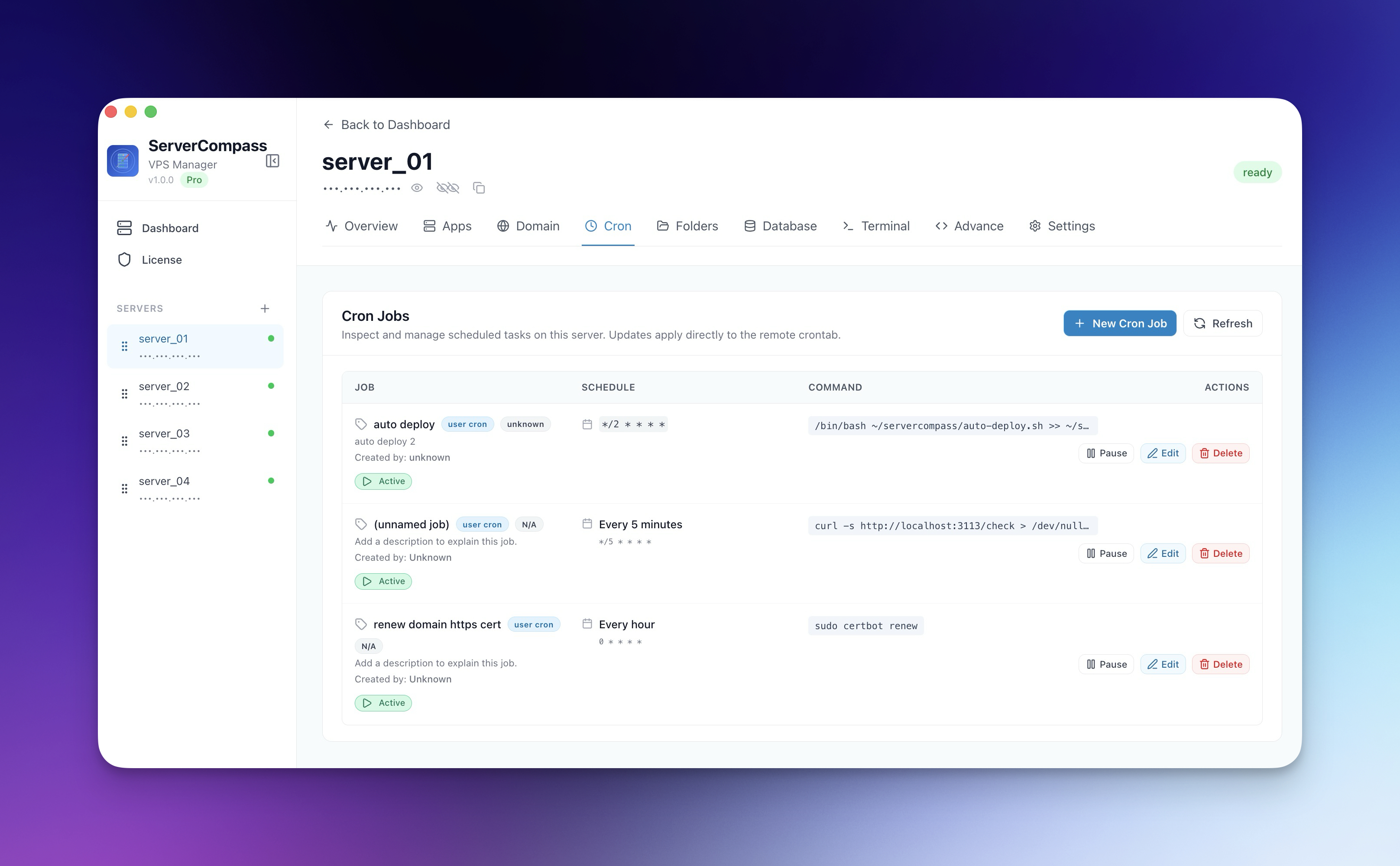
How Visual Cron Scheduler Works
No documentation needed. Visual Cron Scheduler guides you through each step visually.
Open Cron Manager
Navigate to the Cron Jobs section of your server.
Create or Edit Job
Use Visual Cron Scheduler to configure your scheduled task.
Save & Monitor
Deploy the cron job and monitor its execution through the log viewer.
The Terminal Way: No Visual Cron Scheduler
Without Visual Cron Scheduler, you're back to the dark ages of server management. Here's what that looks like.
SSH into server
Connect to manage cron jobs.
ssh root@your-server-ipOpen crontab
Edit the cron configuration.
crontab -e
# Choose your editor (probably nano or vim)Write the cron syntax
Hope you know cron syntax by heart.
# Minute Hour Day Month Weekday Command
# What's "every weekday at 3:30 PM" again?
# 30 15 * * 1-5 /opt/scripts/backup.sh
#
# Or was it:
# 30 15 * * MON-FRI /opt/scripts/backup.sh
#
# Who knows!
Get the syntax wrong and it runs at the wrong time. Or never.
Check if it's working
Wait and see... or check logs.
# Check cron logs
grep CRON /var/log/syslog
# Or wait until the scheduled time
# And hope it runs
# And hope it succeedsYour Time is Worth More
Visual Cron Scheduler in Server Compass does all of this with a single click. No terminal. No memorizing commands. No 3 AM debugging sessions.
- One-click actions
- Real-time feedback
- Automatic backups
- Zero CLI knowledge required
Visual Cron Scheduler Features
Everything you need for cron jobs in one integrated tool, replacing complex CLI commands and manual configuration.
Get StartedThe Power of Visual Cron Scheduler
Server management shouldn't require a DevOps team. Visual Cron Scheduler makes professional-grade cron jobs accessible to everyone.
Visual Scheduling
Visual Cron Scheduler replaces cryptic cron syntax with intuitive dropdowns and a human-readable schedule preview.
Ready-Made Templates
Visual Cron Scheduler includes pre-built templates for common tasks like backups, cleanup, and health checks.
Execution Logging
Visual Cron Scheduler logs every cron execution with output, success/failure status, and timestamps.
Quick Toggle
Visual Cron Scheduler lets you disable and re-enable cron jobs without deleting them, perfect for maintenance windows.
Visual Cron Scheduler: Frequently Asked
Common questions about Visual Cron Scheduler in Server Compass
How do I access Visual Cron Scheduler in Server Compass?
Visual Cron Scheduler is available in the Cron Jobs section of Server Compass. Simply connect to your server, navigate to Cron Jobs, and you'll find Visual Cron Scheduler ready to use. No additional setup or plugins required.
Does Visual Cron Scheduler require any server-side installation?
No. Server Compass operates as a desktop application that connects to your server via SSH. Visual Cron Scheduler works through this connection without installing any agents or packages on your server (except the optional monitoring agent for resource tracking).
Is Visual Cron Scheduler included in all Server Compass plans?
Yes. Every Server Compass feature, including Visual Cron Scheduler, is included with the one-time $29 payment. There are no tier restrictions, add-ons, or per-server fees. You get all 152+ features for all your servers.
Can I use Visual Cron Scheduler with any VPS provider?
Visual Cron Scheduler works with any VPS or dedicated server that supports SSH access and Docker. This includes DigitalOcean, Hetzner, Vultr, Linode, AWS EC2, Google Cloud, Azure, and any other provider. It also works with local servers and homelab setups.
What makes Visual Cron Scheduler different from command-line alternatives?
Visual Cron Scheduler provides a visual, intuitive interface that replaces complex CLI commands and configuration files. You get real-time feedback, safety confirmations, and a consistent experience across all your servers without memorizing syntax or writing scripts.
More Cron Jobs Features
Explore other cron jobs capabilities in Server Compass
Cron Job Templates
Pre-built templates for common scheduled tasks like backups, cleanup, and health checks. Customize and deploy.
Schedule Picker
Visual schedule builder with dropdowns for minute, hour, day, month, and weekday. See human-readable schedule preview.
Cron Job Logs
View execution logs for each cron job. Track success, failure, and output of scheduled tasks.
Enable/Disable Toggle
Temporarily disable cron jobs without deleting them. Re-enable when ready with a single toggle.
Try Visual Cron Scheduler Today
Download Server Compass and get access to Visual Cron Scheduler along with 151 other features. One-time $29 payment. No subscriptions. No per-server fees.