URL Redirects
Configure URL redirects at the domain level. Set up 301/302 redirects without editing server configuration files.
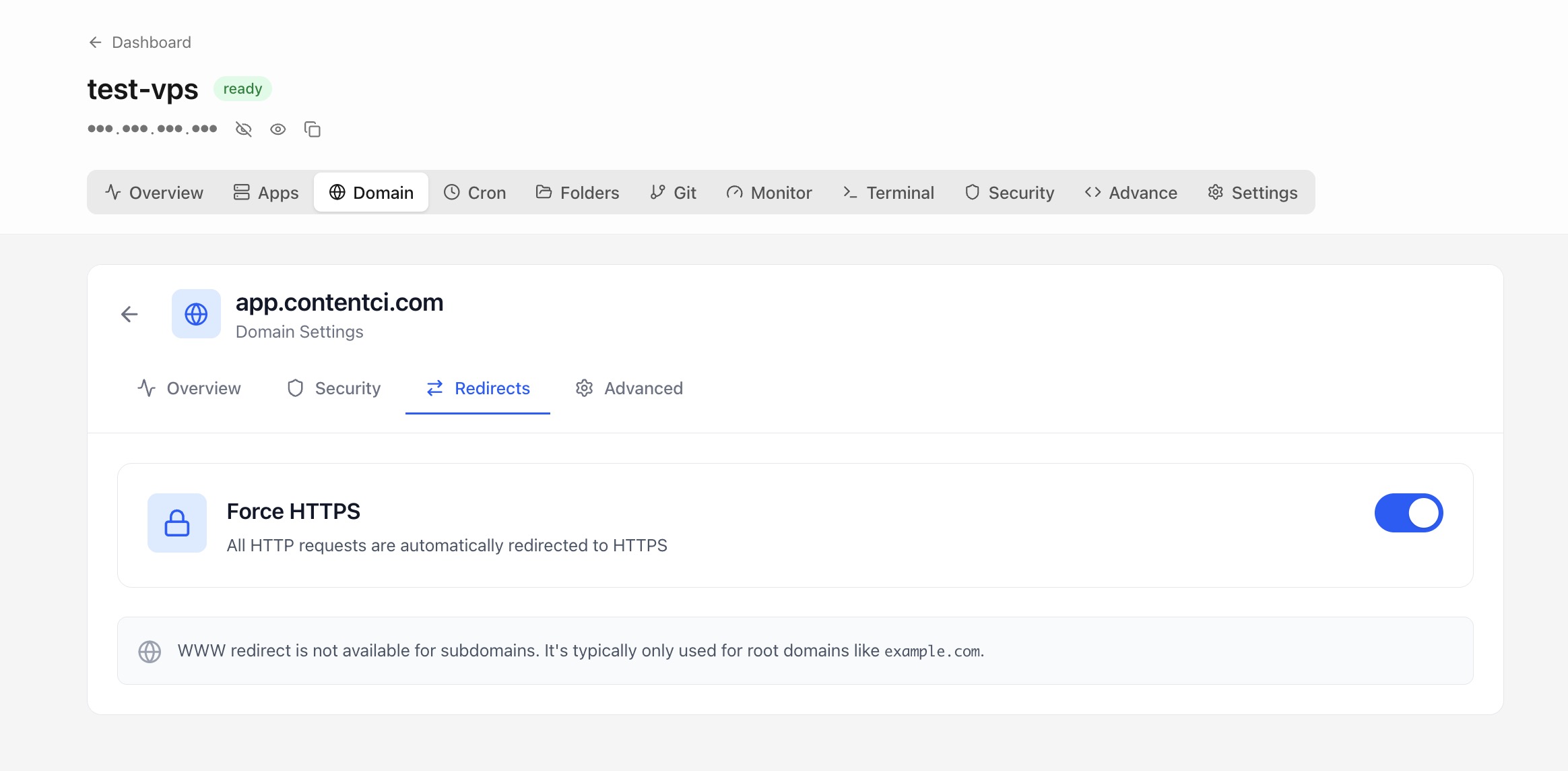
Using URL Redirects in Server Compass
URL Redirects replaces complex workflows with a few clicks. Here's the process.
Open Domain Settings
Navigate to the Domains & SSL section of your application.
Configure Domain
Use URL Redirects to set up your domain configuration.
Verify & Apply
Server Compass verifies your settings and applies changes automatically.
Manual Alternative to URL Redirects
Without URL Redirects, you'd need to SSH into your server and run these commands manually. Every. Single. Time.
SSH into your server
Connect to configure domains.
ssh root@your-server-ipInstall Certbot
Set up Let's Encrypt tooling.
apt update
apt install certbot python3-certbot-nginx
# Or for standalone:
apt install certbotConfigure nginx
Set up reverse proxy manually.
nano /etc/nginx/sites-available/myapp
# server {
#     listen 80;
#     server_name myapp.com www.myapp.com;
#     location / {
#         proxy_pass http://localhost:3000;
#         proxy_http_version 1.1;
#         proxy_set_header Upgrade $http_upgrade;
#         proxy_set_header Connection 'upgrade';
#         proxy_set_header Host $host;
#         proxy_cache_bypass $http_upgrade;
#     }
# }

ln -s /etc/nginx/sites-available/myapp /etc/nginx/sites-enabled/
nginx -t
systemctl reload nginx
One syntax error = site down.
Generate SSL certificate
Run Certbot and cross your fingers.
certbot --nginx -d myapp.com -d www.myapp.com
# Answer the interactive prompts
# Wait for DNS verification
# Hope it doesn't failSet up auto-renewal
Don't forget or your cert expires.
# Test renewal
certbot renew --dry-run

# Add cron job
crontab -e
# 0 12 * * * /usr/bin/certbot renew --quiet
Forget this step and your site shows security warnings in 90 days.
Skip All That. Use Server Compass.
Server Compass replaces all those commands with a beautiful UI. URL Redirects just works—click, configure, done.
- Visual interface
- No terminal needed
- Built-in error handling
- Works on any VPS
Everything URL Redirects Offers
Everything you need for domains & ssl in one integrated tool, replacing complex CLI commands and manual configuration.
Get StartedWhy URL Redirects Matters
Server management shouldn't require a DevOps team. URL Redirects makes professional-grade domains & ssl accessible to everyone.
Automatic HTTPS
URL Redirects handles SSL certificate provisioning and renewal automatically via Let's Encrypt.
Instant Propagation
URL Redirects verifies DNS settings and configures routing instantly once records are pointing correctly.
Certificate Monitoring
URL Redirects tracks certificate expiry and health so you never face an unexpected SSL error.
Zero Downtime Changes
URL Redirects applies domain configuration changes without interrupting live traffic.
Common Questions About URL Redirects
Common questions about URL Redirects in Server Compass
How do I access URL Redirects in Server Compass?
URL Redirects is available in the Domains & SSL section of Server Compass. Simply connect to your server, navigate to Domains & SSL, and you'll find URL Redirects ready to use. No additional setup or plugins required.
Does URL Redirects require any server-side installation?
No. Server Compass operates as a desktop application that connects to your server via SSH. URL Redirects works through this connection without installing any agents or packages on your server (except the optional monitoring agent for resource tracking).
Is URL Redirects included in all Server Compass plans?
Yes. Every Server Compass feature, including URL Redirects, is included with the one-time $29 payment. There are no tier restrictions, add-ons, or per-server fees. You get all 152+ features for all your servers.
Can I use URL Redirects with any VPS provider?
URL Redirects works with any VPS or dedicated server that supports SSH access and Docker. This includes DigitalOcean, Hetzner, Vultr, Linode, AWS EC2, Google Cloud, Azure, and any other provider. It also works with local servers and homelab setups.
What makes URL Redirects different from command-line alternatives?
URL Redirects provides a visual, intuitive interface that replaces complex CLI commands and configuration files. You get real-time feedback, safety confirmations, and a consistent experience across all your servers without memorizing syntax or writing scripts.
More Domains & SSL Features
Explore other domains & ssl capabilities in Server Compass
Visual Domain Management
Add and configure domains with an intuitive UI. Built-in Traefik reverse proxy handles routing and load balancing.
Automatic SSL Certificates
Free SSL certificates from Let's Encrypt with automatic renewal. HTTPS for all your domains with zero configuration.
DNS Verification
Automatic DNS verification checks ensure your domain is correctly pointed before configuring SSL and routing.
Certificate Viewer
View detailed SSL certificate information including issuer, expiry, and chain. Renew certificates with one click.
Try URL Redirects Today
Download Server Compass and get access to URL Redirects along with 151 other features. One-time $29 payment. No subscriptions. No per-server fees.