January 14, 2026
Never Lose Your SSH Connection Again: Auto-Recovery and Database Table Browser
Automatic SSH reconnection with retry logic, plus a database table browser with data viewer, pagination, search, and smart record creation forms.
You're in the middle of deploying an update when your SSH connection drops. Maybe your laptop switched Wi-Fi networks. Maybe your VPS provider had a blip. Either way, you're staring at a "Connection Lost" error and wondering if your deployment finished.
Server Compass v1.4.4 handles this automatically. When a connection drops, the app reconnects up to 3 times with real-time progress feedback. No manual intervention, no lost state.
Automatic Connection Recovery
The new connection recovery system detects drops instantly and begins reconnecting. You see exactly what's happening—which retry attempt, whether authentication succeeded, and when the connection is restored. If your deployment was in progress, it picks up where it left off.
This matters most during long-running operations: building Docker images, running database migrations, or transferring large files. A brief network hiccup no longer means starting over.
Database Table Browser
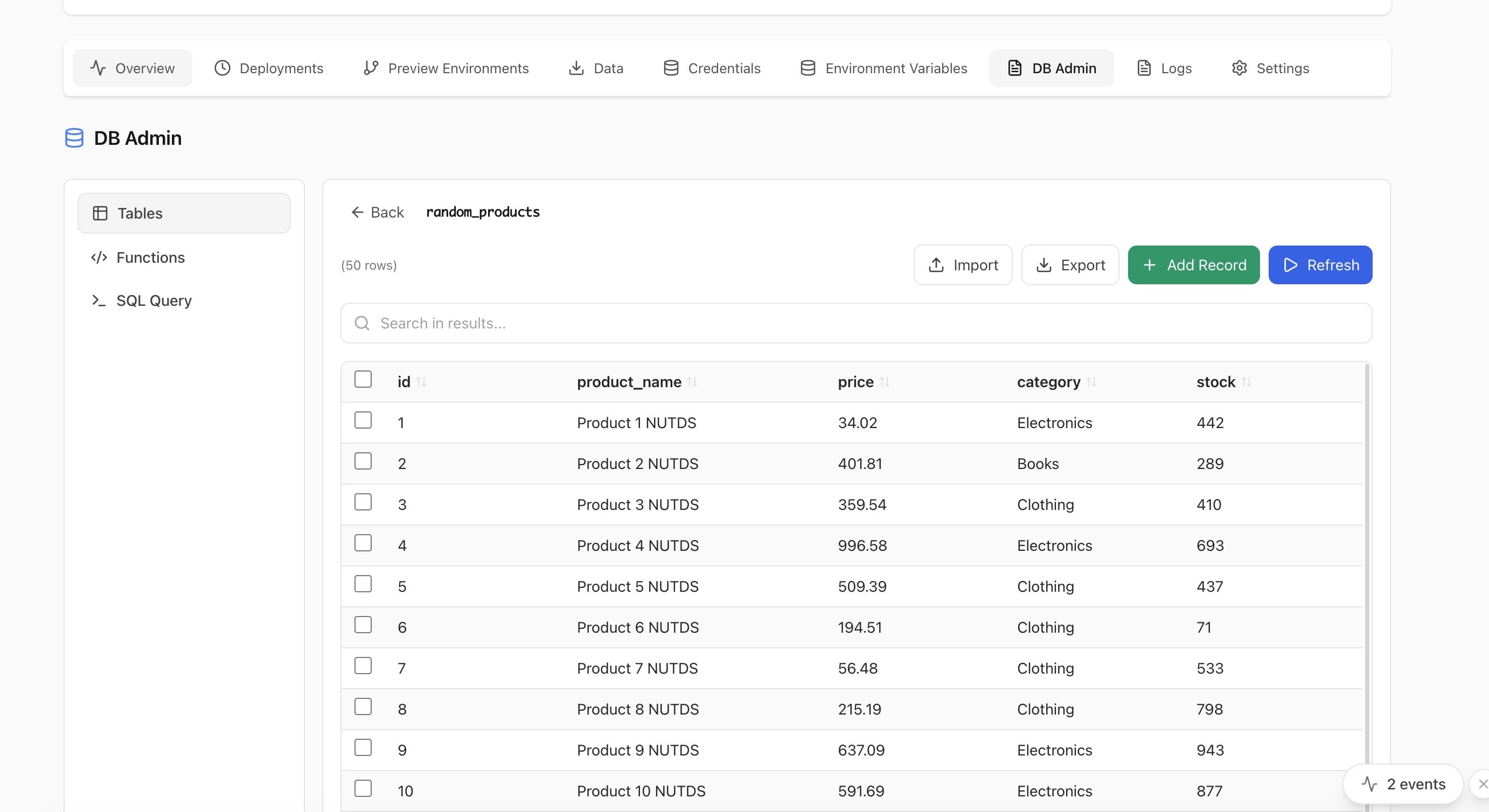
Building on the DB Admin panel from v1.3.10, the table browser now shows all your database tables with metadata at a glance—row count, table size, and column types. Click any table to see its data with pagination and search.
Data Viewer with Pagination and Search
Browse table rows with automatic pagination. Search across all columns to find specific records. This is the "quick check" workflow that database admins do dozens of times a day, without needing to write a SELECT query every time.
Smart Record Creation Forms
Need to insert a test record? The new creation form auto-detects field types from your table schema—text inputs for varchar columns, number inputs for integers, date pickers for timestamps, toggles for booleans. It even shows which fields are required and which have defaults.
Who Benefits
Profile
Benefit
Remote workers
Unreliable Wi-Fi no longer disrupts deployments
Database developers
Browse and search table data without writing queries
QA engineers
Insert test records with auto-generated forms
Try It Today
Auto-recovery and the table browser are available now. Download Server Compass and experience deployments that survive flaky connections.
Related in the StoicSoft network
If you're self-hosting on a VPS or working through a deployment guide like the one above, DeployToVPS is the StoicSoft network's handbook for VPS deployment recipes — docker-compose, nginx, traefik, and common app self-hosts.
From across the StoicSoft network
Hand-curated reads on the same topic from sister sites in the StoicSoft family.