AI MCP for Coding Agents - Manage your VPS with our favorite AI Agents
Download v1.28.0
Get this version from GitHub Releases
What's Changed
New Features
13- AI Access for Coding Agents — Let AI tools manage your servers — turn on AI Access and connect your coding agent to Server Compass through a local, token-secured connection
- AI Access for Coding Agents — Connect popular coding tools faster — copy ready-made setup instructions for Claude Code, Codex CLI, Gemini CLI, OpenCode, Cursor, Windsurf, and VS Code
- Choose the full Server Compass tool name or a shorter alias before copying setup instructions
- Copy matching uninstall instructions when you want to remove access from a tool
- AI Access for Coding Agents — Create scoped access tokens — give each AI tool only the permissions it needs, from read-only visibility to app operations, deployments, or destructive actions
- Restrict tokens to specific servers when you want an agent to work on staging without touching production
- Revoke tokens any time from the AI Access screen
- AI Access for Coding Agents — Ask agents to inspect and manage apps — AI tools can list servers, view live health, read app logs, search templates, check deployments, manage domains, update environment values, and operate Docker apps through Server Compass
- AI Access for Coding Agents — Keep credentials inside Server Compass — SSH keys, passwords, and saved secrets stay in the encrypted local vault; AI tools get actions and results, not raw credentials
- AI Access for Coding Agents — Confirm destructive requests — dangerous actions like deleting apps, deleting secret collections, or running raw server commands ask for explicit approval before they run
- App Templates — Deploy more templates directly — Neon Local, Pastefy, Networking Toolbox, GitIngest, Next.js, Django, FastAPI, and Flask are now available from the template picker
- App Templates — Launch framework starter apps — Next.js, Django, FastAPI, and Flask templates can now deploy a small starter app when no source code has been uploaded yet
- App Templates — Install fuller PostHog and Mailcow stacks — both templates now prepare their official-style self-hosted setup flows with the values they need before first launch
Improvements
9- AI Access Setup — See every available AI tool action — the AI Access screen now includes a searchable tool list grouped by permission level
- AI Access Setup — Review agent activity — recent AI calls show status, timing, client name, server name, and any error so you can see what your tools have been doing
- AI Access Setup — Auto-fill saved token commands — Server Compass tries to recover saved token secrets from the local keychain so setup snippets are ready to copy when possible
- AI Access Setup — Prevent placeholder token mistakes — setup copying is disabled when a real token secret is not available, so you do not paste a non-working placeholder into your AI tool
- AI Access Setup — Stay connected in the background — when AI Access is enabled, Server Compass keeps running in the menu bar or system tray so connected AI tools do not lose access
- Template Reliability — Template setup runs at the right time — complex templates now prepare their required files after setup values are written, reducing failed first launches
- Template Reliability — Template preparation fails clearly — when a required setup step cannot complete, deployment stops with a clear error instead of continuing into a broken app
- Template Reliability — Rancher uses a steadier default image — new Rancher installs use the stable release line and explain that the first dashboard launch can take a few minutes
- Template Reliability — Neon Local accepts branch settings — the template now supports branch and parent-branch values for more realistic local Neon workflows
Bug Fixes
7- AI Access — Fixed AI Access shutting down when the window closed — Server Compass now stays available in the background while AI Access is enabled
- AI Access — Fixed dangerous AI actions running without a final check — destructive requests now require a confirmation prompt before they proceed
- App Template Reliability — Fixed Pastefy, Networking Toolbox, and GitIngest being hidden because their old images could not be pulled — these templates now use working images and are selectable again
- App Template Reliability — Fixed framework templates needing uploaded source before they could be verified — direct template deploys now include starter files for Next.js, Django, FastAPI, and Flask
- App Template Reliability — Fixed PostHog installs starting with an incomplete stack — the template now prepares the current hobby setup flow before launching
- App Template Reliability — Fixed Mailcow installs missing the generated mail server setup — the template now prepares the generated stack, mail hostname values, web ports, and supporting secrets
- App Template Reliability — Fixed complex templates continuing after setup failed — failed preparation now stops the deployment so you can fix the real issue instead of debugging a half-created app
Screenshots
ai-access-activity-log-allowed-denied
ai-access-coding-tools-setup-instructions
agent-deploy-wordpress-via-mcp
ai-access-setup-token-permissions-server-scope
agent-list-servers-list-apps-mcp-tools
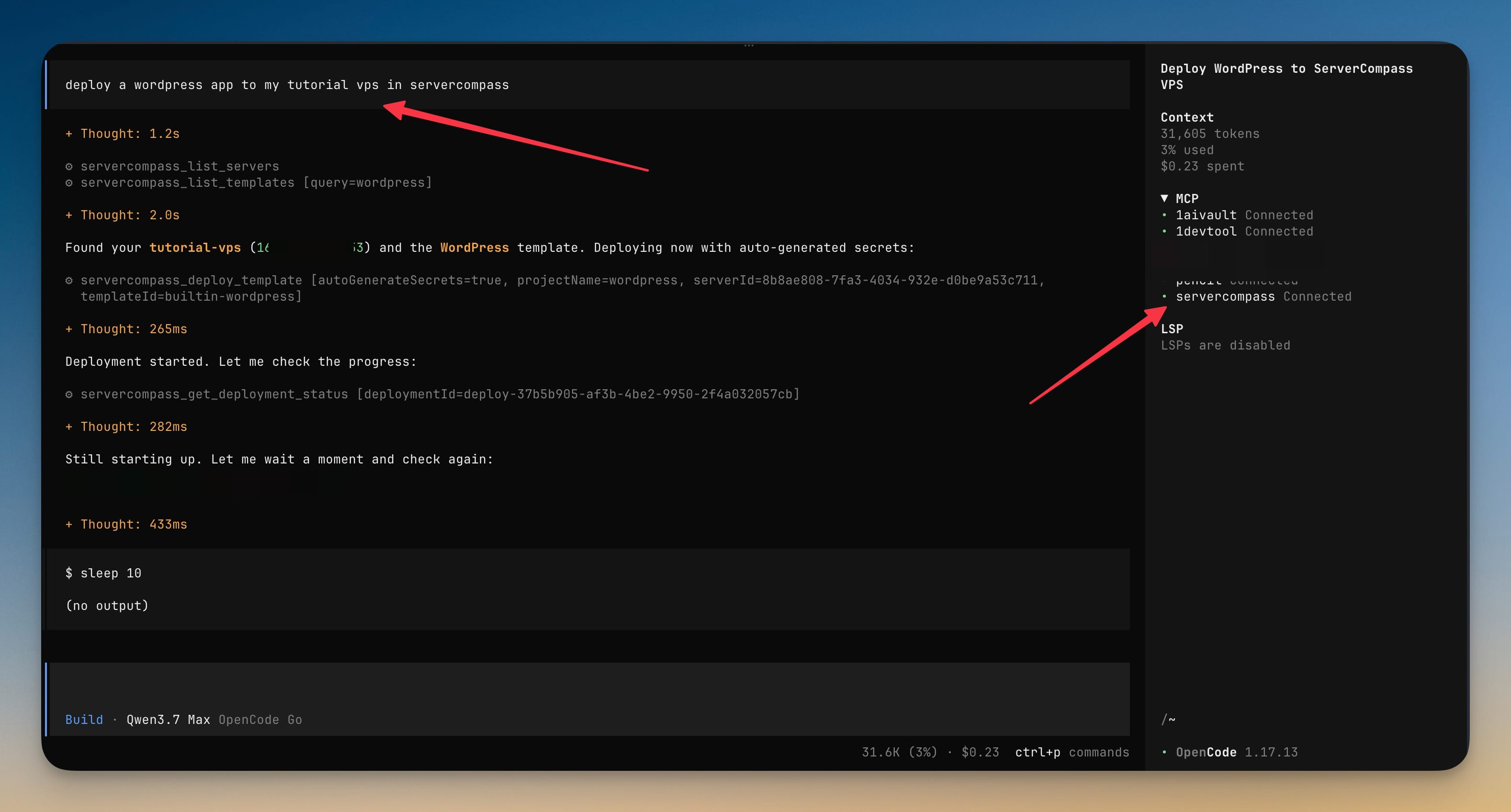
OpenCode agent interface showing a WordPress deployment to a Server Compass tutorial VPS via MCP tools, with deployment progress tracked in the chat panel.
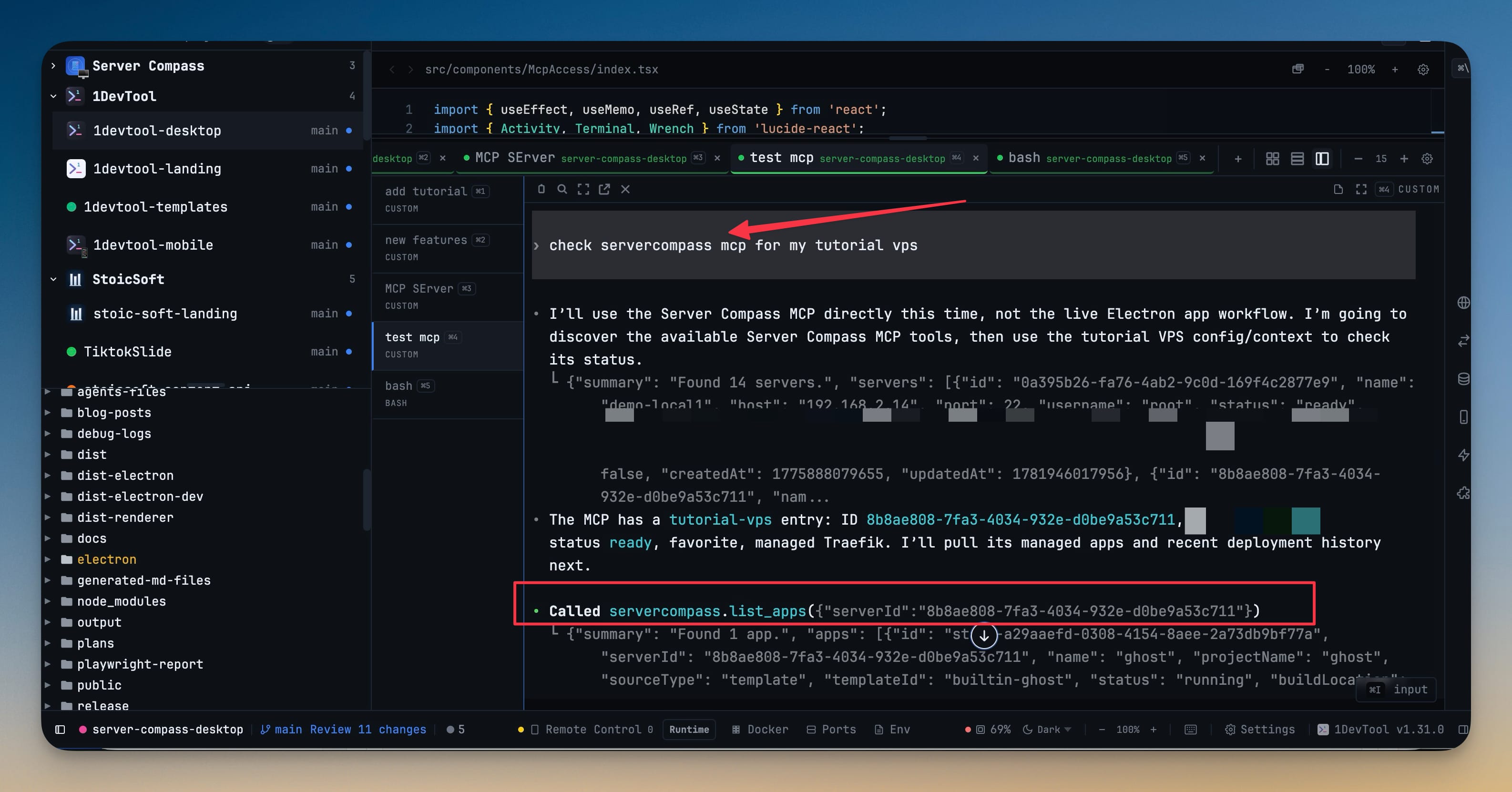
Server Compass MCP tool test showing an agent calling list_servers and list_apps to inspect a tutorial VPS and view a running Ghost app.
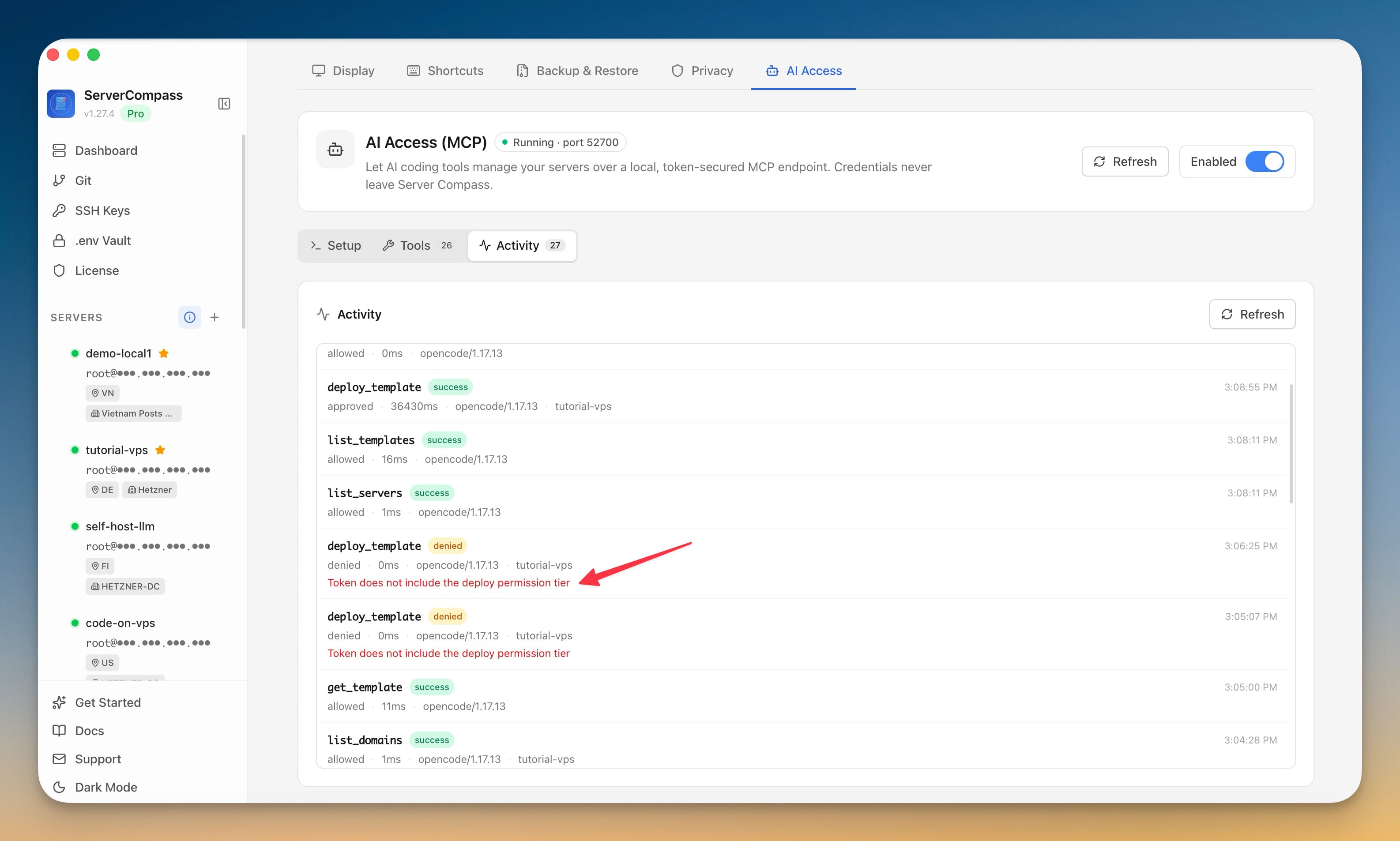
Server Compass AI Access Activity tab showing allowed and denied AI operations, including a blocked deployment without the deploy permission tier.
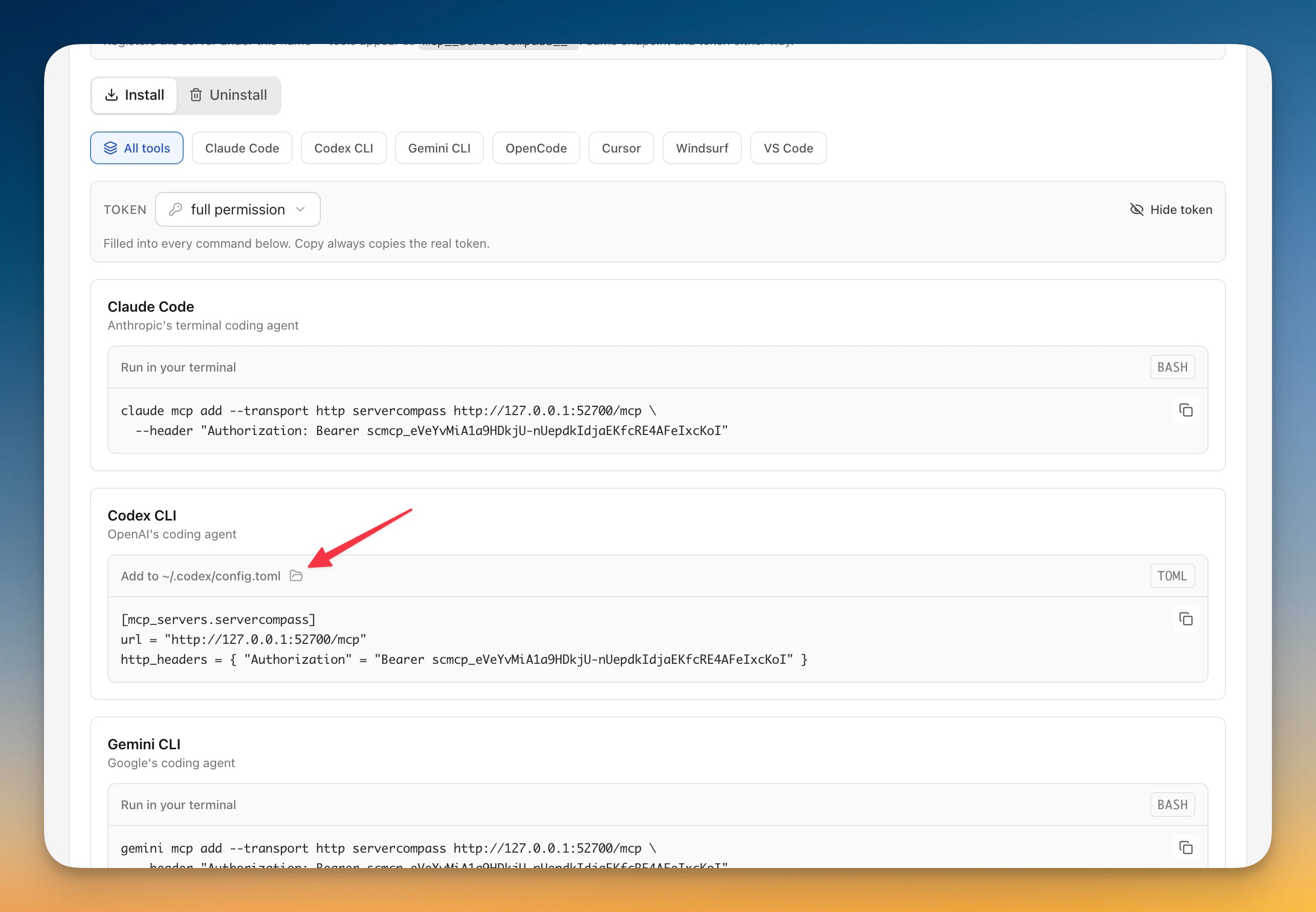
Server Compass AI Access setup panel showing install snippets for Claude Code, Codex CLI, and Gemini CLI with a bearer token.
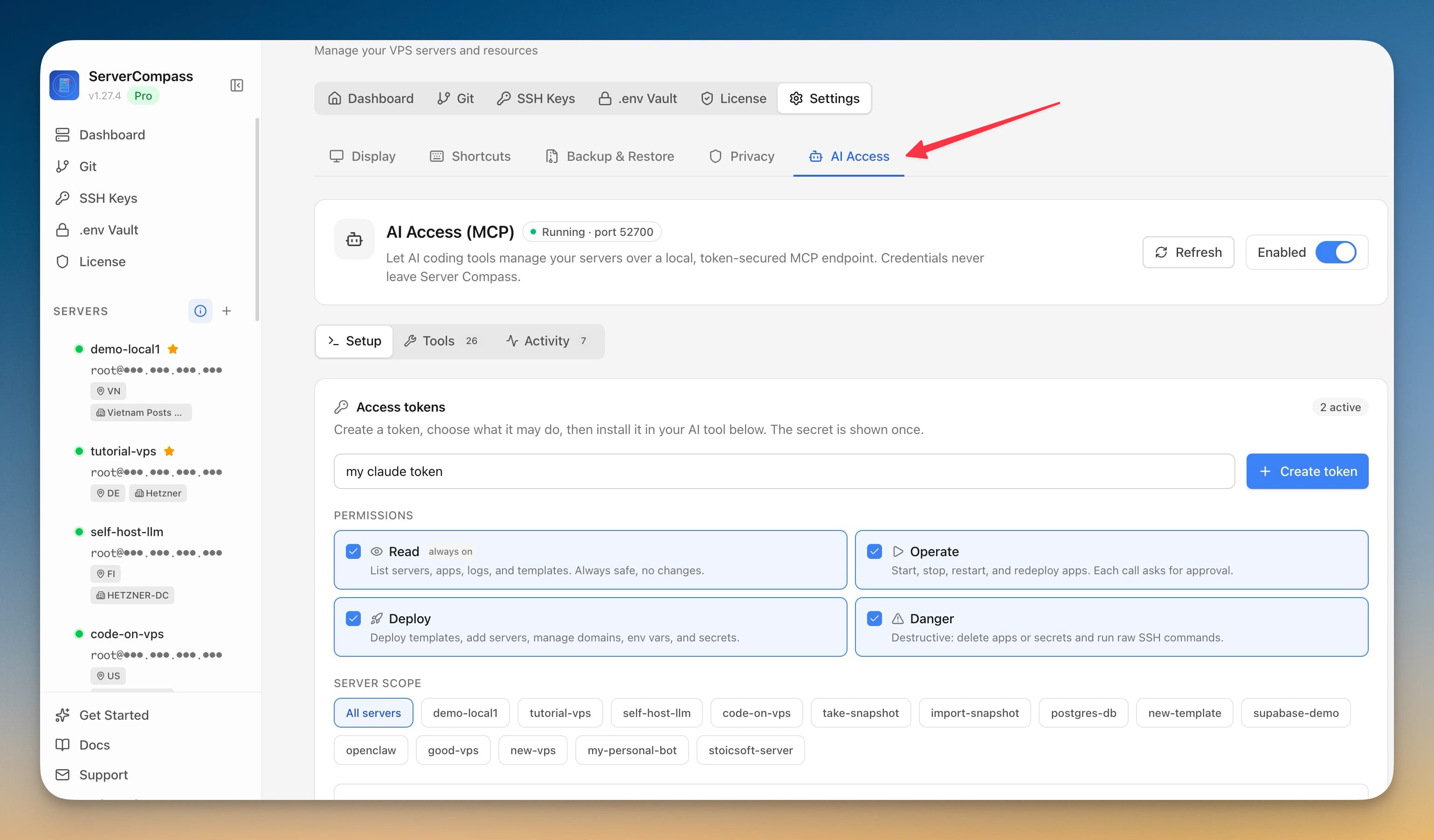
Server Compass AI Access token setup showing Read, Operate, Deploy, and Danger permissions plus server scope selections.