Back to ChangelogDownload
v1.47.0November 22, 2026
Gitea Accounts and App Offload
Server Compass 1.47.0 connects self-hosted Gitea and Forgejo accounts so you can deploy private repositories from your own Git server, and adds Offload to free disk space from rarely used apps while keeping their data. AI agents also get Kubernetes maintenance and app group tools over MCP.
Download v1.47.0
Get this version from GitHub Releases
What's Changed
New Features
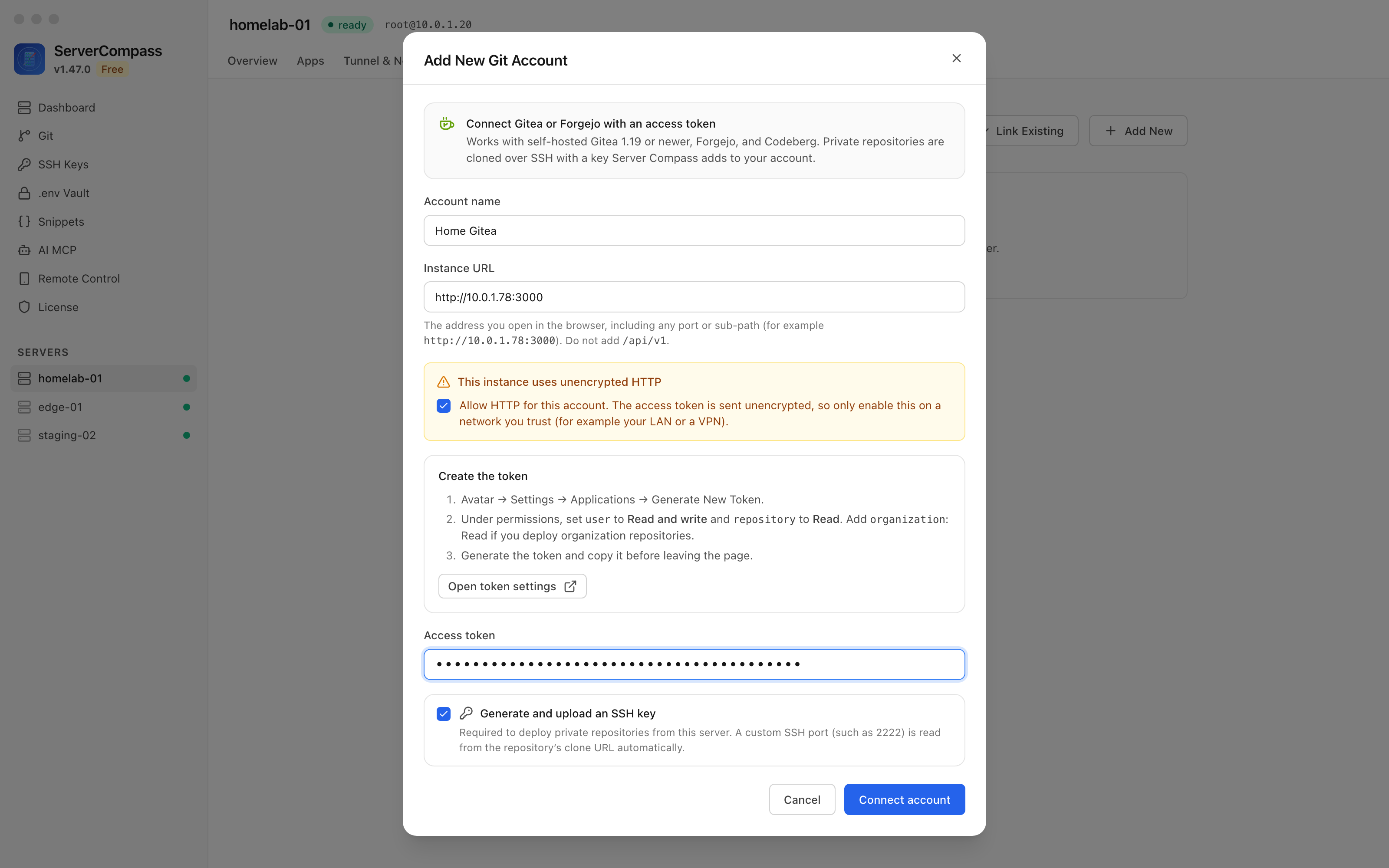
27- Connect a Gitea or Forgejo account — the Add Git Account dialog has a new Gitea / Forgejo option for self-hosted Gitea 1.19 or newer, Forgejo and Codeberg, using an access token
- Add one from a server's Git tab, the Git page, or Add Gitea / Forgejo account in Server Settings
- The token needs user: Read and write and repository: Read (plus organization: Read for organization repositories); a token with too few permissions is refused with the missing permission named
- Generate and upload an SSH key adds a key from your server to the account, so private repositories clone over SSH
- Deploy private Gitea and Forgejo repositories — pick the account, repository and branch in the Stack Wizard; Server Compass reads the repository's Dockerfile and compose file, builds on your server, and pulls new commits when you redeploy with the latest code
- Custom SSH ports work without setup — a port such as 2222 is read from the repository's clone address when you connect, and again before each SSH test and deploy
- Instances on your LAN over plain HTTP — an
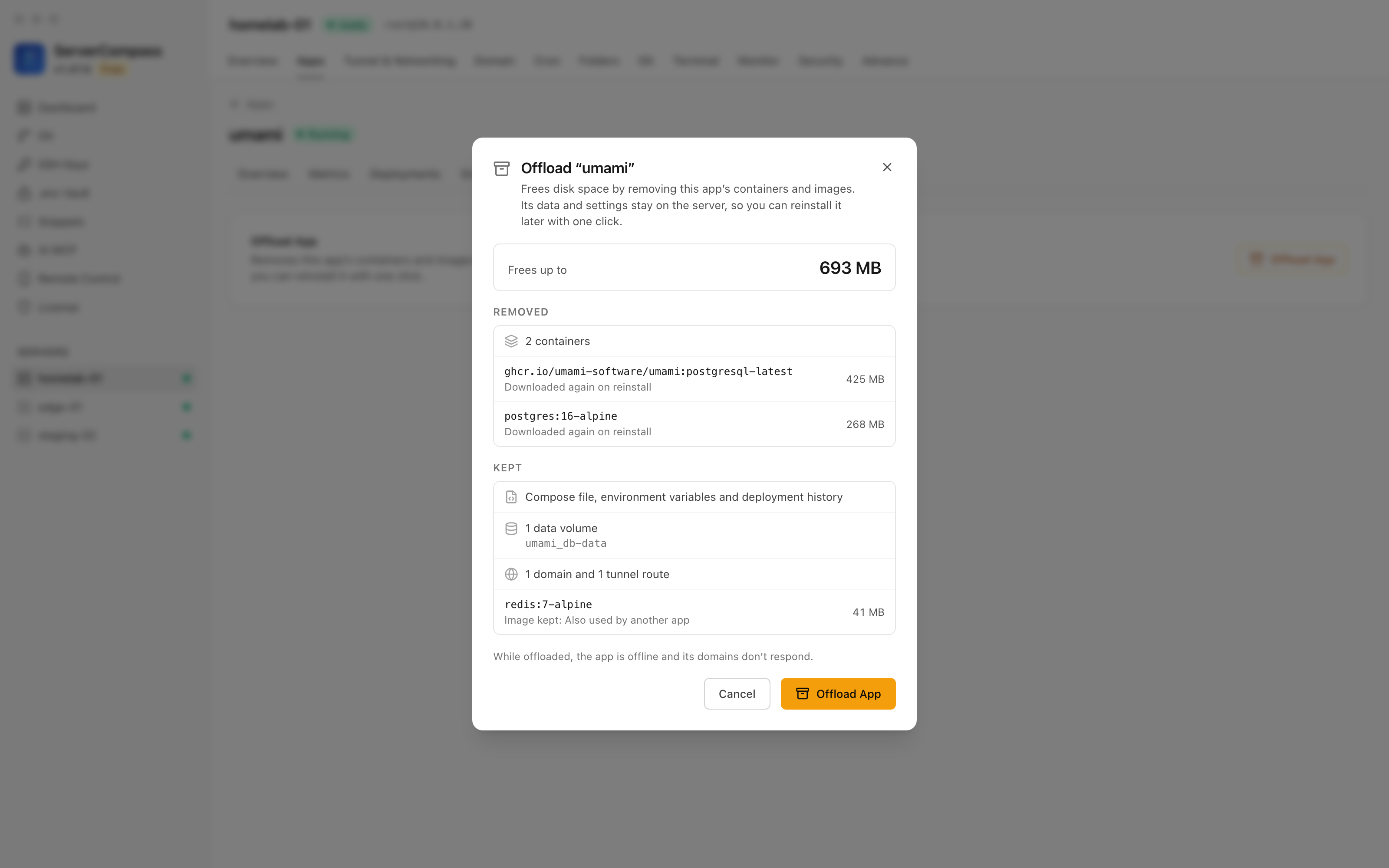
http://instance address shows Allow HTTP for this account, which you tick before connecting; the token is never sent over HTTP without it - Offload an app you rarely use — Offload App in an app's Settings removes its containers and images to free disk space and keeps its data, settings, domains and tunnel routes
- Before anything is removed, the dialog shows how much space it frees and how each image comes back: rebuilt from source, downloaded again at the exact version, or kept because another app uses it or the registry can't confirm it
- Data in anonymous volumes does not come back; the dialog lists those volumes and asks you to confirm
- Domains served through Caddy or nginx are paused while the app is offloaded and come back with it
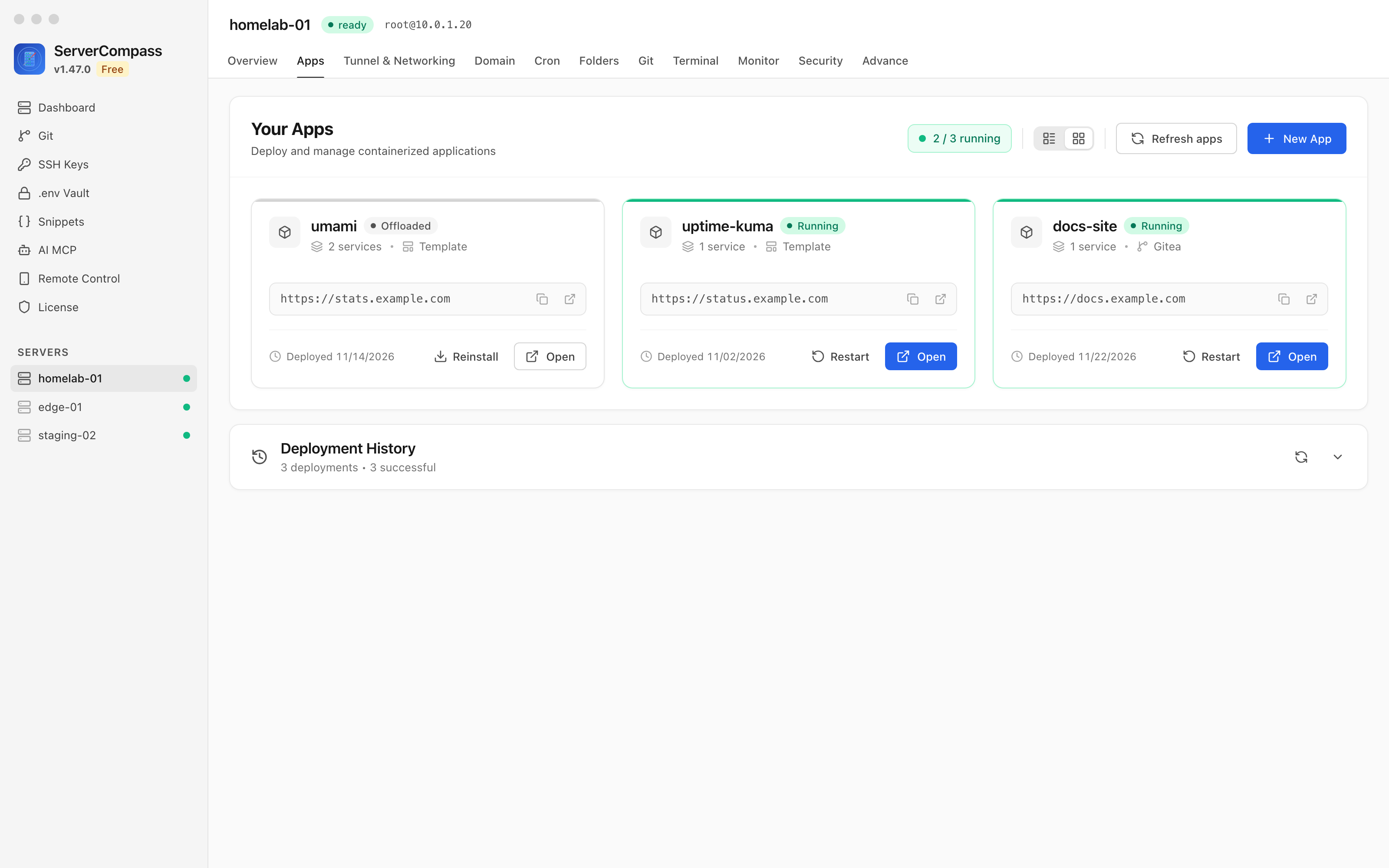
- Reinstall with one click — an offloaded app shows a banner with Reinstall, and its Start button in the Apps list becomes Reinstall; it restores the exact image versions the app ran, not today's tags
- Starting it from bulk actions, MCP or Remote Control reinstalls it the same way; Restart is refused while it is offloaded
- Offload from the Disk Usage panel — an app's Disk Usage panel suggests offloading and shows how much space it would free
- Disk cleanup keeps offloaded apps' data — Disk Management no longer lists an offloaded app's volumes as dangling, and volume cleanup leaves them in place
- Retire a node from an AI agent — new MCP tools cordon, uncordon and drain a node (Operate) and delete it (Danger); a drain honors disruption budgets, and its dry run lists the pods it would evict and anything that blocks it
- Deleting a node is refused unless it is cordoned, and for the last node, the last control-plane node, or the node Server Compass connects through
- Label and taint nodes — set or remove node labels and taints; keys the kubelet and k3s own are refused
- Delete any resource — by kind, namespace and name, with a required dry run that lists what goes with it; deleting a Namespace, PersistentVolumeClaim or PersistentVolume needs the Danger tier, and the system namespaces are protected
- Inspect a cluster without kubectl — events with a warnings-only filter, describe or YAML output with Secret values masked, and new list kinds: ConfigMaps and Secrets (key names only), volume claims, volumes, Jobs and CronJobs
- Helm releases and etcd snapshots — list Helm releases and uninstall one (Danger, dry run first), and list or save k3s etcd snapshots
- Run a command in a pod —
k8s_execruns one command with the same Danger tier and blocked-command list asrun_command - Cordoned nodes show in the Kubernetes tab — the Nodes table reads Ready · Cordoned, with the node's taints on hover
- Let an agent organize your Apps sidebar — new MCP tools list, create, rename, restyle and move app groups and add or remove apps from them (Operate); deleting a group needs the Danger tier
- Deploy straight into a group —
deploy_templateandcreate_apptake group ids and file the new app into those groups - See each app's groups —
list_appsandget_appnow include the groups an app belongs to - The Apps screen follows along — when an agent changes groups, an open Apps screen reloads them
Improvements
1- Self-managed GitLab on a custom SSH port — the SSH port is picked up when you connect the account and before each SSH test, so the test works right away instead of only after the first deploy
Bug Fixes
2- Fixed deploys from a self-managed GitLab served over plain HTTP — deploying and redeploying from an account whose instance uses
http://no longer fails with "Public repositories must use HTTPS" - Fixed broken avatar images for accounts on an HTTP Git instance — accounts you connect to an
http://instance now show the provider icon instead
Screenshots
Related Resources
Video Tutorials
Technology Stacks
Related Topics
server compass giteaserver compass forgejodeploy from giteaself-hosted git deploydocker offload app free disk spacekubernetes mcp toolsserver compass 1.47.0