Back to documentation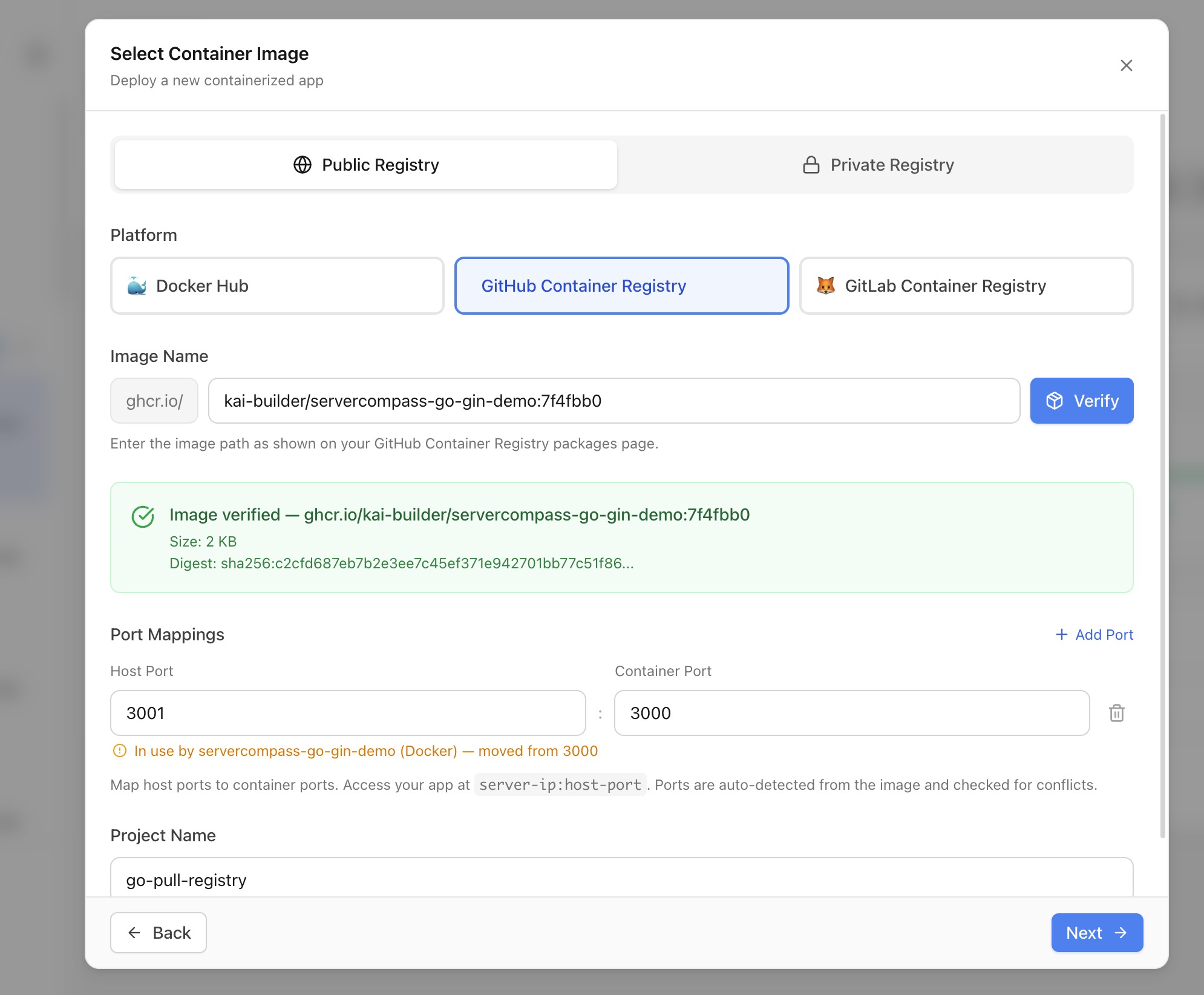
Deployment
Deploying from Docker Registry
Pull and deploy pre-built images from Docker Hub, GHCR, GitLab, ECR, GCR, or private registries without a build step.
Intermediate7 min readUpdated 2026-03-29
Supported registries
Server Compass supports pulling images from six registry types:
- Docker Hub — Public and private images with access tokens
- GitHub Container Registry (GHCR) — Link your GitHub account for seamless OAuth access
- GitLab Container Registry — Access tokens or deploy tokens
- Amazon ECR — Login tokens (12-hour expiry)
- Google Container Registry (GCR) — JSON key file authentication
- Custom registries — Any OCI-compliant registry
Deploy a public image
- Open the Stack Wizard and select Pull from Registry
- Enter the image reference (e.g.,
nginx:latestorghcr.io/owner/app:v1.2) - Server Compass auto-detects exposed ports for 30+ popular images (Nginx, PostgreSQL, Redis, Grafana, etc.)
- Review detected ports and resolve any conflicts with running containers
- Configure environment variables and restart policy
- Click Deploy — a compose file is generated and the image is pulled directly
Deploy from a private registry
- Add registry credentials in the Registry Selector panel
- Each registry type includes setup instructions (e.g., required scopes for GHCR tokens)
- Test the connection before saving
- Select the credential when deploying — Server Compass authenticates via
docker loginautomatically - For GHCR, you can also link your GitHub account for OAuth-based access without manual tokens
One-click redeploy
Registry-deployed apps support instant redeployment:
- Open the app's Deployments tab
- Click Redeploy — Server Compass pulls the latest image digest and restarts the container
- No rebuild needed — the updated image is pulled and swapped in place
- Image tags are shown in your deployment history for easy tracking
Screenshots
Video Tutorials
Related Features
Ready to try Server Compass?
Download the app and deploy your first application in under 5 minutes.
Download Server Compass