Deploy from a Public Git Repository
Paste a public HTTPS repository URL from GitHub, GitLab, Bitbucket, or another compatible Git host, choose a branch, and deploy it without forking the repo or connecting an account. The result is a normal Server Compass app with redeploys, rollbacks, preview environments, backups, and server transfers.
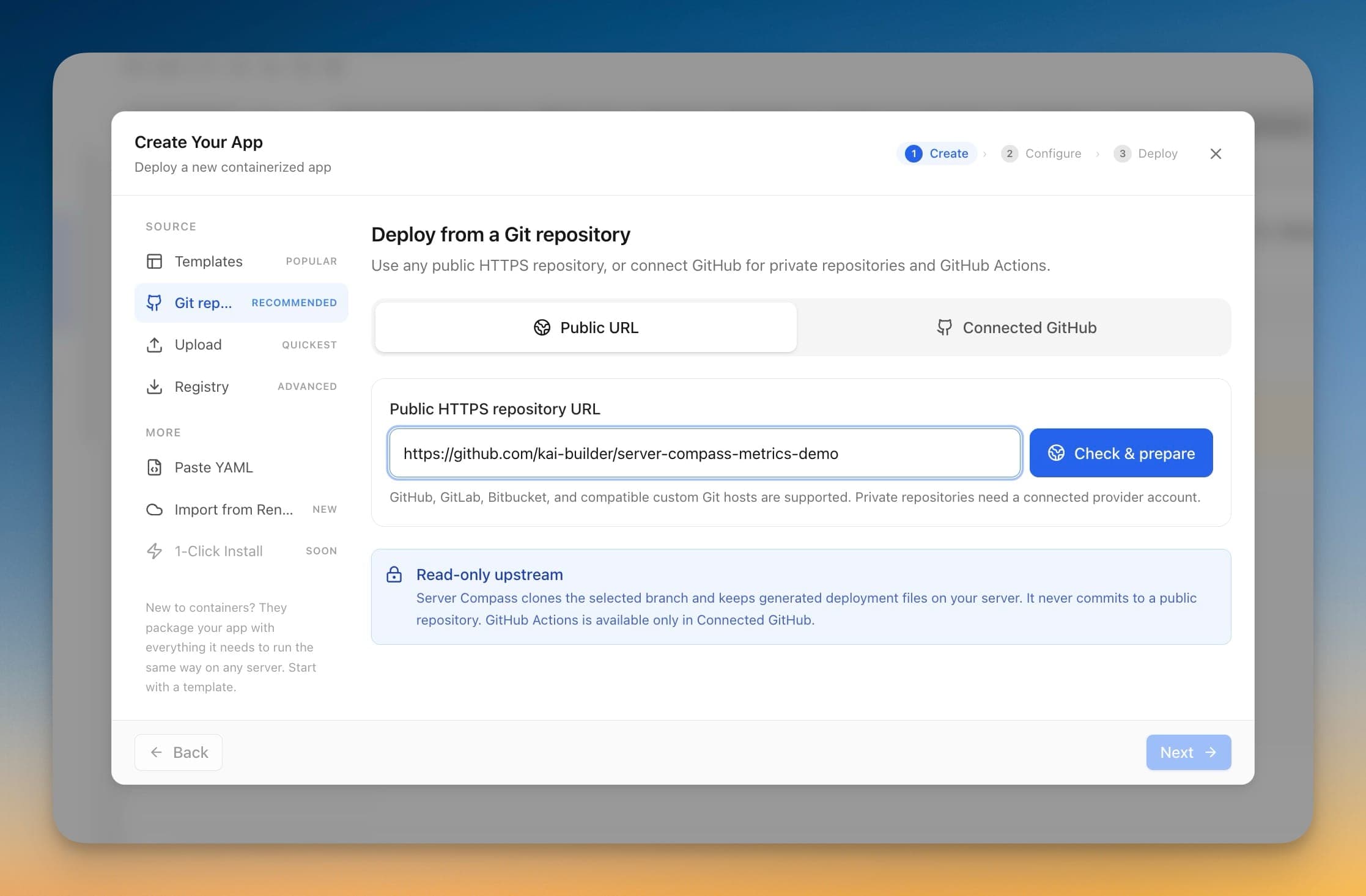
How Deploy from a Public Git Repository Works
No documentation needed. Deploy from a Public Git Repository guides you through each step visually.
Open Deployment Panel
Navigate to the Deploy from a Public Git Repository section in your Server Compass dashboard.
Configure Settings
Fill in the required configuration through the visual interface.
Deploy
Review your settings and deploy with a single click.
The Terminal Way: No Deploy from a Public Git Repository
Without Deploy from a Public Git Repository, you're back to the dark ages of server management. Here's what that looks like.
SSH into your server
First, open your terminal and connect to your VPS.
ssh root@your-server-ipClone your repository
Navigate to your apps directory and clone the repo.
cd /opt/apps
git clone https://github.com/your-username/your-repo.git
cd your-repoCreate environment file
Manually create and configure your .env file.
nano .env
# Add all your environment variables one by one
# DATABASE_URL=...
# API_KEY=...
# SECRET_KEY=...
One wrong character and your app won't start. No validation, no hints.
Build the Docker image
Build your application image from the Dockerfile.
docker build -t myapp:latest .
# Wait 5-15 minutes...
# Hope there are no build errors...Write docker-compose.yml
Manually write your compose configuration.
nano docker-compose.yml
# services:
#   app:
#     image: myapp:latest
#     ports:
#       - "3000:3000"
#     environment:
#       - NODE_ENV=production
# restart: unless-stoppedDeploy the container
Start the container and pray it works.
docker compose up -d
docker compose logs -f
# Ctrl+C when you're tired of watching logsYour Time is Worth More
Deploy from a Public Git Repository in Server Compass does all of this with a single click. No terminal. No memorizing commands. No 3 AM debugging sessions.
- One-click actions
- Real-time feedback
- Automatic backups
- Zero CLI knowledge required
Deploy from a Public Git Repository Features
Everything you need for deployment in one integrated tool, replacing complex CLI commands and manual configuration.
Get StartedThe Power of Deploy from a Public Git Repository
Server management shouldn't require a DevOps team. Deploy from a Public Git Repository makes professional-grade deployment accessible to everyone.
Deploy in Minutes
Deploy from a Public Git Repository eliminates complex CLI workflows. Deploy your applications visually without memorizing Docker commands.
Zero-Configuration Defaults
Deploy from a Public Git Repository comes pre-configured with production-ready settings so you can ship with confidence.
Visual Feedback
Track every step of your deployment with Deploy from a Public Git Repository. See progress, logs, and status in real time.
Repeatable Process
Once configured, Deploy from a Public Git Repository lets you replicate deployments across servers consistently.
Deploy from a Public Git Repository: Frequently Asked
Common questions about Deploy from a Public Git Repository in Server Compass
How do I access Deploy from a Public Git Repository in Server Compass?
Deploy from a Public Git Repository is available in the Deployment section of Server Compass. Simply connect to your server, navigate to Deployment, and you'll find Deploy from a Public Git Repository ready to use. No additional setup or plugins required.
Does Deploy from a Public Git Repository require any server-side installation?
No. Server Compass operates as a desktop application that connects to your server via SSH. Deploy from a Public Git Repository works through this connection without installing any agents or packages on your server (except the optional monitoring agent for resource tracking).
Is Deploy from a Public Git Repository included in all Server Compass plans?
Yes. Every Server Compass feature, including Deploy from a Public Git Repository, is included with the one-time $29 payment. There are no tier restrictions, add-ons, or per-server fees. You get all 152+ features for all your servers.
Can I use Deploy from a Public Git Repository with any VPS provider?
Deploy from a Public Git Repository works with any VPS or dedicated server that supports SSH access and Docker. This includes DigitalOcean, Hetzner, Vultr, Linode, AWS EC2, Google Cloud, Azure, and any other provider. It also works with local servers and homelab setups.
What makes Deploy from a Public Git Repository different from command-line alternatives?
Deploy from a Public Git Repository provides a visual, intuitive interface that replaces complex CLI commands and configuration files. You get real-time feedback, safety confirmations, and a consistent experience across all your servers without memorizing syntax or writing scripts.
More Deployment Features
Explore other deployment capabilities in Server Compass
Docker Stack Wizard
Multi-step wizard walks you through deploying containerized applications. Choose source, configure settings, and deploy in minutes.
Template-Based Deployment
Choose from 100+ pre-built templates for databases, services, and development tools. Deploy popular stacks with one click.
Deploy from GitHub
Deploy directly from any GitHub repository. Select branches, configure build settings, and ship your code to production.
Docker Compose Editor
Full-featured YAML editor for docker-compose configurations. Write, edit, and validate your compose files visually.
Try Deploy from a Public Git Repository Today
Download Server Compass and get access to Deploy from a Public Git Repository along with 151 other features. One-time $29 payment. No subscriptions. No per-server fees.