Custom SSL Certificates
Bring your own OV or EV SSL certificate from any certificate authority instead of Let's Encrypt. Upload the certificate, key, and CA bundle for a domain and Server Compass validates and installs them over SSH — with a manual-renewal reminder so an expiry never slips past you.
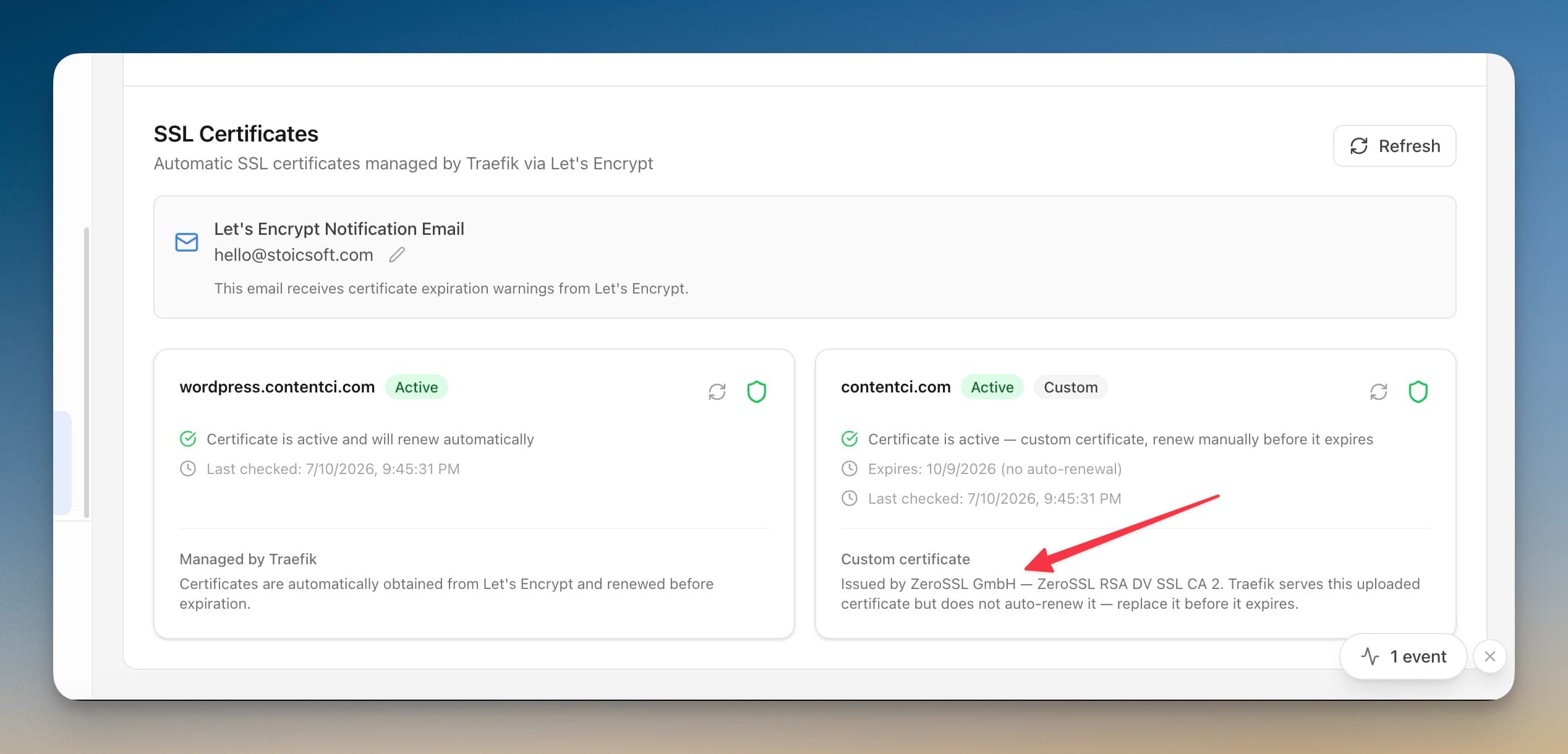
Using Custom SSL Certificates in Server Compass
Custom SSL Certificates replaces complex workflows with a few clicks. Here's the process.
Open Domain Settings
Navigate to the Domains & SSL section of your application.
Configure Domain
Use Custom SSL Certificates to set up your domain configuration.
Verify & Apply
Server Compass verifies your settings and applies changes automatically.
Manual Alternative to Custom SSL Certificates
Without Custom SSL Certificates, you'd need to SSH into your server and run these commands manually. Every. Single. Time.
SSH into your server
Connect to configure domains.
ssh root@your-server-ipInstall Certbot
Set up Let's Encrypt tooling.
apt update
apt install certbot python3-certbot-nginx
# Or for standalone:
apt install certbotConfigure nginx
Set up reverse proxy manually.
nano /etc/nginx/sites-available/myapp
# server {
#     listen 80;
#     server_name myapp.com www.myapp.com;
#     location / {
#         proxy_pass http://localhost:3000;
#         proxy_http_version 1.1;
#         proxy_set_header Upgrade $http_upgrade;
#         proxy_set_header Connection 'upgrade';
#         proxy_set_header Host $host;
#         proxy_cache_bypass $http_upgrade;
#     }
# }

ln -s /etc/nginx/sites-available/myapp /etc/nginx/sites-enabled/
nginx -t
systemctl reload nginx
One syntax error = site down.
Generate SSL certificate
Run Certbot and cross your fingers.
certbot --nginx -d myapp.com -d www.myapp.com
# Answer the interactive prompts
# Wait for DNS verification
# Hope it doesn't failSet up auto-renewal
Don't forget or your cert expires.
# Test renewal
certbot renew --dry-run

# Add cron job
crontab -e
# 0 12 * * * /usr/bin/certbot renew --quiet
Forget this step and your site shows security warnings in 90 days.
Skip All That. Use Server Compass.
Custom SSL Certificates isn't just faster—it's safer. No typos, no forgotten flags, no accidental disasters.
- Visual interface
- No terminal needed
- Built-in error handling
- Works on any VPS
Everything Custom SSL Certificates Offers
Everything you need for domains & ssl in one integrated tool, replacing complex CLI commands and manual configuration.
Get StartedWhy Custom SSL Certificates Matters
Server management shouldn't require a DevOps team. Custom SSL Certificates makes professional-grade domains & ssl accessible to everyone.
Automatic HTTPS
Custom SSL Certificates handles SSL certificate provisioning and renewal automatically via Let's Encrypt.
Instant Propagation
Custom SSL Certificates verifies DNS settings and configures routing instantly once records are pointing correctly.
Certificate Monitoring
Custom SSL Certificates tracks certificate expiry and health so you never face an unexpected SSL error.
Zero Downtime Changes
Custom SSL Certificates applies domain configuration changes without interrupting live traffic.
Common Questions About Custom SSL Certificates
Common questions about Custom SSL Certificates in Server Compass
How do I access Custom SSL Certificates in Server Compass?
Custom SSL Certificates is available in the Domains & SSL section of Server Compass. Simply connect to your server, navigate to Domains & SSL, and you'll find Custom SSL Certificates ready to use. No additional setup or plugins required.
Does Custom SSL Certificates require any server-side installation?
No. Server Compass operates as a desktop application that connects to your server via SSH. Custom SSL Certificates works through this connection without installing any agents or packages on your server (except the optional monitoring agent for resource tracking).
Is Custom SSL Certificates included in all Server Compass plans?
Yes. Every Server Compass feature, including Custom SSL Certificates, is included with the one-time $29 payment. There are no tier restrictions, add-ons, or per-server fees. You get all 152+ features for all your servers.
Can I use Custom SSL Certificates with any VPS provider?
Custom SSL Certificates works with any VPS or dedicated server that supports SSH access and Docker. This includes DigitalOcean, Hetzner, Vultr, Linode, AWS EC2, Google Cloud, Azure, and any other provider. It also works with local servers and homelab setups.
What makes Custom SSL Certificates different from command-line alternatives?
Custom SSL Certificates provides a visual, intuitive interface that replaces complex CLI commands and configuration files. You get real-time feedback, safety confirmations, and a consistent experience across all your servers without memorizing syntax or writing scripts.
More Domains & SSL Features
Explore other domains & ssl capabilities in Server Compass
Visual Domain Management
Add and configure domains with an intuitive UI. Built-in Traefik reverse proxy handles routing and load balancing.
Automatic SSL Certificates
Free SSL certificates from Let's Encrypt with automatic renewal. HTTPS for all your domains with zero configuration.
DNS Verification
Automatic DNS verification checks ensure your domain is correctly pointed before configuring SSL and routing.
Certificate Viewer
View detailed SSL certificate information including issuer, expiry, and chain. Renew certificates with one click.
Try Custom SSL Certificates Today
Download Server Compass and get access to Custom SSL Certificates along with 151 other features. One-time $29 payment. No subscriptions. No per-server fees.