1-Click GitHub OAuth
Connect your GitHub account with a single OAuth click. No GitHub App setup or personal access tokens needed.
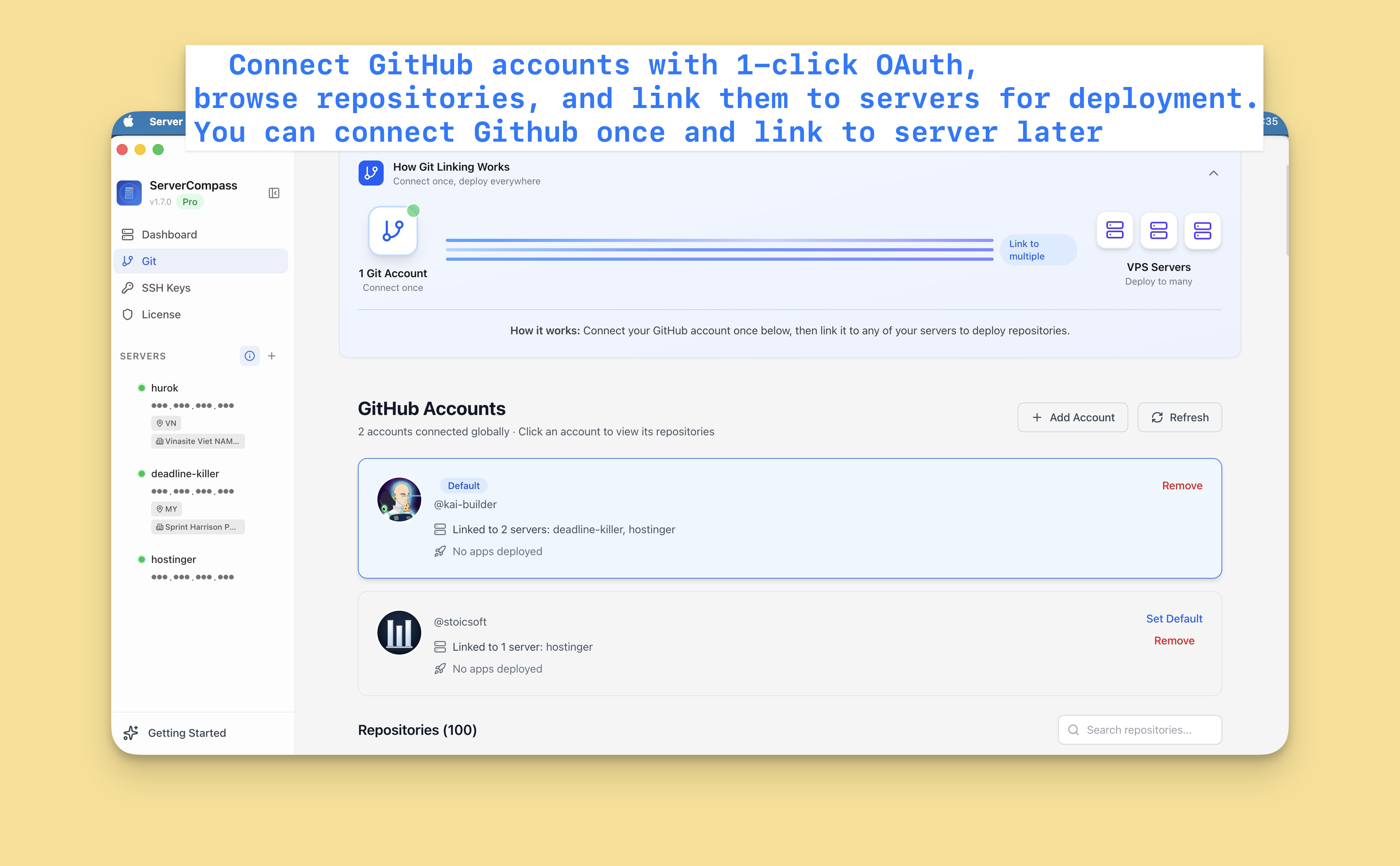
Using 1-Click GitHub OAuth in Server Compass
1-Click GitHub OAuth is designed to be intuitive. Here's how you use it in Server Compass.
Connect GitHub
Link your GitHub account through the OAuth integration.
Select Repository
Browse and select repositories from your connected accounts.
Configure 1-Click GitHub OAuth
Set up 1-Click GitHub OAuth for your deployment workflow.
Before 1-Click GitHub OAuth Existed
This is what you'd have to do manually without 1-Click GitHub OAuth. We don't recommend it.
Generate GitHub token
Create a personal access token.
# Go to GitHub.com
# Settings > Developer settings > Personal access tokens
# Generate new token (classic)
# Select scopes: repo, workflow
# Copy token (you'll only see it once!)
Tokens expire. You'll be doing this again.
Configure git on server
Set up authentication.
ssh root@your-server-ip
git config --global credential.helper store
# Clone using HTTPS with token
git clone https://[email protected]/username/repo.git
# Token is now in plaintext in ~/.git-credentials
Token stored in plaintext file. Security risk.
Set up deploy key (safer)
Or use SSH keys for each repo.
# Generate key
ssh-keygen -t ed25519 -C "deploy-key-myapp"
# Copy public key
cat ~/.ssh/id_ed25519.pub
# Go to GitHub repo > Settings > Deploy keys > Add
# Paste the key
# Repeat for every single repositoryOr... Just Use Server Compass
1-Click GitHub OAuth isn't just faster—it's safer. No typos, no forgotten flags, no accidental disasters.
- Point and click
- Instant validation
- Safe defaults
- Works with any provider
Everything 1-Click GitHub OAuth Offers
Everything you need for github integration in one integrated tool, replacing complex CLI commands and manual configuration.
Get Started1-Click GitHub OAuth: Why It's Essential
Server management shouldn't require a DevOps team. 1-Click GitHub OAuth makes professional-grade github integration accessible to everyone.
One-Click Setup
1-Click GitHub OAuth connects via OAuth, requiring no personal access tokens or manual GitHub App configuration.
Full Repository Access
1-Click GitHub OAuth lets you browse, search, and select repositories directly within Server Compass.
Secure Authentication
1-Click GitHub OAuth uses OAuth 2.0 for secure GitHub access without storing your credentials.
Multi-Account Support
1-Click GitHub OAuth allows linking personal and organization accounts for flexible deployment workflows.
Questions About 1-Click GitHub OAuth
Common questions about 1-Click GitHub OAuth in Server Compass
How do I access 1-Click GitHub OAuth in Server Compass?
1-Click GitHub OAuth is available in the GitHub Integration section of Server Compass. Simply connect to your server, navigate to GitHub Integration, and you'll find 1-Click GitHub OAuth ready to use. No additional setup or plugins required.
Does 1-Click GitHub OAuth require any server-side installation?
No. Server Compass operates as a desktop application that connects to your server via SSH. 1-Click GitHub OAuth works through this connection without installing any agents or packages on your server (except the optional monitoring agent for resource tracking).
Is 1-Click GitHub OAuth included in all Server Compass plans?
Yes. Every Server Compass feature, including 1-Click GitHub OAuth, is included with the one-time $29 payment. There are no tier restrictions, add-ons, or per-server fees. You get all 152+ features for all your servers.
Can I use 1-Click GitHub OAuth with any VPS provider?
1-Click GitHub OAuth works with any VPS or dedicated server that supports SSH access and Docker. This includes DigitalOcean, Hetzner, Vultr, Linode, AWS EC2, Google Cloud, Azure, and any other provider. It also works with local servers and homelab setups.
What makes 1-Click GitHub OAuth different from command-line alternatives?
1-Click GitHub OAuth provides a visual, intuitive interface that replaces complex CLI commands and configuration files. You get real-time feedback, safety confirmations, and a consistent experience across all your servers without memorizing syntax or writing scripts.
More GitHub Integration Features
Explore other github integration capabilities in Server Compass
Multi-Account Support
Link multiple GitHub accounts per server. Switch between personal and organization accounts seamlessly.
Repository Browser
Browse all accessible repositories with search and filter. Select repos for deployment without leaving the app.
Branch Selection
Deploy from any branch. Switch deployment branches and trigger rebuilds with the selected branch.
Framework Auto-Detection
Automatically detect the application framework from your repository. Pre-configure build settings based on detected stack.
Try 1-Click GitHub OAuth Today
Download Server Compass and get access to 1-Click GitHub OAuth along with 151 other features. One-time $29 payment. No subscriptions. No per-server fees.