Guided Tour
A seven-chapter visual tour from Get Started that explains how Server Compass sits between your computer and your servers, where each screen lives, how deploys and domains work, and where your secrets are kept. Each chapter has a diagram you can interact with.
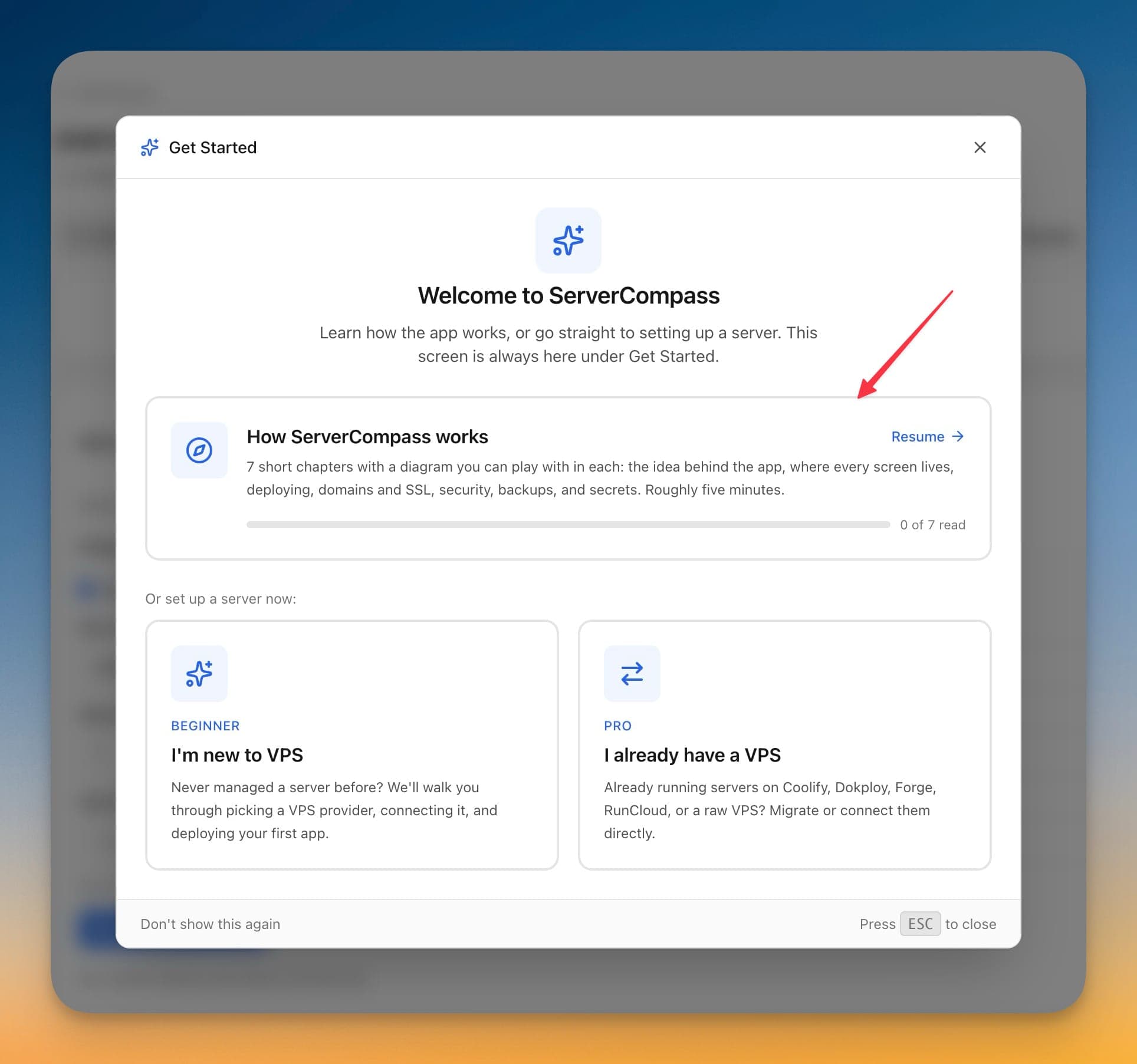
Guided Tour Walkthrough
Guided Tour is designed to be intuitive. Here's how you use it in Server Compass.
Open Get Started
The Get Started screen offers How ServerCompass works alongside shortcuts for new and existing VPS users. It stays available, so it is not a one-time popup.
Work through the chapters
Seven chapters run from the architecture and where every screen lives, through deploying, domains and SSL, hardening and backups, to where secrets are stored.
Play with the diagram
Each chapter carries a diagram you can interact with rather than a static illustration.
Leave and come back
Progress is remembered, so closing the tour part-way resumes where you stopped instead of restarting.
Before Guided Tour Existed
This is what you'd have to do manually without Guided Tour. We don't recommend it.
Work out what is actually running
Without a mental model of the stack, you start by reverse-engineering the box.
docker ps -a
systemctl list-units --type=service --state=running | head -20Find where the web server config lives
Every distribution and every panel puts it somewhere slightly different.
nginx -T 2>/dev/null | grep -E 'server_name|root ' | head
ls -la /etc/nginx/conf.d/ /etc/caddy/ 2>/dev/nullWork out how deploys happen
Cron entries and unit files are where someone else's automation hides.
crontab -l 2>/dev/null
ls -la /etc/systemd/system/*.serviceOr... Just Use Server Compass
Server Compass replaces all those commands with a beautiful UI. Guided Tour just works—click, configure, done.
- Point and click
- Instant validation
- Safe defaults
- Works with any provider
Guided Tour Capabilities
Everything you need for server management in one integrated tool, replacing complex CLI commands and manual configuration.
Get StartedGuided Tour: Why It's Essential
Server management shouldn't require a DevOps team. Guided Tour makes professional-grade server management accessible to everyone.
At-a-Glance Monitoring
Guided Tour shows CPU, RAM, disk, and network metrics in a single dashboard view.
Quick Actions
Guided Tour provides one-click package updates, Docker setup, and system configuration.
Multi-Server Support
Guided Tour manages unlimited VPS servers from one application with saved connections.
Resource Trending
Guided Tour tracks resource usage over time so you can plan capacity and identify bottlenecks.
Questions About Guided Tour
Common questions about Guided Tour in Server Compass
How do I access Guided Tour in Server Compass?
Guided Tour is available in the Server Management section of Server Compass. Simply connect to your server, navigate to Server Management, and you'll find Guided Tour ready to use. No additional setup or plugins required.
Does Guided Tour require any server-side installation?
No. Server Compass operates as a desktop application that connects to your server via SSH. Guided Tour works through this connection without installing any agents or packages on your server (except the optional monitoring agent for resource tracking).
Is Guided Tour included in all Server Compass plans?
Yes. Every Server Compass feature, including Guided Tour, is included with the one-time $29 payment. There are no tier restrictions, add-ons, or per-server fees. You get all 152+ features for all your servers.
Can I use Guided Tour with any VPS provider?
Guided Tour works with any VPS or dedicated server that supports SSH access and Docker. This includes DigitalOcean, Hetzner, Vultr, Linode, AWS EC2, Google Cloud, Azure, and any other provider. It also works with local servers and homelab setups.
What makes Guided Tour different from command-line alternatives?
Guided Tour provides a visual, intuitive interface that replaces complex CLI commands and configuration files. You get real-time feedback, safety confirmations, and a consistent experience across all your servers without memorizing syntax or writing scripts.
More Server Management Features
Explore other server management capabilities in Server Compass
Server Overview Dashboard
At-a-glance view of CPU, RAM, and disk usage. See OS info, auth method, location, and provider details.
Resource Monitoring
Real-time CPU, memory, and disk usage graphs. Track resource trends and identify bottlenecks.
System Packages
List and manage installed APT packages, update individual ones, or run a system-wide upgrade. Install Recommended covers the baseline a server needs — including sudo and jq — and an Available Packages section installs optional software like Caddy with its repository set up for you.
Port Management
View all open ports and the services using them. Identify conflicts and manage port allocations.
Try Guided Tour Today
Download Server Compass and get access to Guided Tour along with 151 other features. One-time $29 payment. No subscriptions. No per-server fees.