Ollama Management
Built-in UI for managing local LLMs. Browse and pull models, view running instances, get API endpoints with code snippets, and test chat directly — no CLI needed.
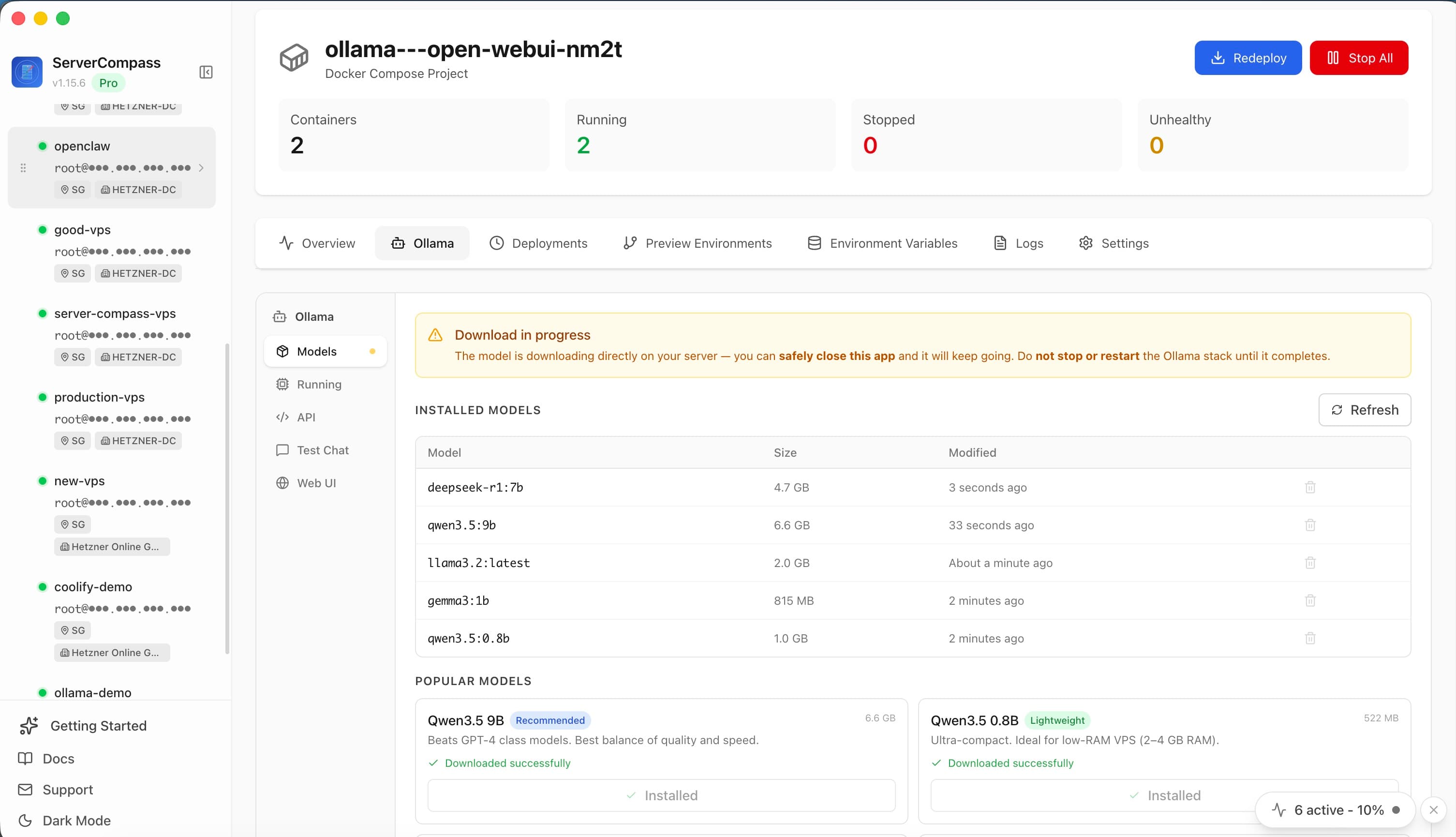
Ollama Management: Step by Step
Using Ollama Management is straightforward. Follow these simple steps to get started.
Open Server Compass
Connect to your server from the Server Compass desktop app.
Navigate to Ollama Management
Find Ollama Management in the relevant section of the dashboard.
Configure & Use
Set up your preferences and start using the feature immediately.
Ollama Management vs. The Command Line
Miss the old days? Here's how to do everything Ollama Management does... the hard way.
SSH into your server
First, open your terminal and connect to your VPS.
ssh root@your-server-ipClone your repository
Navigate to your apps directory and clone the repo.
cd /opt/apps
git clone https://github.com/your-username/your-repo.git
cd your-repoCreate environment file
Manually create and configure your .env file.
nano .env
# Add all your environment variables one by one
# DATABASE_URL=...
# API_KEY=...
# SECRET_KEY=...
One wrong character and your app won't start. No validation, no hints.
Build the Docker image
Build your application image from the Dockerfile.
docker build -t myapp:latest .
# Wait 5-15 minutes...
# Hope there are no build errors...Write docker-compose.yml
Manually write your compose configuration.
nano docker-compose.yml
# services:
#   app:
#     image: myapp:latest
#     ports:
#       - "3000:3000"
#     environment:
#       - NODE_ENV=production
# restart: unless-stoppedDeploy the container
Start the container and pray it works.
docker compose up -d
docker compose logs -f
# Ctrl+C when you're tired of watching logsThere's a Better Way
Everything above in one visual interface. Ollama Management handles the complexity so you can focus on building.
- No SSH required
- Guided workflows
- Undo support
- Multi-server management
Ollama Management: Full Feature List
Everything you need for app integrations in one integrated tool, replacing complex CLI commands and manual configuration.
Get StartedBenefits of Ollama Management
Server management shouldn't require a DevOps team. Ollama Management makes professional-grade app integrations accessible to everyone.
Deploy in Minutes
Ollama Management eliminates complex CLI workflows. Deploy your applications visually without memorizing Docker commands.
Zero-Configuration Defaults
Ollama Management comes pre-configured with production-ready settings so you can ship with confidence.
Visual Feedback
Track every step of your deployment with Ollama Management. See progress, logs, and status in real time.
Repeatable Process
Once configured, Ollama Management lets you replicate deployments across servers consistently.
Ollama Management FAQ
Common questions about Ollama Management in Server Compass
How do I access Ollama Management in Server Compass?
Ollama Management is available in the App Integrations section of Server Compass. Simply connect to your server, navigate to App Integrations, and you'll find Ollama Management ready to use. No additional setup or plugins required.
Does Ollama Management require any server-side installation?
No. Server Compass operates as a desktop application that connects to your server via SSH. Ollama Management works through this connection without installing any agents or packages on your server (except the optional monitoring agent for resource tracking).
Is Ollama Management included in all Server Compass plans?
Yes. Every Server Compass feature, including Ollama Management, is included with the one-time $29 payment. There are no tier restrictions, add-ons, or per-server fees. You get all 152+ features for all your servers.
Can I use Ollama Management with any VPS provider?
Ollama Management works with any VPS or dedicated server that supports SSH access and Docker. This includes DigitalOcean, Hetzner, Vultr, Linode, AWS EC2, Google Cloud, Azure, and any other provider. It also works with local servers and homelab setups.
What makes Ollama Management different from command-line alternatives?
Ollama Management provides a visual, intuitive interface that replaces complex CLI commands and configuration files. You get real-time feedback, safety confirmations, and a consistent experience across all your servers without memorizing syntax or writing scripts.
More App Integrations Features
Explore other app integrations capabilities in Server Compass
OpenClaw Management
Full management dashboard for self-hosted Claude agents. Manage devices, models, channels, pairing, gateway settings, agents, and skills with SSH tunnel support.
Gitea & Forgejo Management
Integrated management for self-hosted Git servers. Get SSH connection instructions, view service status, access admin panel, and browse repositories.
1DevTool Handoff
Receive deployment bundles from the 1DevTool desktop app over a deep link. Server Compass picks the right deploy lane (compose, GitHub repo, or local upload) automatically, pre-fills project name, compose YAML, Dockerfile, env vars, and Git remote, and labels the wizard with `Source: 1DevTool` so the handoff is obvious.
AI Access for Coding Agents
Connect Claude Code, Codex CLI, Gemini CLI, OpenCode, Cursor, Windsurf, or VS Code to Server Compass through a local token-secured MCP server. Agents can inspect servers, review app health, manage Docker apps, update environment values, and deploy with scoped permissions instead of receiving raw SSH credentials.
Try Ollama Management Today
Download Server Compass and get access to Ollama Management along with 151 other features. One-time $29 payment. No subscriptions. No per-server fees.