Team Workspaces
Run your servers with other people without creating an account or sending anyone a password. The workspace lives as encrypted objects in an S3-compatible bucket you already own, and every member syncs against it with their own role.
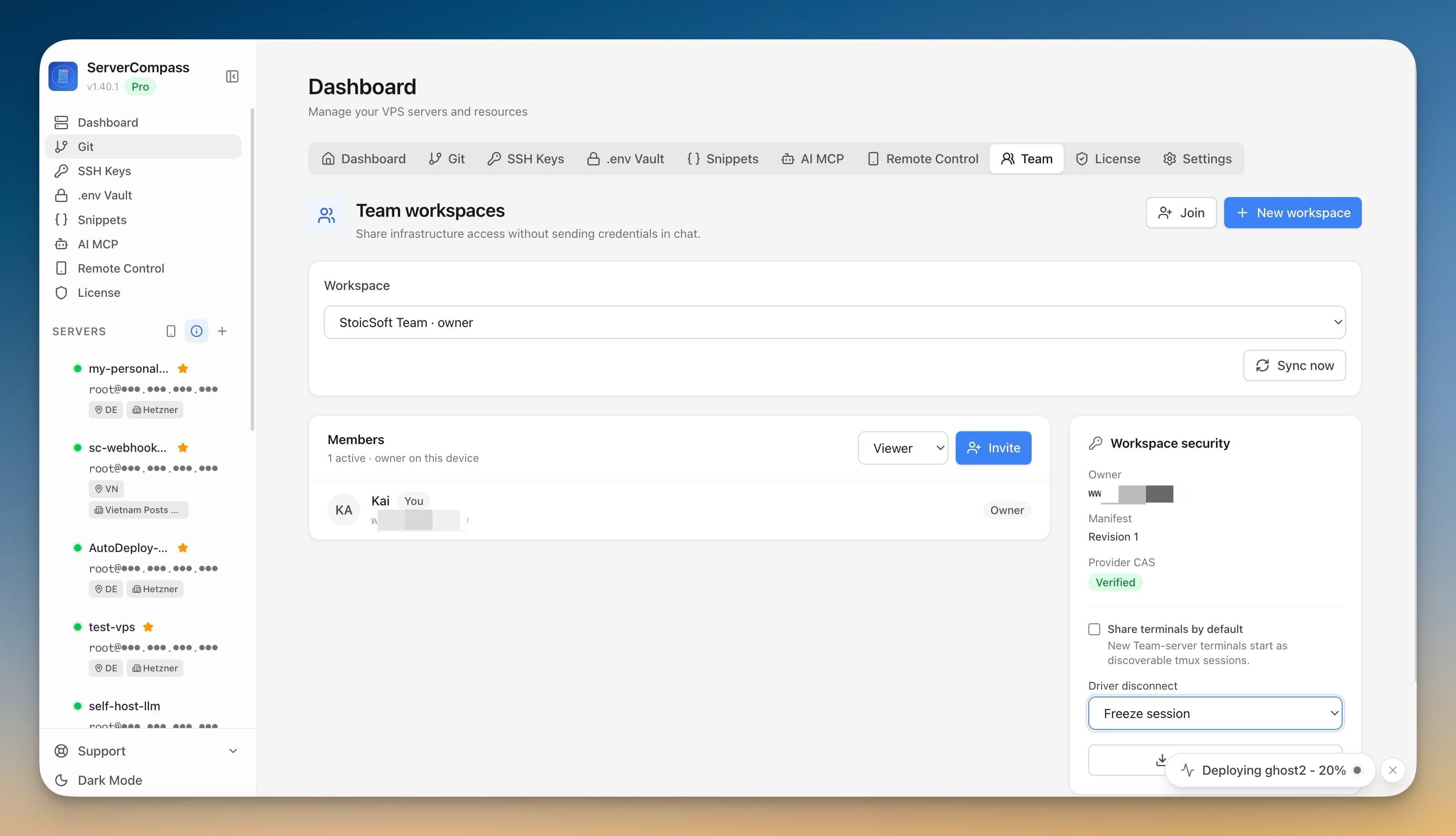
Using Team Workspaces in Server Compass
Using Team Workspaces is straightforward. Follow these simple steps to get started.
Point it at storage you already own
Open the Team tab on the Dashboard and pick a saved S3-compatible destination — Cloudflare R2, AWS S3 or MinIO. No storage yet? The screen jumps you straight to the form.
Create the workspace
Name it, set a recovery passphrase of at least 12 characters, and pick your display name. The passphrase encrypts the one-time owner recovery bundle and is never stored.
Invite by QR or code
Invites expire in 24 hours, 72 hours, 7 days or 30 days, are one-time, and an Owner or Admin approves the join request before anyone is in.
Work from four screens
Overview for members and pending invites, Permission for who can reach what, Security for workspace settings, and Activity for the log.
What If You Don't Have Team Workspaces?
Before Team Workspaces, this is what server management looked like. Spoiler: it wasn't fun.
Create a Unix account for each teammate
Without a shared workspace, every person who needs the server gets their own account on every host, repeated by hand.
sudo adduser --disabled-password --gecos "" alex
sudo usermod -aG docker,sudo alex
sudo mkdir -p /home/alex/.ssh && sudo chmod 700 /home/alex/.sshCollect and install their public key
Ask them to send a public key, then append it to their authorized_keys on each server they need.
sudo tee -a /home/alex/.ssh/authorized_keys < alex_id_ed25519.pub
sudo chmod 600 /home/alex/.ssh/authorized_keys
sudo chown -R alex:alex /home/alex/.sshRepeat for every host, and keep a list somewhere
There is no central record, so the roster of who is on which machine lives in a spreadsheet or in someone’s memory.
for host in web-1 web-2 db-1; do
  ssh root@$host "id alex >/dev/null 2>&1 && echo "$host: yes" || echo "$host: no""
done
Nothing here expires. An account created for a two-week contract stays until somebody remembers to delete it.
One Click > 50 Commands
Stop copy-pasting commands from Stack Overflow. Team Workspaces gives you a proper interface for server management.
- No SSH required
- Guided workflows
- Undo support
- Multi-server management
Everything Team Workspaces Offers
Everything you need for security in one integrated tool, replacing complex CLI commands and manual configuration.
Get StartedBenefits of Team Workspaces
Server management shouldn't require a DevOps team. Team Workspaces makes professional-grade security accessible to everyone.
Proactive Protection
Team Workspaces identifies vulnerabilities before they're exploited with automated security scanning.
Visual Configuration
Team Workspaces makes firewall rules, SSH settings, and Fail2Ban configuration accessible through a GUI.
One-Click Hardening
Team Workspaces applies security best practices with a single click: disable root, change ports, enforce key auth.
Continuous Monitoring
Team Workspaces keeps watching your security posture and alerts you when new issues are detected.
Team Workspaces FAQ
Common questions about Team Workspaces in Server Compass
How do I access Team Workspaces in Server Compass?
Team Workspaces is available in the Security section of Server Compass. Simply connect to your server, navigate to Security, and you'll find Team Workspaces ready to use. No additional setup or plugins required.
Does Team Workspaces require any server-side installation?
No. Server Compass operates as a desktop application that connects to your server via SSH. Team Workspaces works through this connection without installing any agents or packages on your server (except the optional monitoring agent for resource tracking).
Is Team Workspaces included in all Server Compass plans?
Yes. Every Server Compass feature, including Team Workspaces, is included with the one-time $29 payment. There are no tier restrictions, add-ons, or per-server fees. You get all 152+ features for all your servers.
Can I use Team Workspaces with any VPS provider?
Team Workspaces works with any VPS or dedicated server that supports SSH access and Docker. This includes DigitalOcean, Hetzner, Vultr, Linode, AWS EC2, Google Cloud, Azure, and any other provider. It also works with local servers and homelab setups.
What makes Team Workspaces different from command-line alternatives?
Team Workspaces provides a visual, intuitive interface that replaces complex CLI commands and configuration files. You get real-time feedback, safety confirmations, and a consistent experience across all your servers without memorizing syntax or writing scripts.
More Security Features
Explore other security capabilities in Server Compass
Security Audit Scanner
Run comprehensive security audits on your server. Get actionable recommendations for hardening your infrastructure.
Fail2Ban Configuration
Manage Fail2Ban brute-force protection rules. Configure jail settings, ban times, and whitelist IPs visually.
UFW Firewall Management
Configure UFW firewall rules with a visual interface. Add, remove, and toggle rules without memorizing iptables.
SSH Hardening
Apply SSH security best practices with one click. Disable root login, change ports, and configure key-only auth.
Try Team Workspaces Today
Download Server Compass and get access to Team Workspaces along with 151 other features. One-time $29 payment. No subscriptions. No per-server fees.