दस्तावेज़ पर वापस

शुरुआत करें
पहला सर्वर जोड़ें
SSH पासवर्ड या key authentication का उपयोग करके अपना VPS Server Compass से कनेक्ट करें।
Beginner5 min readUpdated 2026-09-09
शुरू करने से पहले
आपको चाहिए:
- किसी भी प्रोवाइडर का VPS (DigitalOcean, Hetzner, Vultr, AWS, आदि)
- SSH access credentials (IP address, username, password या SSH key)
- Port 22 खुला हो (default SSH port)
पासवर्ड से सर्वर जोड़ें
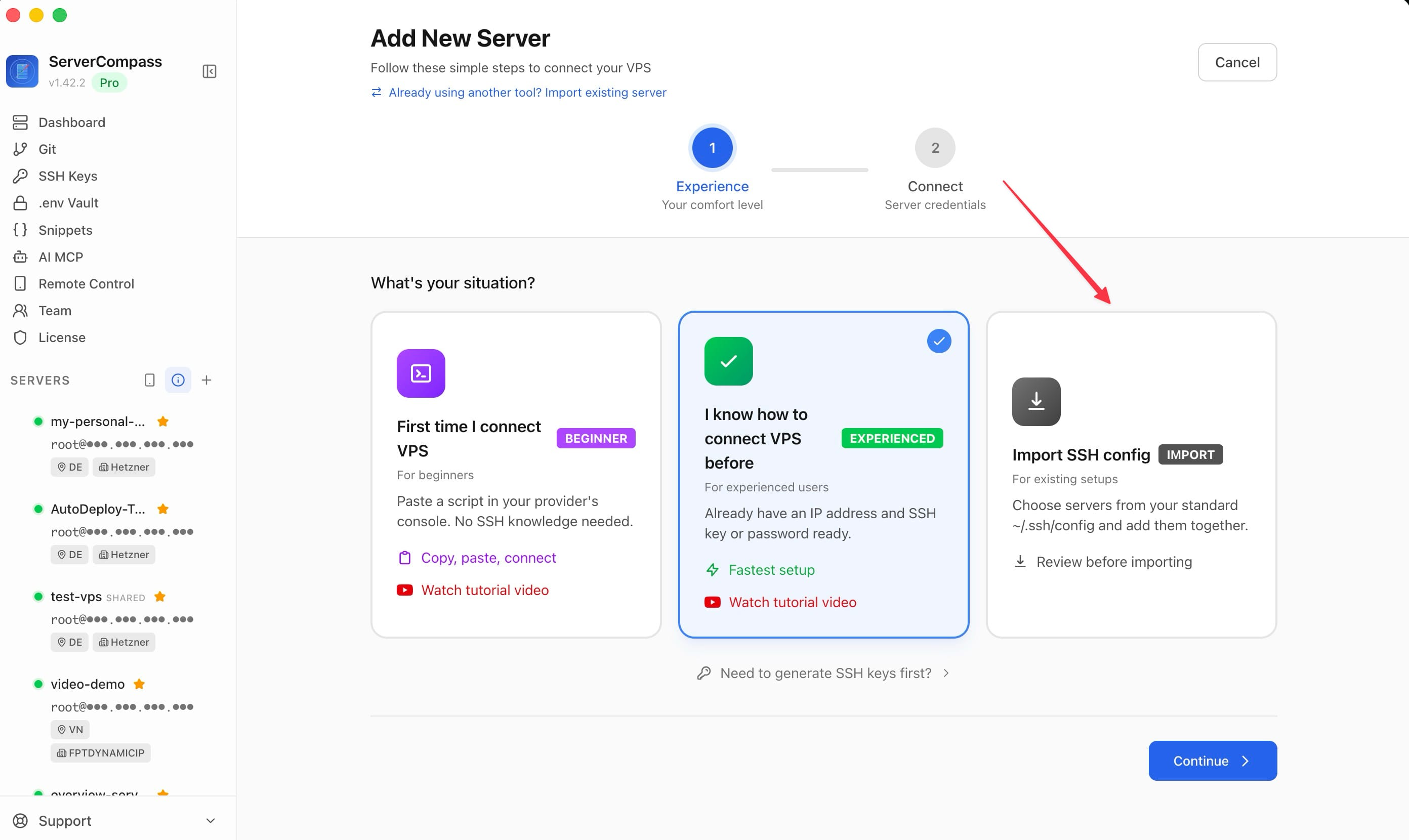
- Sidebar में "Add Server" पर क्लिक करें
- सर्वर की जानकारी डालें:
- Name: सर्वर का एक पहचान योग्य नाम
- Host: आपके सर्वर का IP address या hostname
- Port: आमतौर पर 22
- Username: आमतौर पर "root" या आपका बनाया user
- Password: आपका SSH password
- "Test Connection" पर क्लिक करें
- सफल होने पर "Save Server" पर क्लिक करें
SSH key से सर्वर जोड़ें
- Sidebar में "Add Server" पर क्लिक करें
- सर्वर की जानकारी डालें
- Authentication method में "SSH Key" चुनें
- इनमें से कोई एक करें:
- अपने system की मौजूदा key चुनें
- Private key content paste करें
- नई key pair generate करें
- "Test Connection" फिर "Save Server" पर क्लिक करें
पहली बार सर्वर सेटअप
पहली बार कनेक्ट होने पर Server Compass:
- जाँचेगा कि Docker installed है या नहीं
- अगर नहीं है तो Docker auto-install का offer करेगा
- Domains के लिए Traefik reverse proxy सेटअप करेगा
- बेसिक security settings कॉन्फ़िगर करेगा
यह automatically होता है — prompt पर बस "Setup Server" पर क्लिक करें।
Screenshots
Frequently Asked Questions
क्या मैं non-root user इस्तेमाल कर सकता हूं?
हां! आप sudo privileges वाले किसी भी user का उपयोग कर सकते हैं। ज़रूरत पड़ने पर Server Compass sudo password मांगेगा।
अगर मेरा SSH port 22 नहीं है तो?
Port field में अपना custom SSH port डालें। Server Compass किसी भी port number को support करता है।
क्या मैं किसी भी प्रोवाइडर के सर्वर जोड़ सकता हूं?
हां! Server Compass SSH access वाले किसी भी VPS या dedicated server के साथ काम करता है, जिसमें DigitalOcean, Hetzner, Vultr, Linode, AWS EC2, Google Cloud, Azure और self-hosted सर्वर शामिल हैं।
Video Tutorials
Related Features
Ready to try Server Compass?
Download the app and deploy your first application in under 5 minutes.
Download Server Compass