ドキュメントに戻る


データベース
データベース管理インターフェースを使用
外部ツールなしでデータベースを視覚的にクエリ、閲覧、管理します。
Intermediate7 min readUpdated 2024-02-01
データベース管理にアクセス
データベースコンテナを持つアプリの場合:
- Server Compass でアプリを開く
- 「データベース」タブに移動
- Server Compass がサポートされているデータベースを自動検出
- 「管理を開く」をクリックしてインターフェースを起動
サポートされているデータベース
Server Compass がサポート:
- SQL:PostgreSQL、MySQL、MariaDB
- NoSQL:MongoDB、Redis、CouchDB、Cassandra
- 検索:Elasticsearch、OpenSearch
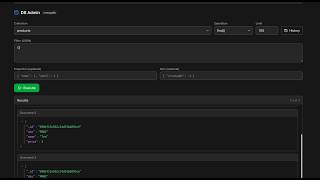
クエリを実行
内蔵クエリエディターを使用:
- データベース/コレクションを選択
- SQL またはデータベース固有のクエリを記述
- 「実行」をクリックまたは Cmd/Ctrl + Enter を押す
- フォーマットされたテーブルで結果を表示
- 結果を CSV または JSON でエクスポート
データを閲覧
データを視覚的に閲覧:
- テーブル/コレクションを選択
- スプレッドシートのようなインターフェースでデータを表示
- 列を並べ替えおよびフィルタ
- 個別のセルを編集(サポートされているデータベースの場合)
Screenshots
Video Tutorials
Related Features
Database Admin Interface
Full database management UI for SQL and NoSQL databases. Query, browse tables, and manage data visually.
SQL Query Editor
Execute SQL queries directly on connected databases. Syntax highlighting, results table, and query history.
NoSQL Query Editors
Specialized query editors for MongoDB, Elasticsearch, CouchDB, and Cassandra. Native query syntax support.
Tables & Schema Browser
Browse database tables, view schemas, column types, and relationships. Understand your data structure visually.
Ready to try Server Compass?
Download the app and deploy your first application in under 5 minutes.
Download Server Compass