Quay lại tài liệu


Cơ sở dữ liệu
Sử dụng giao diện quản trị cơ sở dữ liệu
Truy vấn, duyệt và quản lý cơ sở dữ liệu trực quan mà không cần công cụ bên ngoài.
Intermediate7 min readUpdated 2024-02-01
Truy cập quản trị cơ sở dữ liệu
Với ứng dụng có container cơ sở dữ liệu:
- Mở ứng dụng trong Server Compass
- Đi đến tab "Database"
- Server Compass tự động phát hiện cơ sở dữ liệu được hỗ trợ
- Nhấp "Open Admin" để khởi chạy giao diện
Cơ sở dữ liệu được hỗ trợ
Server Compass hỗ trợ:
- SQL: PostgreSQL, MySQL, MariaDB
- NoSQL: MongoDB, Redis, CouchDB, Cassandra
- Tìm kiếm: Elasticsearch, OpenSearch
Chạy truy vấn
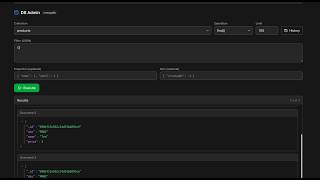
Dùng trình soạn thảo truy vấn tích hợp:
- Chọn cơ sở dữ liệu/collection
- Viết truy vấn SQL hoặc truy vấn riêng của cơ sở dữ liệu
- Nhấp "Run" hoặc nhấn Cmd/Ctrl + Enter
- Xem kết quả trong bảng được định dạng
- Xuất kết quả dưới dạng CSV hoặc JSON
Duyệt dữ liệu
Duyệt dữ liệu trực quan:
- Chọn bảng/collection
- Xem dữ liệu trong giao diện dạng bảng tính
- Sắp xếp và lọc cột
- Chỉnh sửa từng ô (với cơ sở dữ liệu được hỗ trợ)
Screenshots
Video Tutorials
Related Features
Database Admin Interface
Full database management UI for SQL and NoSQL databases. Query, browse tables, and manage data visually.
SQL Query Editor
Execute SQL queries directly on connected databases. Syntax highlighting, results table, and query history.
NoSQL Query Editors
Specialized query editors for MongoDB, Elasticsearch, CouchDB, and Cassandra. Native query syntax support.
Tables & Schema Browser
Browse database tables, view schemas, column types, and relationships. Understand your data structure visually.
Ready to try Server Compass?
Download the app and deploy your first application in under 5 minutes.
Download Server Compass