Copy the Exact Commit You Deployed
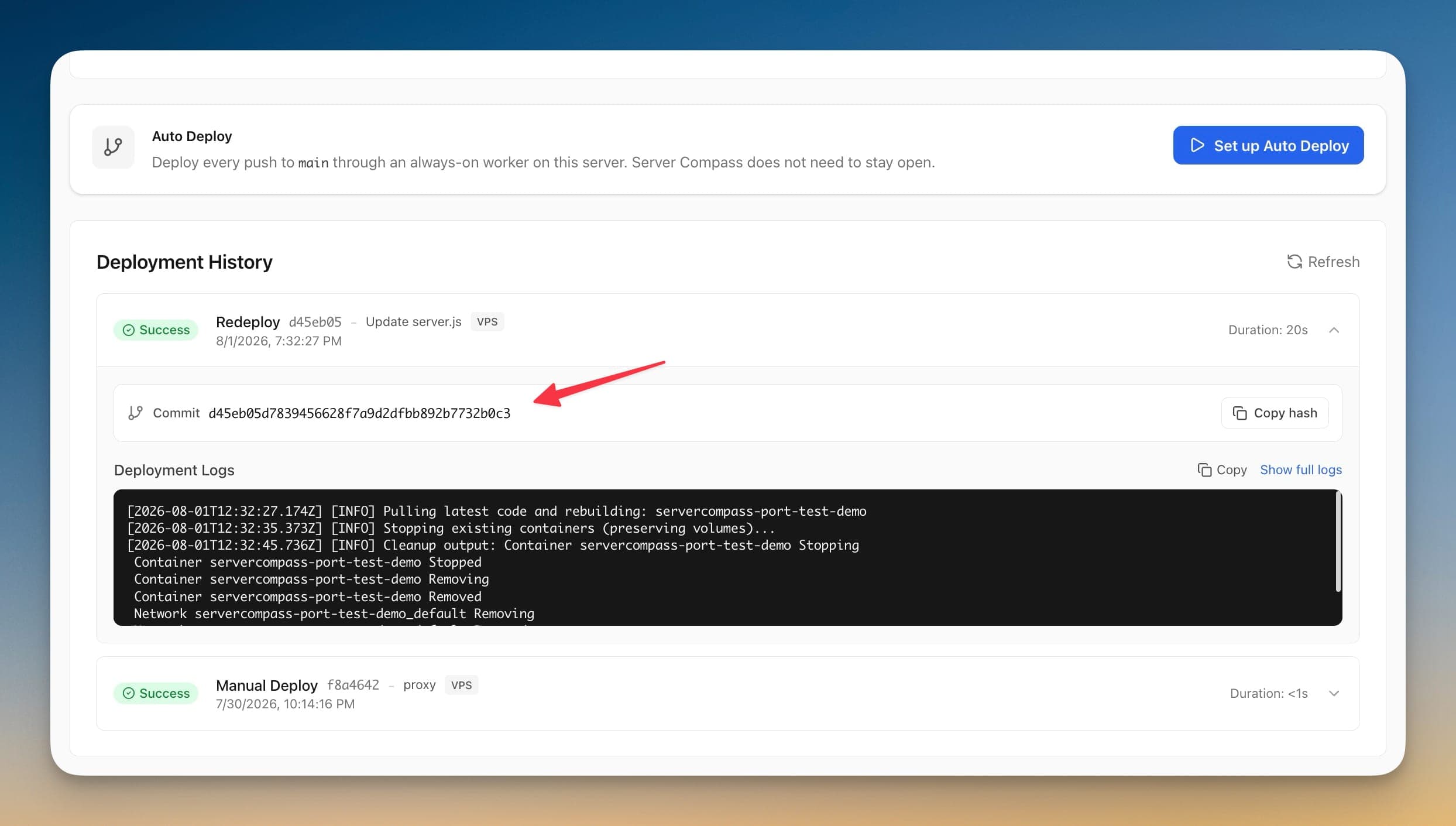
Expand any deployment in App Details or a server's Deployment History to see the full 40-character commit hash with a Copy hash button. The short hash tells you which deploy it was; the full hash is what you paste into git.
Copy the Exact Commit You Deployed: Step by Step
No documentation needed. Copy the Exact Commit You Deployed guides you through each step visually.
Open a deployment list
Either the Deployments tab of an app in App Details, or the Deployment History panel on a server.
Expand the deployment
Click a deployment row. Any deployment that recorded a Git commit shows a Commit row above the deployment logs.
Click Copy hash
The complete 40-character hash goes to your clipboard and the button confirms with Copied.
The Terminal Way: No Copy the Exact Commit You Deployed
Without Copy the Exact Commit You Deployed, you're back to the dark ages of server management. Here's what that looks like.
SSH in to find what actually shipped
Without the hash in the app, you go looking for it on the server.
ssh root@your-server-ip
cd /opt/apps/your-app
git rev-parse HEAD
Assumes the deployed checkout still exists and nobody has pulled since.
Expand the short hash by hand
A short hash is not what git checkout, bisect, or an incident report wants.
git rev-parse --verify d45eb05
# or dig through your Git host UI until you find the full hashDiff two deployments
Compare the last good deployment against the one that broke.
git log --oneline <last-good-hash>..<bad-hash>Bisect from a known-good deploy
You need both full hashes before you can even start.
git bisect start <bad-hash> <last-good-hash>Your Time is Worth More
Everything above in one visual interface. Copy the Exact Commit You Deployed handles the complexity so you can focus on building.
- One-click actions
- Real-time feedback
- Automatic backups
- Zero CLI knowledge required
Copy the Exact Commit You Deployed: Full Feature List
Everything you need for app management in one integrated tool, replacing complex CLI commands and manual configuration.
Get StartedThe Power of Copy the Exact Commit You Deployed
Server management shouldn't require a DevOps team. Copy the Exact Commit You Deployed makes professional-grade app management accessible to everyone.
Complete Visibility
Copy the Exact Commit You Deployed gives you a bird's-eye view of all your applications. No more guessing container states.
Instant Actions
Copy the Exact Commit You Deployed puts start, stop, restart, and rollback at your fingertips with one-click controls.
Safe Operations
Copy the Exact Commit You Deployed includes safety guards and confirmations to prevent accidental destructive actions.
Historical Context
Copy the Exact Commit You Deployed keeps a full audit trail so you always know what changed and when.
Copy the Exact Commit You Deployed: Frequently Asked
Common questions about Copy the Exact Commit You Deployed in Server Compass
How do I access Copy the Exact Commit You Deployed in Server Compass?
Copy the Exact Commit You Deployed is available in the App Management section of Server Compass. Simply connect to your server, navigate to App Management, and you'll find Copy the Exact Commit You Deployed ready to use. No additional setup or plugins required.
Does Copy the Exact Commit You Deployed require any server-side installation?
No. Server Compass operates as a desktop application that connects to your server via SSH. Copy the Exact Commit You Deployed works through this connection without installing any agents or packages on your server (except the optional monitoring agent for resource tracking).
Is Copy the Exact Commit You Deployed included in all Server Compass plans?
Yes. Every Server Compass feature, including Copy the Exact Commit You Deployed, is included with the one-time $29 payment. There are no tier restrictions, add-ons, or per-server fees. You get all 152+ features for all your servers.
Can I use Copy the Exact Commit You Deployed with any VPS provider?
Copy the Exact Commit You Deployed works with any VPS or dedicated server that supports SSH access and Docker. This includes DigitalOcean, Hetzner, Vultr, Linode, AWS EC2, Google Cloud, Azure, and any other provider. It also works with local servers and homelab setups.
What makes Copy the Exact Commit You Deployed different from command-line alternatives?
Copy the Exact Commit You Deployed provides a visual, intuitive interface that replaces complex CLI commands and configuration files. You get real-time feedback, safety confirmations, and a consistent experience across all your servers without memorizing syntax or writing scripts.
More App Management Features
Explore other app management capabilities in Server Compass
Application Dashboard
View all deployed applications with real-time status indicators. Switch between grid and table view for your preferred workflow.
Grid & Table View
Toggle between visual grid cards and compact table view. See container status, uptime, and quick actions at a glance.
Container Health Monitoring
Real-time container status with uptime tracking, health check indicators, and resource usage per container.
Zero-Downtime Deployment
Blue-green deployment keeps the old container serving while the new one is built and health-checked, then switches traffic over. Progress appears the moment you press Redeploy, the deployment is recorded in history right away with its commit, and a deploy that passes 45 minutes stops with a message pointing you at the logs.
Try Copy the Exact Commit You Deployed Today
Download Server Compass and get access to Copy the Exact Commit You Deployed along with 151 other features. One-time $29 payment. No subscriptions. No per-server fees.