Install k3s on Your Server
Install a single-node k3s cluster from Server Compass after nine preflight checks for memory, disk space, ports, the firewall and your reverse proxy. Bundled Traefik stays off so your existing domains keep routing, and UFW gets the pod and service rules the cluster needs.
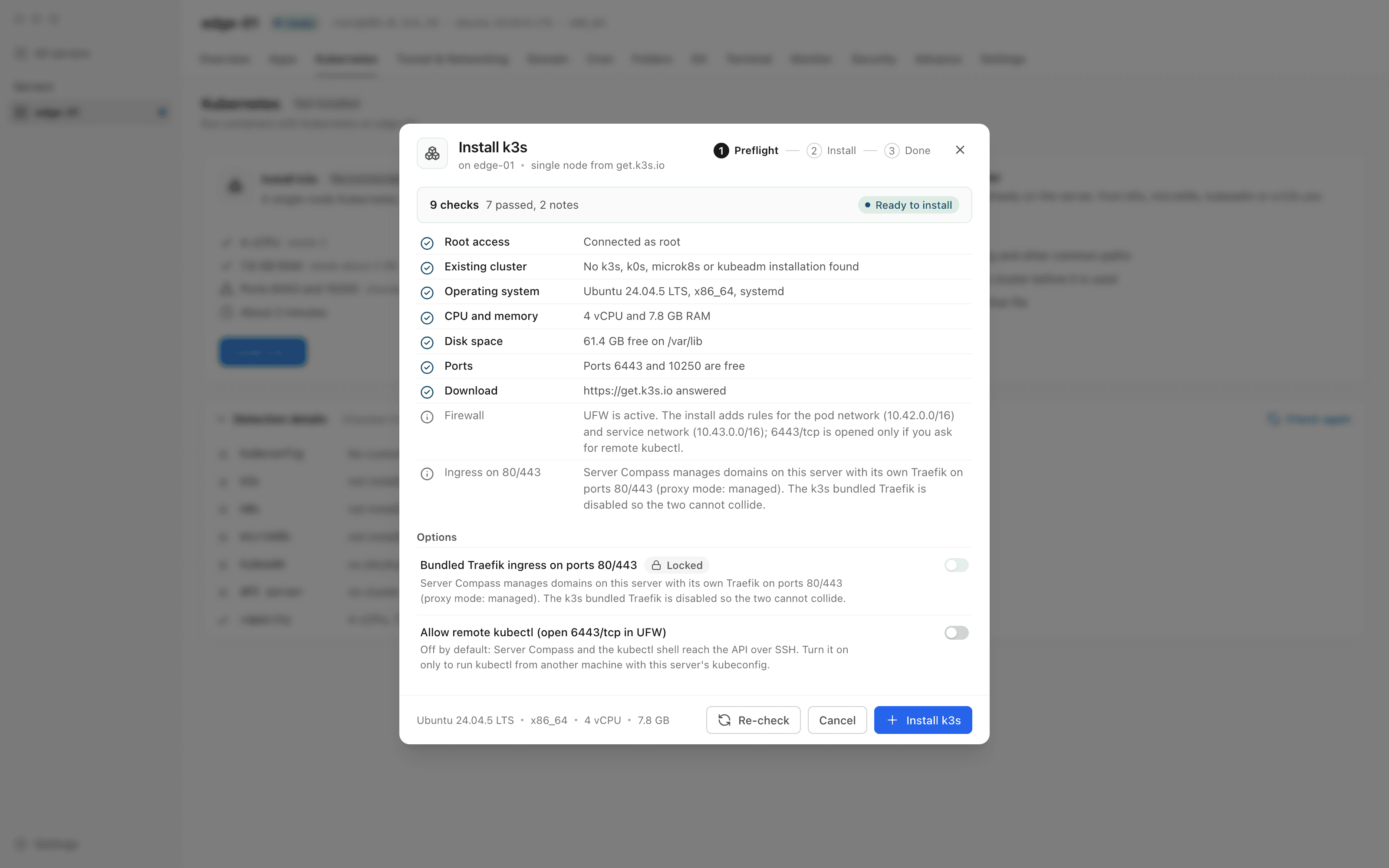
Install k3s on Your Server: Step by Step
Install k3s on Your Server is designed to be intuitive. Here's how you use it in Server Compass.
Open Kubernetes from Server Settings
The Kubernetes card says Not installed. Open Kubernetes tab, then choose Install k3s… (Recommended) or Connect an existing cluster.
Read the nine preflight checks
Root access, Existing cluster, Operating system, CPU and memory, Disk space, Ports, Download, Firewall, and Ingress on 80/443, each with what was found.
Choose the two options
Bundled Traefik ingress on ports 80/443 starts off and is Locked when your proxy owns those ports. Allow remote kubectl opens 6443/tcp in UFW only if you ask.
Install and open the cluster
Install k3s runs the get.k3s.io installer over SSH, adds UFW rules for 10.42.0.0/16 and 10.43.0.0/16, then Open the cluster takes you to the Kubernetes tab.
The Hard Way: Without Install k3s on Your Server
No Install k3s on Your Server? Get ready to memorize these terminal commands and pray you don't make a typo.
Check the server can take it
Look at memory, free space under /var/lib and whether anything already holds the Kubernetes or web ports.
free -m
df -h /var/lib
ss -ltn | grep -E ':(6443|10250|80|443) 'Install k3s without its Traefik
Your reverse proxy already owns 80 and 443, so the bundled ingress has to be disabled at install time.
curl -sfL https://get.k3s.io | INSTALL_K3S_EXEC="--disable traefik" sh -Let pods through UFW
Allow the pod and service networks, or pods start but cannot resolve cluster DNS.
ufw allow from 10.42.0.0/16 to any
ufw allow from 10.43.0.0/16 to any
Missing rules show up as timeouts inside your apps, not as a firewall error.
Point kubectl at the new cluster
k3s writes its kubeconfig to a root-only path.
export KUBECONFIG=/etc/rancher/k3s/k3s.yaml
kubectl get nodesWhy Suffer? We Built Something Better
Install k3s on Your Server automates the tedious parts. What takes 30 minutes via terminal takes 30 seconds with Server Compass.
- Point and click
- Instant validation
- Safe defaults
- Works with any provider
Install k3s on Your Server: Full Feature List
Everything you need for server management in one integrated tool, replacing complex CLI commands and manual configuration.
Get StartedInstall k3s on Your Server: Why It's Essential
Server management shouldn't require a DevOps team. Install k3s on Your Server makes professional-grade server management accessible to everyone.
At-a-Glance Monitoring
Install k3s on Your Server shows CPU, RAM, disk, and network metrics in a single dashboard view.
Quick Actions
Install k3s on Your Server provides one-click package updates, Docker setup, and system configuration.
Multi-Server Support
Install k3s on Your Server manages unlimited VPS servers from one application with saved connections.
Resource Trending
Install k3s on Your Server tracks resource usage over time so you can plan capacity and identify bottlenecks.
Questions About Install k3s on Your Server
Common questions about Install k3s on Your Server in Server Compass
How do I access Install k3s on Your Server in Server Compass?
Install k3s on Your Server is available in the Server Management section of Server Compass. Simply connect to your server, navigate to Server Management, and you'll find Install k3s on Your Server ready to use. No additional setup or plugins required.
Does Install k3s on Your Server require any server-side installation?
No. Server Compass operates as a desktop application that connects to your server via SSH. Install k3s on Your Server works through this connection without installing any agents or packages on your server (except the optional monitoring agent for resource tracking).
Is Install k3s on Your Server included in all Server Compass plans?
Yes. Every Server Compass feature, including Install k3s on Your Server, is included with the one-time $29 payment. There are no tier restrictions, add-ons, or per-server fees. You get all 155+ features for all your servers.
Can I use Install k3s on Your Server with any VPS provider?
Install k3s on Your Server works with any VPS or dedicated server that supports SSH access and Docker. This includes DigitalOcean, Hetzner, Vultr, Linode, AWS EC2, Google Cloud, Azure, and any other provider. It also works with local servers and homelab setups.
What makes Install k3s on Your Server different from command-line alternatives?
Install k3s on Your Server provides a visual, intuitive interface that replaces complex CLI commands and configuration files. You get real-time feedback, safety confirmations, and a consistent experience across all your servers without memorizing syntax or writing scripts.
More Server Management Features
Explore other server management capabilities in Server Compass
Server Overview Dashboard
At-a-glance view of CPU, RAM, and disk usage. See OS info, auth method, location, and provider details.
Resource Monitoring
Real-time CPU, memory, and disk usage graphs. Track resource trends and identify bottlenecks.
System Packages
List and manage installed APT packages, update individual ones, or run a system-wide upgrade. Install Recommended covers the baseline a server needs — including sudo and jq — and an Available Packages section installs optional software like Caddy with its repository set up for you.
Port Management
View all open ports and the services using them. Identify conflicts and manage port allocations.
Try Install k3s on Your Server Today
Download Server Compass and get access to Install k3s on Your Server along with 154 other features. One-time $29 payment. No subscriptions. No per-server fees.