Share a Server Without Sharing Its Password
Move a server's SSH credential into the encrypted Team vault so teammates connect through it instead of holding a copy. Choose whether the key can ever be displayed, and every reveal is logged.
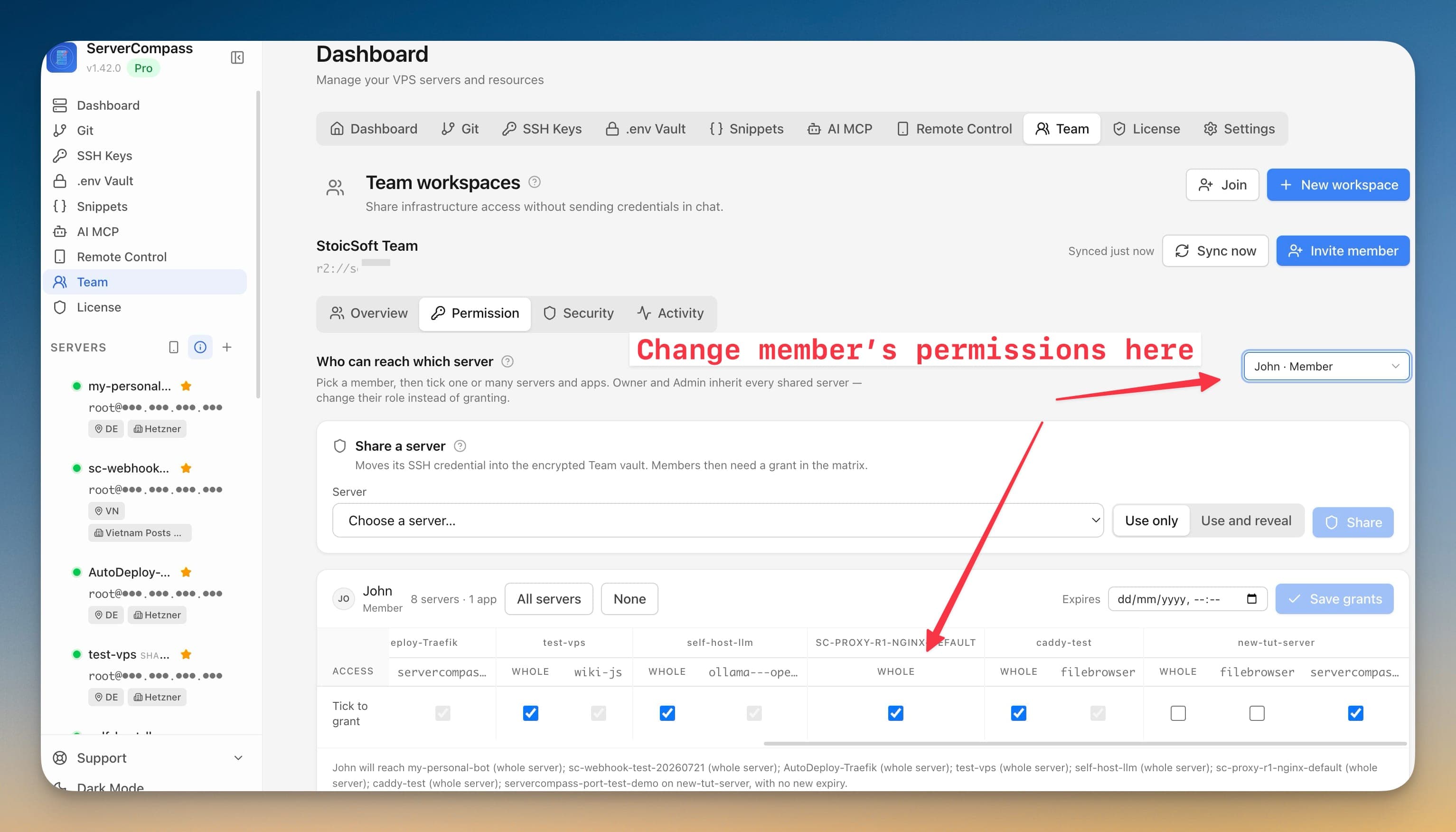
How Share a Server Without Sharing Its Password Works
No documentation needed. Share a Server Without Sharing Its Password guides you through each step visually.
Open Permission and choose Share a server
Pick the server from the Choose a server list. Sharing moves its SSH credential into the encrypted Team vault; members still need a grant in the matrix afterwards.
Pick Use only or Use and reveal
Use only is recommended: people connect, deploy and open terminals while the key is never displayed or copied in the app. Use and reveal additionally lets admins display and copy it.
Share it
The server picks up a Shared to workspace badge in its header, and is marked as shared in the sidebar and on the dashboard so nobody confuses it with a personal connection.
Watch the reveals
Every reveal is written to the Activity log with who did it, when, and from which device. Filter or search that log by person rather than scrolling it.
The Terminal Way: No Share a Server Without Sharing Its Password
Without Share a Server Without Sharing Its Password, you're back to the dark ages of server management. Here's what that looks like.
Send the credential and hope
The usual approach is to hand over the private key or the root password directly — a one-way door you cannot close.
# what most teams actually do
cat ~/.ssh/id_ed25519            # paste into chat
# or share the root password out of a vault entry
Once a secret has been read it cannot be un-read. The only real revocation is rotating it everywhere it was used.
The safer manual version: a per-person key, no secret shared
Install their public key so the private half never leaves their machine. This works, but it is per-server, per-person, and entirely manual.
ssh-copy-id -i alex_id_ed25519.pub [email protected]
sudo sed -i 's/^#\?PasswordAuthentication.*/PasswordAuthentication no/' /etc/ssh/sshd_config
sudo systemctl reload sshRevoke by editing files on every host
Taking access back means finding and removing their key line on each machine, then rotating anything they could have read.
sudo sed -i '/alex@laptop/d' /home/alex/.ssh/authorized_keys
sudo pkill -u alex
sudo deluser --remove-home alexYour Time is Worth More
Share a Server Without Sharing Its Password in Server Compass does all of this with a single click. No terminal. No memorizing commands. No 3 AM debugging sessions.
- One-click actions
- Real-time feedback
- Automatic backups
- Zero CLI knowledge required
Share a Server Without Sharing Its Password Features
Everything you need for security in one integrated tool, replacing complex CLI commands and manual configuration.
Get StartedThe Power of Share a Server Without Sharing Its Password
Server management shouldn't require a DevOps team. Share a Server Without Sharing Its Password makes professional-grade security accessible to everyone.
Proactive Protection
Share a Server Without Sharing Its Password identifies vulnerabilities before they're exploited with automated security scanning.
Visual Configuration
Share a Server Without Sharing Its Password makes firewall rules, SSH settings, and Fail2Ban configuration accessible through a GUI.
One-Click Hardening
Share a Server Without Sharing Its Password applies security best practices with a single click: disable root, change ports, enforce key auth.
Continuous Monitoring
Share a Server Without Sharing Its Password keeps watching your security posture and alerts you when new issues are detected.
Share a Server Without Sharing Its Password: Frequently Asked
Common questions about Share a Server Without Sharing Its Password in Server Compass
How do I access Share a Server Without Sharing Its Password in Server Compass?
Share a Server Without Sharing Its Password is available in the Security section of Server Compass. Simply connect to your server, navigate to Security, and you'll find Share a Server Without Sharing Its Password ready to use. No additional setup or plugins required.
Does Share a Server Without Sharing Its Password require any server-side installation?
No. Server Compass operates as a desktop application that connects to your server via SSH. Share a Server Without Sharing Its Password works through this connection without installing any agents or packages on your server (except the optional monitoring agent for resource tracking).
Is Share a Server Without Sharing Its Password included in all Server Compass plans?
Yes. Every Server Compass feature, including Share a Server Without Sharing Its Password, is included with the one-time $29 payment. There are no tier restrictions, add-ons, or per-server fees. You get all 152+ features for all your servers.
Can I use Share a Server Without Sharing Its Password with any VPS provider?
Share a Server Without Sharing Its Password works with any VPS or dedicated server that supports SSH access and Docker. This includes DigitalOcean, Hetzner, Vultr, Linode, AWS EC2, Google Cloud, Azure, and any other provider. It also works with local servers and homelab setups.
What makes Share a Server Without Sharing Its Password different from command-line alternatives?
Share a Server Without Sharing Its Password provides a visual, intuitive interface that replaces complex CLI commands and configuration files. You get real-time feedback, safety confirmations, and a consistent experience across all your servers without memorizing syntax or writing scripts.
More Security Features
Explore other security capabilities in Server Compass
Security Audit Scanner
Run comprehensive security audits on your server. Get actionable recommendations for hardening your infrastructure.
Fail2Ban Configuration
Manage Fail2Ban brute-force protection rules. Configure jail settings, ban times, and whitelist IPs visually.
UFW Firewall Management
Configure UFW firewall rules with a visual interface. Add, remove, and toggle rules without memorizing iptables.
SSH Hardening
Apply SSH security best practices with one click. Disable root login, change ports, and configure key-only auth.
Try Share a Server Without Sharing Its Password Today
Download Server Compass and get access to Share a Server Without Sharing Its Password along with 151 other features. One-time $29 payment. No subscriptions. No per-server fees.