Save the Commands You Keep Retyping
Save reusable shell commands in a searchable Snippets library instead of rebuilding them from memory. Organize commands in folders, scope them to one server or all servers, then insert, edit, copy, or run them from desktop and mobile terminals.
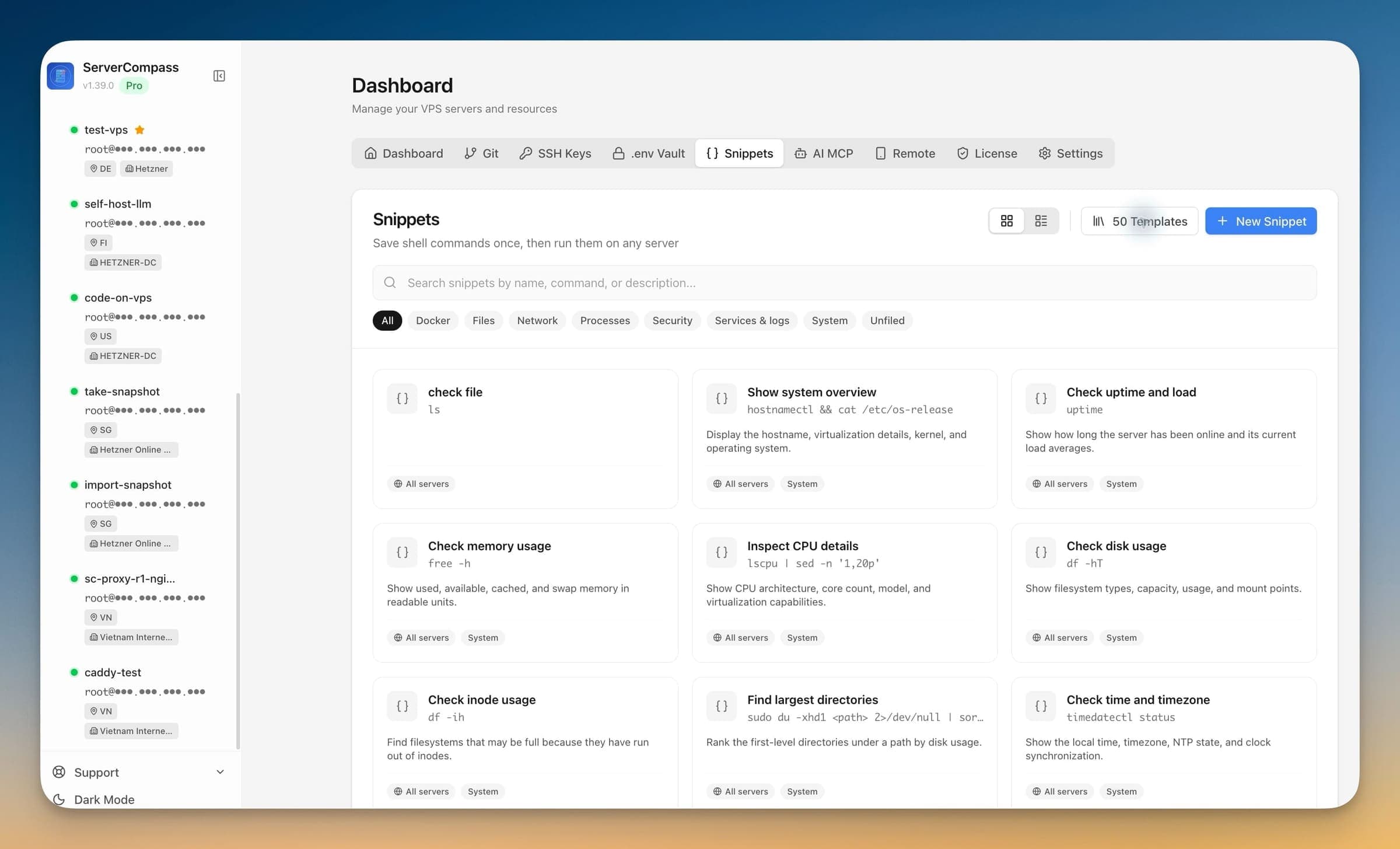
Getting Started with Save the Commands You Keep Retyping
Save the Commands You Keep Retyping is designed to be intuitive. Here's how you use it in Server Compass.
Open Terminal
Click the terminal icon or use the keyboard shortcut to open SSH terminal.
Connect to Server
Server Compass establishes a secure SSH connection automatically.
Use Save the Commands You Keep Retyping
Take advantage of Save the Commands You Keep Retyping to streamline your terminal workflow.
Before Save the Commands You Keep Retyping Existed
This is what you'd have to do manually without Save the Commands You Keep Retyping. We don't recommend it.
Open your terminal app
Launch Terminal, iTerm, or your preferred app.
# On Mac: Cmd+Space, type "Terminal"
# On Windows: Win+R, type "cmd" or use PuTTY
# On Linux: Ctrl+Alt+TSSH into server
Connect with your credentials.
ssh -i ~/.ssh/id_rsa root@your-server-ip
# Enter passphrase if prompted
# Hope you remember which key goes to which server
Managing keys for 10+ servers? Good luck.
Navigate to your app
Find where your app lives.
cd /opt/apps/myapp
# Or was it /var/www/myapp?
# Or /home/user/apps/myapp?
# Every server is different!Run your commands
Execute whatever you need to do.
# No autocomplete
# No command history across sessions
# No syntax highlighting
docker compose logs -f
# Oops, typo: docker compse logs -f
# "compse: command not found"Or... Just Use Server Compass
Save the Commands You Keep Retyping automates the tedious parts. What takes 30 minutes via terminal takes 30 seconds with Server Compass.
- Point and click
- Instant validation
- Safe defaults
- Works with any provider
What Save the Commands You Keep Retyping Can Do
Everything you need for ssh terminal in one integrated tool, replacing complex CLI commands and manual configuration.
Get StartedSave the Commands You Keep Retyping: Why It's Essential
Server management shouldn't require a DevOps team. Save the Commands You Keep Retyping makes professional-grade ssh terminal accessible to everyone.
No External Tools
Save the Commands You Keep Retyping runs directly in Server Compass, so you never need to install or configure PuTTY, iTerm, or other SSH clients.
Smart Assistance
Save the Commands You Keep Retyping suggests commands and corrects typos, speeding up your terminal workflow significantly.
Secure Connection
Save the Commands You Keep Retyping uses your existing SSH credentials with encrypted connections for every session.
Session Persistence
Save the Commands You Keep Retyping maintains terminal sessions even while you navigate other parts of the application.
Questions About Save the Commands You Keep Retyping
Common questions about Save the Commands You Keep Retyping in Server Compass
How do I access Save the Commands You Keep Retyping in Server Compass?
Save the Commands You Keep Retyping is available in the SSH Terminal section of Server Compass. Simply connect to your server, navigate to SSH Terminal, and you'll find Save the Commands You Keep Retyping ready to use. No additional setup or plugins required.
Does Save the Commands You Keep Retyping require any server-side installation?
No. Server Compass operates as a desktop application that connects to your server via SSH. Save the Commands You Keep Retyping works through this connection without installing any agents or packages on your server (except the optional monitoring agent for resource tracking).
Is Save the Commands You Keep Retyping included in all Server Compass plans?
Yes. Every Server Compass feature, including Save the Commands You Keep Retyping, is included with the one-time $29 payment. There are no tier restrictions, add-ons, or per-server fees. You get all 155+ features for all your servers.
Can I use Save the Commands You Keep Retyping with any VPS provider?
Save the Commands You Keep Retyping works with any VPS or dedicated server that supports SSH access and Docker. This includes DigitalOcean, Hetzner, Vultr, Linode, AWS EC2, Google Cloud, Azure, and any other provider. It also works with local servers and homelab setups.
What makes Save the Commands You Keep Retyping different from command-line alternatives?
Save the Commands You Keep Retyping provides a visual, intuitive interface that replaces complex CLI commands and configuration files. You get real-time feedback, safety confirmations, and a consistent experience across all your servers without memorizing syntax or writing scripts.
More SSH Terminal Features
Explore other ssh terminal capabilities in Server Compass
Interactive SSH Terminal
Full xterm-based SSH terminal right in the app. Execute commands, view output, and manage your server without external tools.
Multi-Tab Terminal
Open multiple terminal sessions per server with tab management. Run commands in parallel without switching windows.
Command Suggestions
Auto-suggestions for common commands like ls, git, docker, npm, and more. Speed up your terminal workflow.
Command Auto-Correction
Automatically correct common typos like "sl" to "ls" or "docer" to "docker". Save time on frequent mistakes.
Try Save the Commands You Keep Retyping Today
Download Server Compass and get access to Save the Commands You Keep Retyping along with 154 other features. One-time $29 payment. No subscriptions. No per-server fees.