SSH Hardening & Fail2Ban
Strengthen server security with SSH hardening and brute-force protection via Fail2Ban.
SSH hardening
Server Compass can apply recommended SSH security settings:
- Go to Security tab
- Open SSH Hardening
- Apply recommended settings:
- Disable root login
- Disable password authentication (key-only)
- Change default SSH port
- Set idle timeout
- Server Compass updates
sshd_configand restarts the SSH service safely
Fail2Ban setup
Fail2Ban protects against brute-force attacks:
- Open the Security tab
- Click Enable Fail2Ban
- Server Compass installs and configures Fail2Ban automatically
- Configure ban rules:
- Max retries before ban
- Ban duration
- Monitored services (SSH, HTTP, etc.)
- View banned IPs and unban manually if needed
Firewall rules
Combine SSH hardening with firewall rules:
- Go to Security > Firewall
- Allow only necessary ports (SSH, HTTP, HTTPS)
- Block all other incoming traffic
- Server Compass manages
ufworiptablesrules for you
Undoing an SSH change
SSH configuration is the one file where a mistake can remove your ability to fix the mistake. Server Compass takes a timestamped backup before applying any SSH settings change.
- On the SSH Hardening card, keep Create a timestamped backup before applying enabled
- The five newest Server Compass backups are listed, and the backup path can be copied
- Choose Restore previous configuration to put an earlier configuration back
If a restore would reopen a port your firewall still blocks, it is refused unless you explicitly allow it — so you cannot roll back into a server you can no longer reach.
Disabling root login safely
Disable root login stays locked until Server Compass has verified a working sudo account with an authorized key. Until then the control reads Requires passwordless sudo and an authorized SSH key.
Set that fallback up first — see Run Your Server as a Sudo User — then disable root login.
Choosing which services are protected
Brute-force protection is no longer SSH-only. Under Protected services you can choose SSH, nginx, Apache, Postfix and repeat offenders.
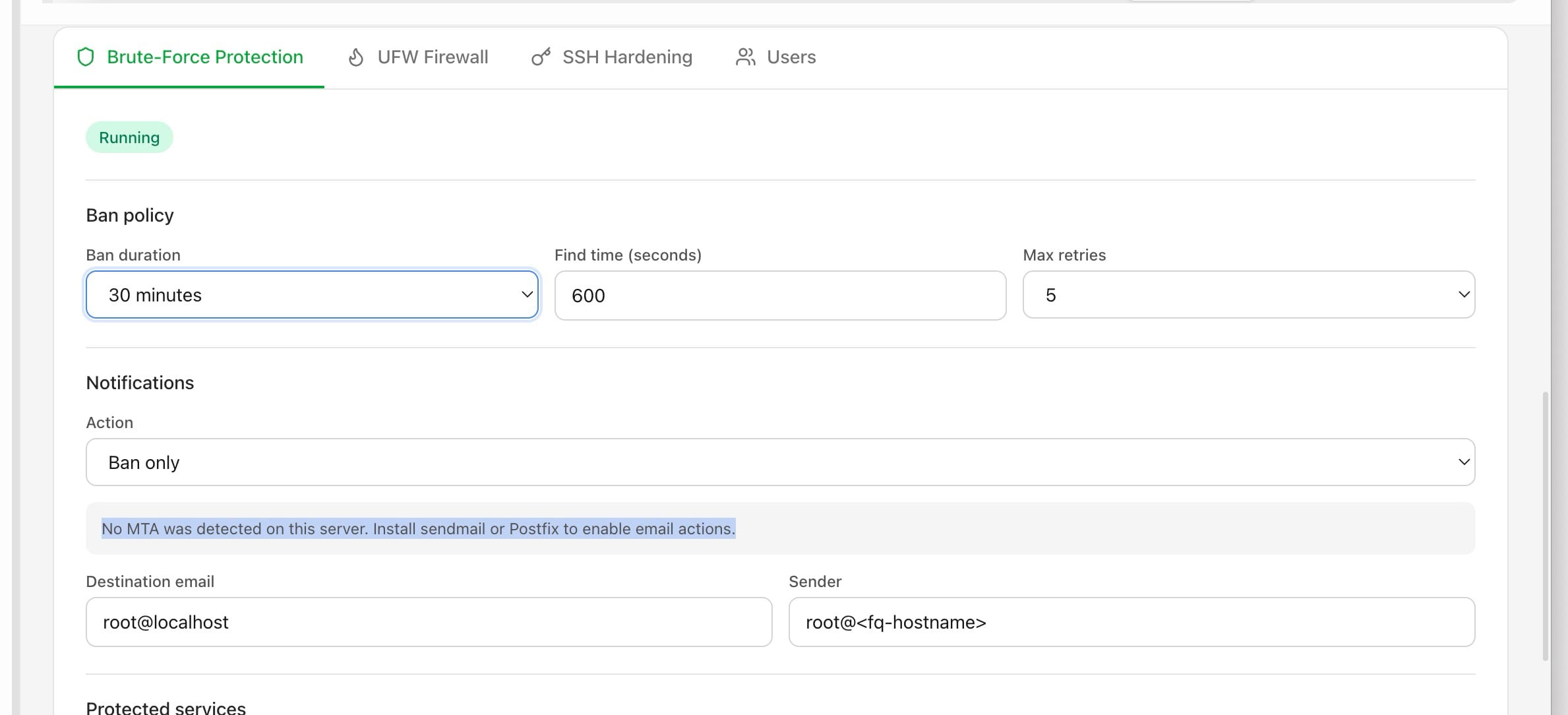
Set the Ban policy — ban duration, find time in seconds, and max retries — and optionally have it email you when it bans an address, if the server already has an MTA. A jail file you wrote by hand is left alone.
Screenshots


Related Features
Ready to try Server Compass?
Download the app and deploy your first application in under 5 minutes.
Download Server Compass