Tätä sivua ei ole vielä käännetty. Näytetään englanninkielinen versio.
Takaisin dokumentaatioonAloitus
Dashboard Tour
A fast tour of Server Compass: the Dashboard, the sidebar tools that span every server, and the 12 tabs inside a single server.
Beginner6 min readUpdated 2026-09-23
The Dashboard
The Dashboard ("Manage your VPS servers and resources") lists every server you have added, with its status at a glance — and it is where you add the next one.
- Use Add Server (it reads Add Your First Server when the list is empty) to connect a VPS
- Toggle Hide IPs / Show IPs to keep addresses off screen
- Each server card shows Username, Port, Auth (SSH Key or Password), and Last check-in:
The sidebar — tools that span every server
The left sidebar holds tools that work across all of your servers:
- Dashboard — every server you have added, with its status at a glance
- Git ("Git Resources") — connect a GitHub, GitLab, or Bitbucket account once, then link it to as many servers as you like
- SSH Keys — generate and store SSH keypairs; private keys are encrypted on this machine. See SSH Key Management
- .env Vault — encrypted collections of environment variables you can reuse across apps and servers. See .env Vault
- Snippets — shell commands you keep re-typing, saved and runnable against any server. See Snippet Library
- AI MCP — expose your servers to an AI assistant over MCP, with scoped tokens. See AI Access (MCP)
- Remote Control — pair a phone or tablet to drive the app from your pocket. See Remote Control
- License and Settings — activate your license and configure Display, Shortcuts, Backups, Privacy, and Updates. See License
Inside one server — 12 tabs
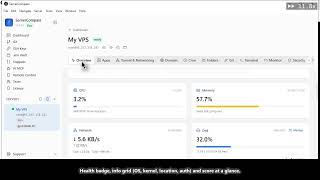
Open a server and you get 12 tabs for that host:
- Overview — live CPU, memory, and disk, plus what is running right now
- Apps — install, redeploy, restart, read logs, and roll back
- Domain — point domains at your apps and issue SSL certificates
- Tunnel & Networking — publish an app through a Cloudflare tunnel with no open port. See Tunnel & Networking
- Monitor — alert rules on CPU, memory, and disk to Slack, Discord, email, or a webhook
- Security — firewall, Fail2Ban, SSH hardening, Linux users, and automatic updates, with an audit that scores them
- Cron — scheduled jobs, written without hand-editing a crontab
- Git — repositories deployed to this server and the branch each one tracks. See Git Accounts for a Server
- Folders — a file browser over SSH: upload, download, edit, and fix permissions
- Terminal — a real shell on the server
- Advance — command logs, sessions, packages, ports, hosts file, and SSH config. See The Advance Tab
- Settings — connection details, backups, migration from another panel, and removing the server
Video Tutorials
Ready to try Server Compass?
Download the app and deploy your first application in under 5 minutes.
Download Server Compass