자동 배포
서버에서 상시 실행되는 webhook worker를 통해, 추적 중인 GitHub 브랜치로의 모든 푸시를 배포합니다.
자동 배포의 작동 방식
자동 배포는 앱이 추적하는 브랜치에 대해 GitHub가 push 이벤트를 보낼 때마다 해당 GitHub 앱을 다시 배포합니다. Server Compass는 서버에 상시 실행 게이트웨이와 비공개 배포 worker를 설치하고, 저장소 webhook을 생성하며, GitHub의 서명된 테스트 전달을 검증하고, 정확한 commit을 배포 대기열에 넣습니다.
설정이 끝난 후 Server Compass 데스크톱 앱을 계속 열어 둘 필요는 없습니다. 서버 측 런타임은 Docker와 함께 다시 시작되며, webhook 수신, 앱 빌드, 배포 기록을 계속합니다. SSH 포트는 비공개로 유지해도 됩니다. GitHub가 HTTPS로 도달할 수 있어야 하는 것은 webhook 호스트명뿐입니다.
요구 사항
시작하기 전에 다음을 갖추었는지 확인하세요:
- GitHub 저장소에서 이미 배포된 Docker 앱
- 빌드 위치로 Build on VPS 선택 (GitHub Actions 빌드는 webhook 자동 배포 v1에서 지원되지 않습니다)
- 앱의 Server Compass 디렉터리 안에 있는 관리형 Git 체크아웃
- 저장소 webhook을 생성할 권한이 있는 연결된 GitHub 계정
- 서버의 Docker Engine 및 Docker Compose
deploy.example.com과 같은 전용 공개 HTTPS 호스트명- 해당 호스트명에서 webhook 게이트웨이로의 경로
자동 배포는 배포된 앱에 저장된 브랜치를 따릅니다. 그 정확한 브랜치로의 각 push는 GitHub 이벤트에 포함된 commit을 대기열에 넣습니다. 다른 브랜치로의 push는 무시됩니다.
앱 설정
- Server Compass에서 저장소를 GitHub 앱으로 배포합니다.
- 배포 중에 Build on VPS를 선택합니다.
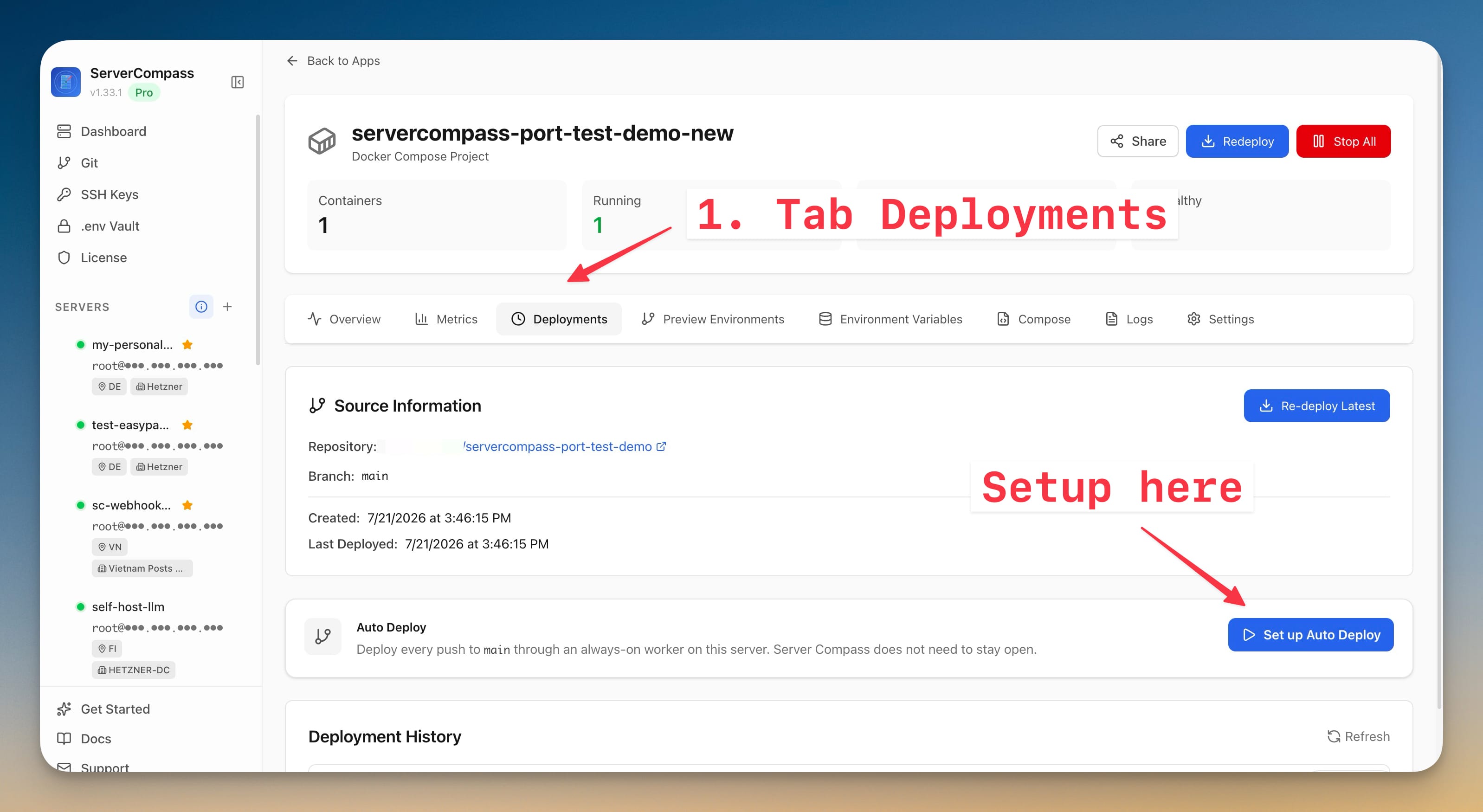
- 배포된 앱을 열고 Deployments로 이동합니다.
- 자동 배포 카드를 찾아 Set up Auto Deploy를 클릭합니다.
- 공개 webhook 호스트명을 입력합니다. 호스트명 또는 HTTPS origin만 사용하세요(예:
deploy.example.com또는https://deploy.example.com). 경로, 쿼리 문자열, 사용자 지정 포트는 추가하지 마세요.
이 호스트명은 GitHub의 공개 입구입니다. 도메인만으로는 충분하지 않습니다. DNS, TLS, 방화벽 또는 NAT 규칙, 그리고 프록시 또는 터널이 서버의 게이트웨이까지 완전한 경로를 형성해야 합니다.
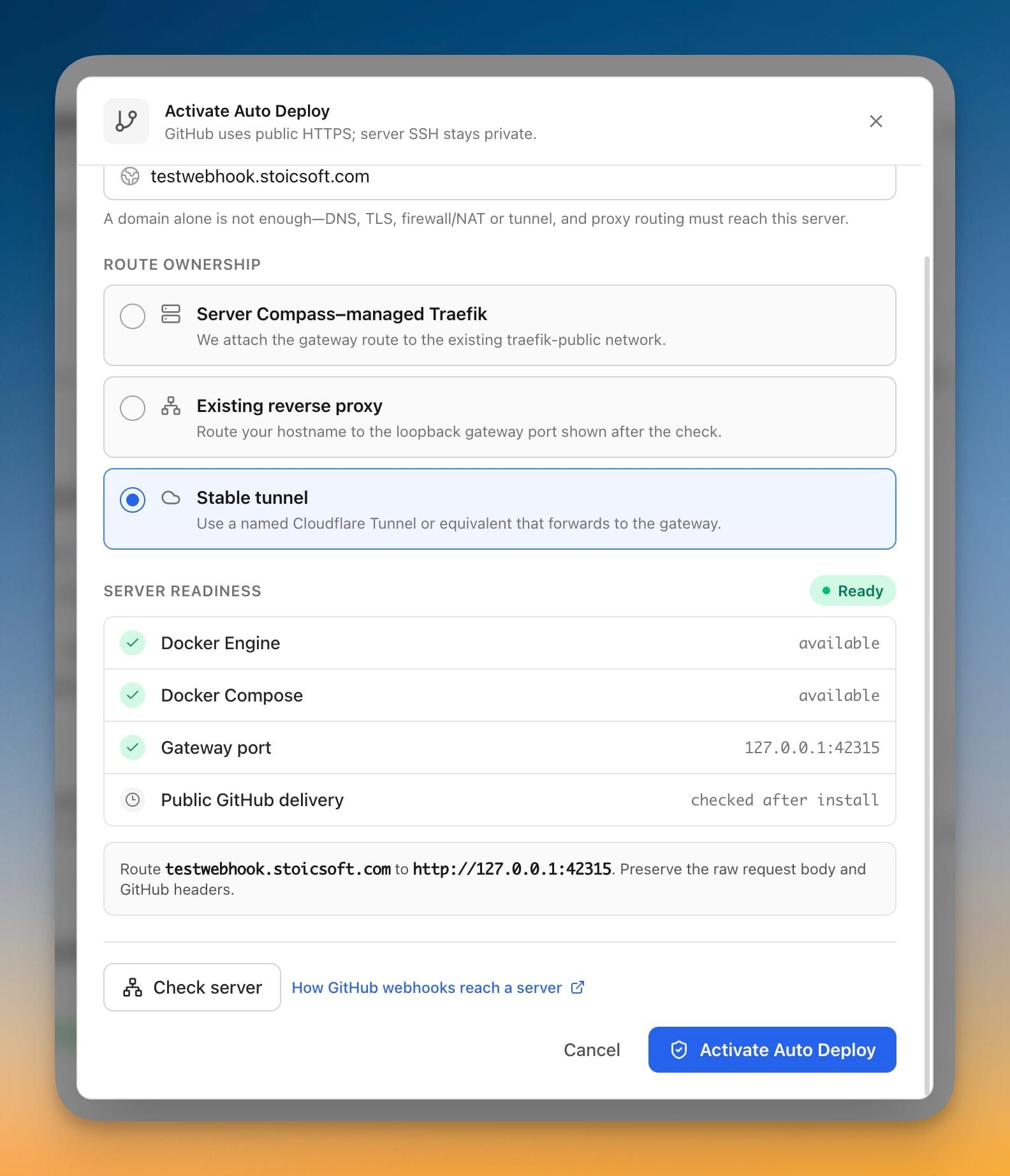
GitHub가 서버에 도달하는 방식 선택
세 가지 경로 옵션은 모두 동일한 서명된 webhook과 비공개 배포 worker를 사용합니다. 다른 것은 공개 경로뿐입니다.
Server Compass 관리 Traefik
Server Compass 관리 Traefik이 이미 서버의 공개 리버스 프록시인 경우 사용합니다. 호스트명의 DNS 레코드를 서버로 향하게 하고, 인바운드 포트 80과 443이 도달할 수 있도록 합니다. Server Compass는 webhook 게이트웨이를 기존 traefik-public Docker 네트워크에 연결하고 HTTPS 호스트 경로를 구성합니다.
공개 VPS의 경우 보통 가장 간단한 옵션입니다. 라우터가 포트 80과 443을 해당 서버로 전달하고 호스트명이 라우터의 공개 IP로 확인되는 경우 LAN 서버에서도 작동할 수 있습니다.
기존 리버스 프록시
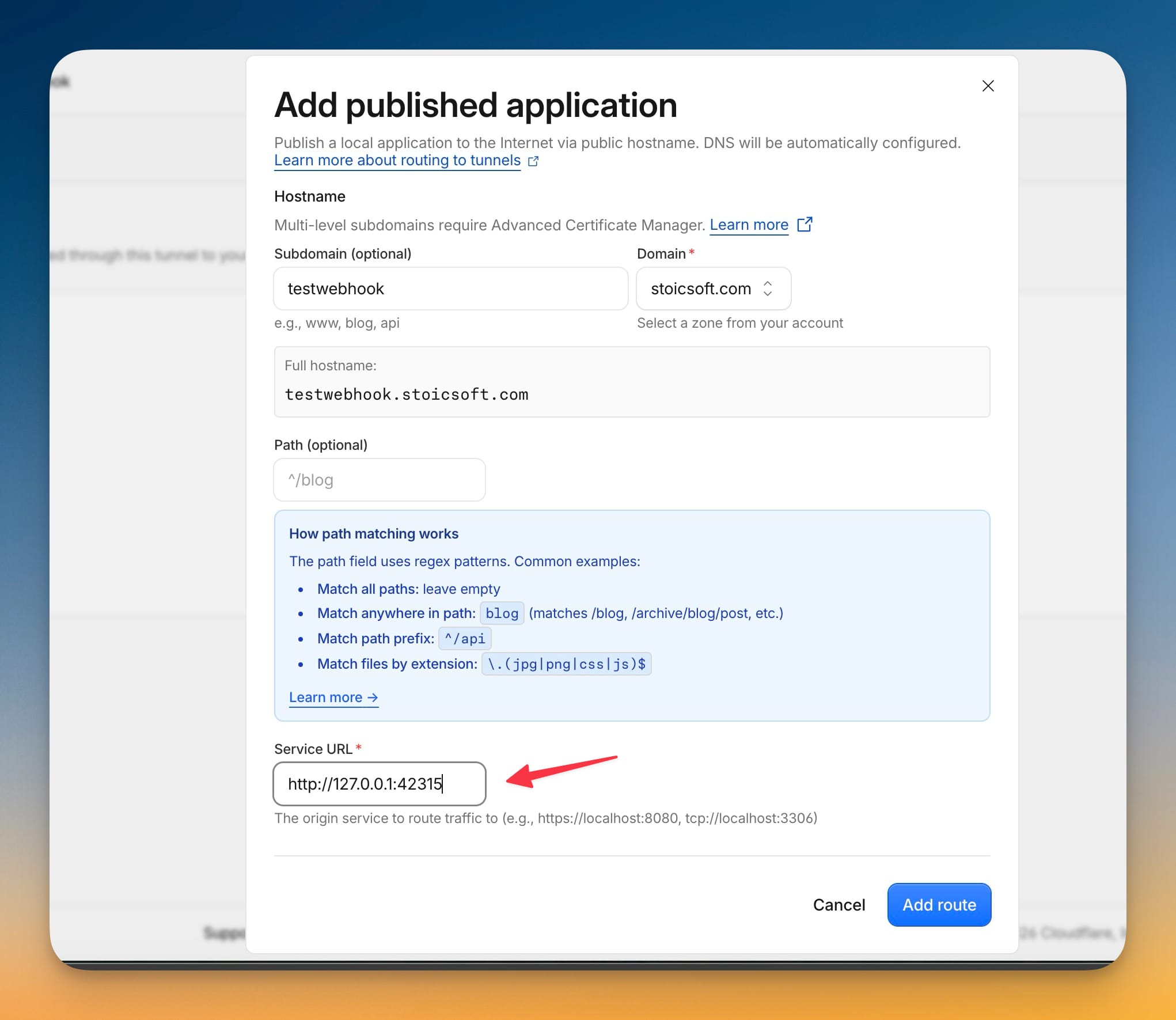
Nginx, Caddy, Traefik, HAProxy 또는 다른 프록시가 이미 호스트명을 처리하는 경우 사용합니다. Check server를 클릭하여 생성된 루프백 대상을 얻은 다음, webhook 호스트명을 표시된 주소(예: http://127.0.0.1:42315)로 라우팅합니다.
게이트웨이가 HMAC 서명을 검증할 수 있도록 프록시는 원본 요청 본문과 GitHub webhook 헤더를 보존해야 합니다. 이 경로 앞에 로그인 미들웨어, Cloudflare Access 또는 다른 대화형 인증 페이지를 두지 마세요.
프록시가 Docker에서 실행되는 경우, 프록시 컨테이너 내부의 127.0.0.1은 그 컨테이너 자신을 가리킨다는 점을 기억하세요. 대신 호스트 네트워킹, host-gateway 주소 또는 적절한 공유 Docker 네트워크를 사용하세요.
안정적인 터널
LAN 서버, 비공개 VPS, CGNAT 연결 또는 인바운드 포트를 열고 싶지 않은 서버에는 이 옵션을 사용합니다. 지속적인 이름이 지정된 Cloudflare Tunnel 또는 이에 준하는 터널을 만들고, 그 커넥터를 서버에서 실행하며, 공개 호스트명을 Check server가 표시하는 루프백 대상(예: http://127.0.0.1:42315)에 매핑합니다.
터널은 안정적이어야 하며 재부팅 후 자동으로 시작되어야 합니다. GitHub는 webhook URL을 저장하므로, 임시 Quick Tunnel이나 재시작 시 바뀌는 ngrok URL은 적합하지 않습니다. 커넥터가 Docker에서 실행되는 경우, 호스트의 게이트웨이에 실제로 도달할 수 있는 호스트 네트워킹이나 다른 경로를 제공하세요.
서버 확인 및 활성화
- Check server를 클릭합니다.
- Docker Engine, Docker Compose, 제안된 게이트웨이 포트가 준비 상태 확인을 통과하는지 확인합니다.
- 관리형 Traefik을 선택했다면
traefik-public네트워크도 통과하는지 확인합니다. - 기존 프록시 또는 안정적인 터널을 선택했다면, 결과에 표시된 정확한 루프백 포트로 외부 경로를 완성합니다.
- Activate Auto Deploy를 클릭합니다.
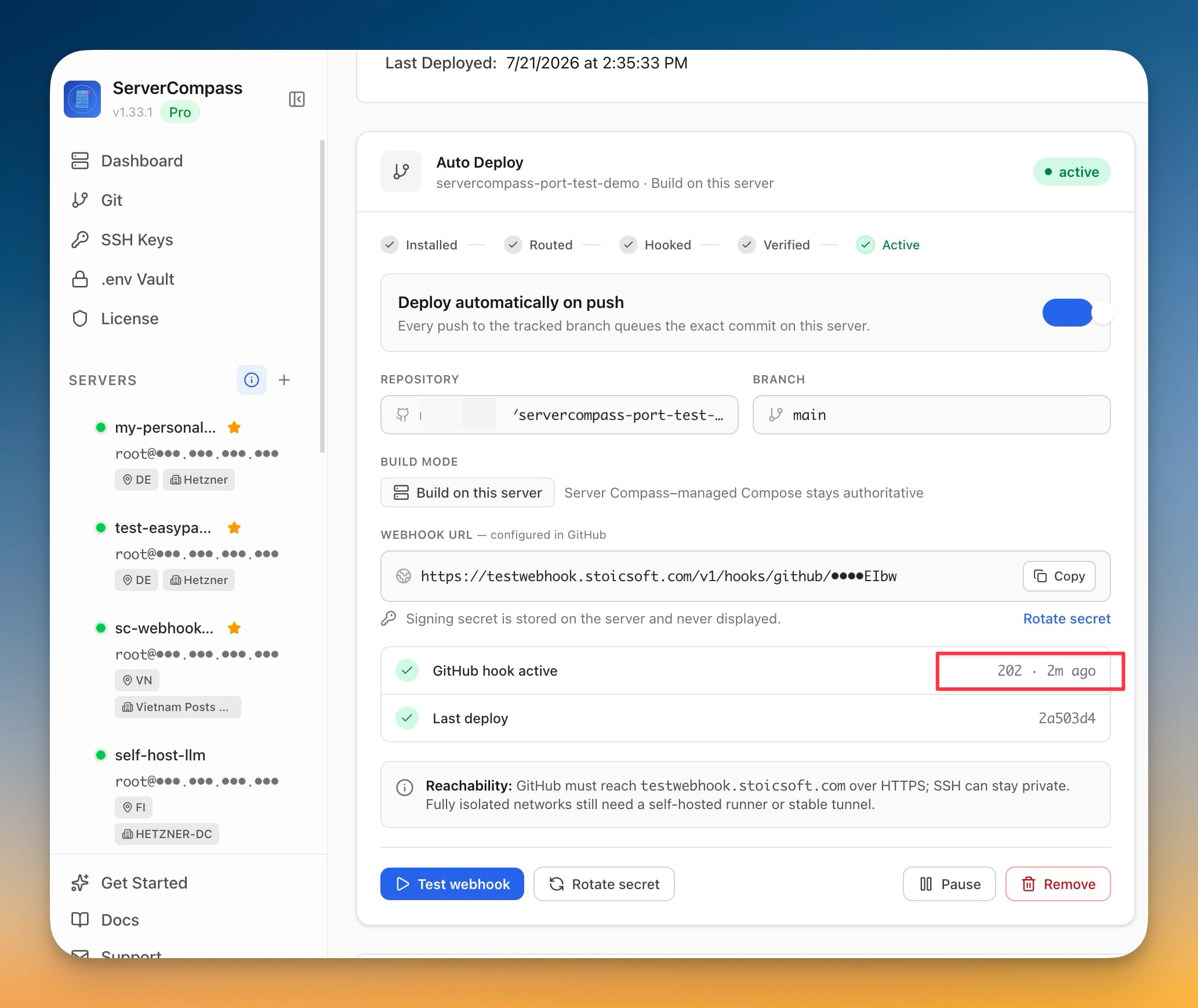
Server Compass는 게이트웨이와 worker를 설치하고, 비공개 webhook URL을 생성하며, 서명 시크릿을 서버에 저장하고, GitHub에 webhook을 생성하며, GitHub ping을 보내고, 성공적인 서명된 전달을 기다립니다. 상태는 Installed, Routed, Hooked, Verified, Active 순으로 진행됩니다.
설정이 Awaiting route에서 멈추면 런타임은 이미 설치되었지만 GitHub가 아직 도달하지 못한 것입니다. DNS, TLS, 방화벽/NAT, 프록시 또는 터널 경로를 완성하거나 수정한 다음 Continue setup을 클릭하세요. 앱을 다시 설치할 필요는 없습니다.
자동 배포 검증
먼저 공개 상태 확인 엔드포인트가 Server Compass 게이트웨이에 도달하는지 확인합니다:
curl -fsS https://deploy.example.com/healthz
그런 다음 전체 배포 흐름을 검증합니다:
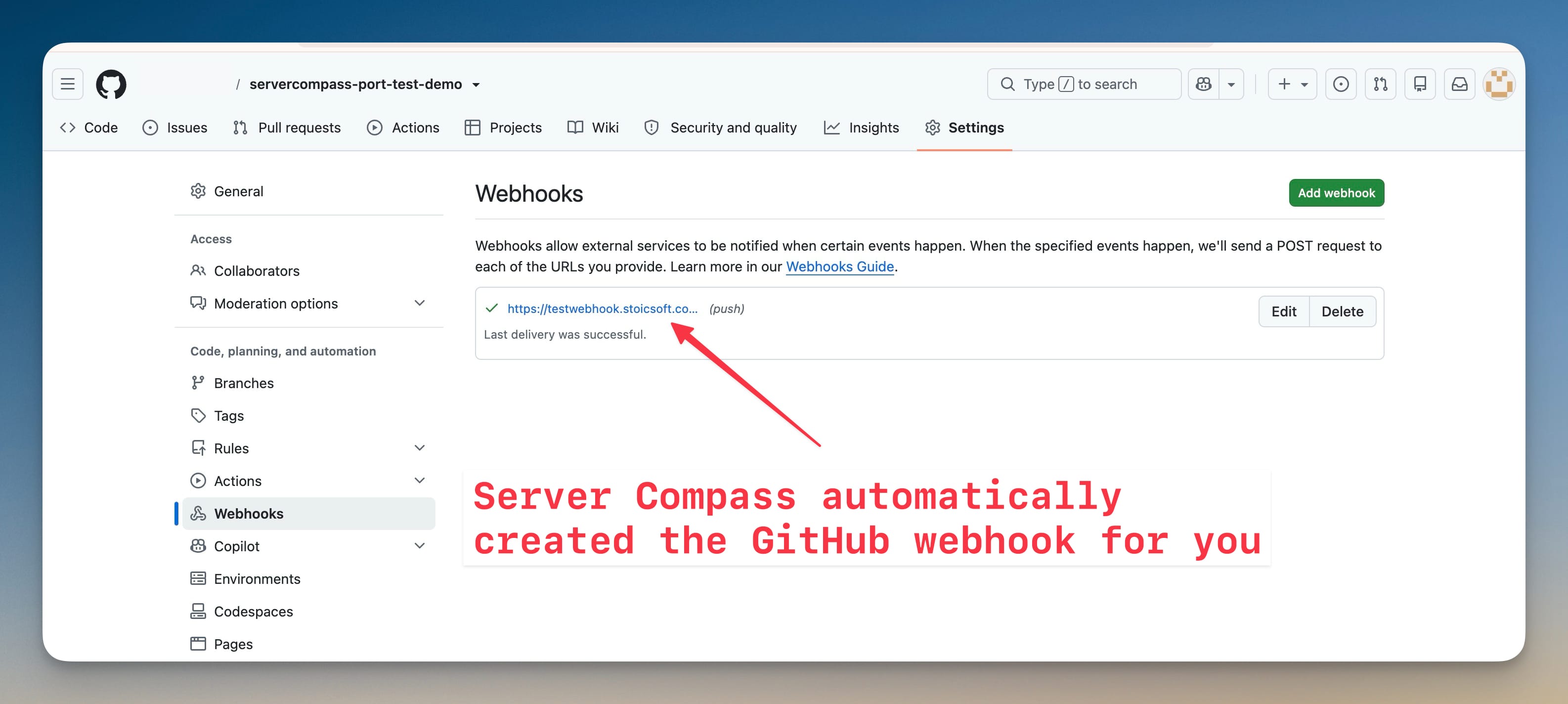
- GitHub에서 저장소를 열고 Settings > Webhooks로 이동합니다.
- Server Compass가 생성한 webhook을 열고 최근 전달이
2xx응답을 반환했는지 확인합니다. - 추적 중인 브랜치에 작은 commit을 push합니다.
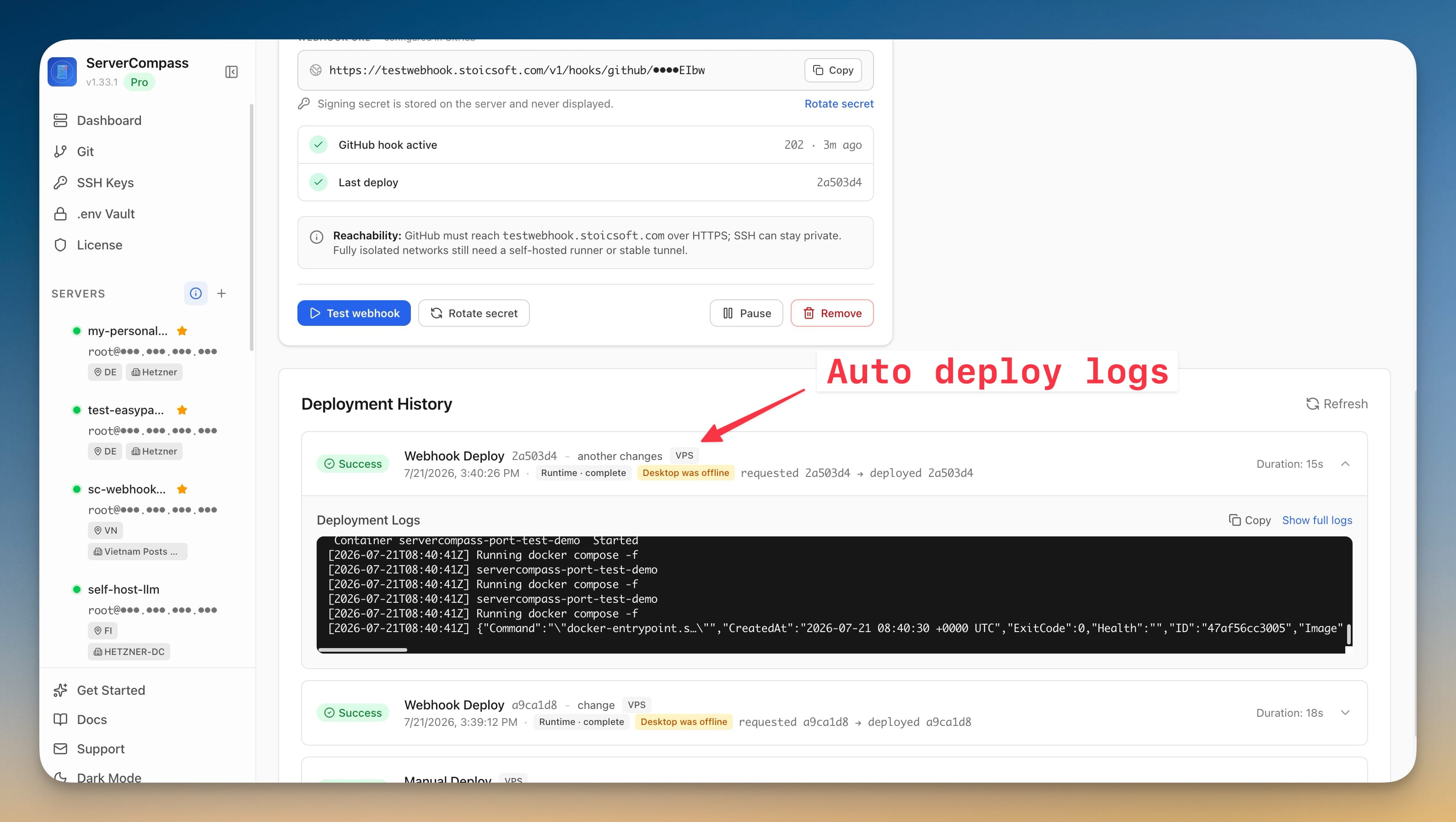
- Server Compass에서 앱의 배포 기록을 열고 webhook 작업이 push된 commit을 사용했는지 확인합니다.
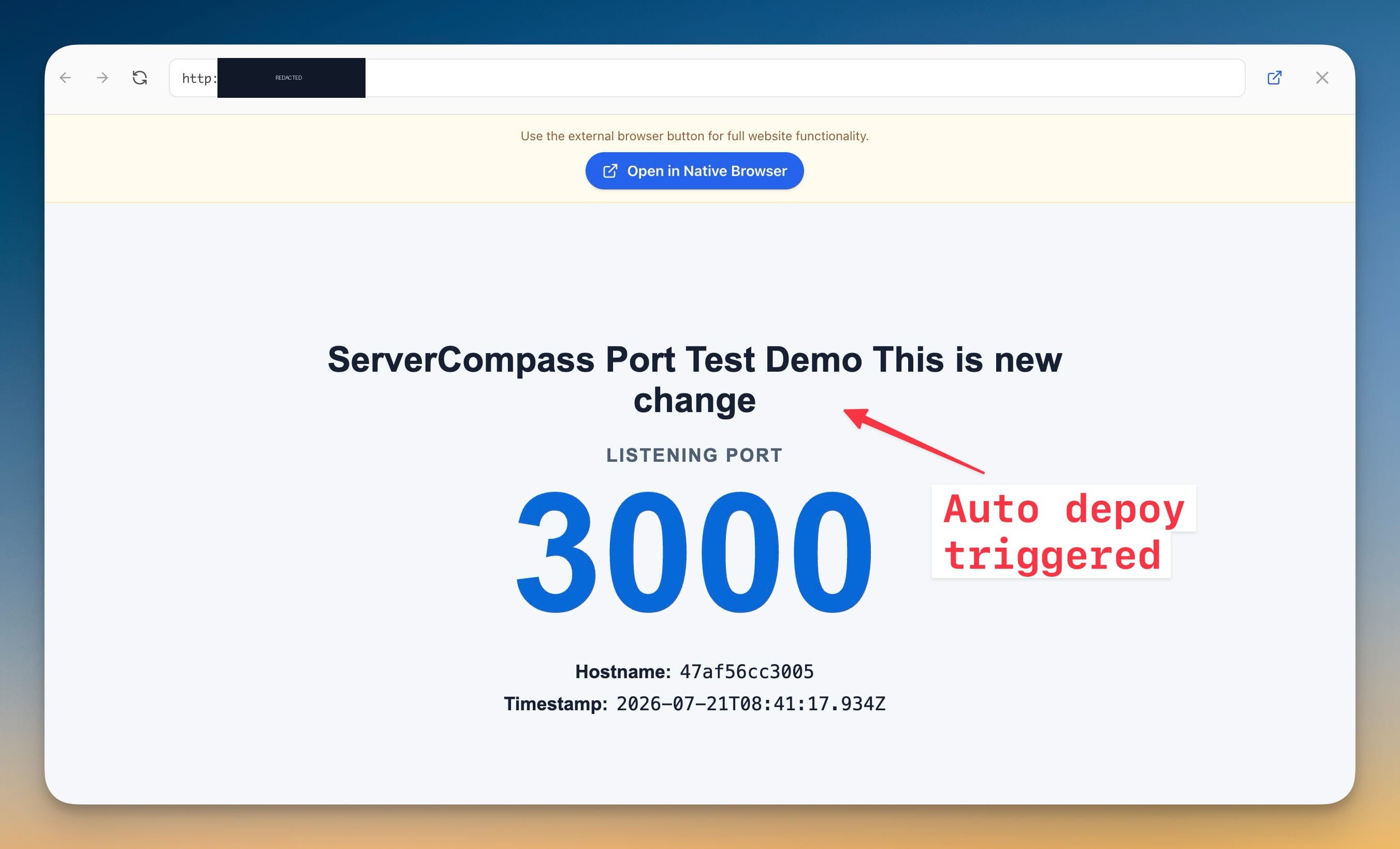
- 배포된 애플리케이션에 그 변경 사항이 포함되어 있는지 확인합니다.
마지막 테스트로, Server Compass를 완전히 종료하고 추적 중인 브랜치에 commit을 하나 더 push한 다음 애플리케이션을 다시 검증합니다. 게이트웨이, 대기열, worker가 서버에서 실행되므로 배포는 여전히 완료되어야 합니다.
활성 webhook 관리
자동 배포 카드는 다음 작업을 제공합니다:
- Test webhook은 GitHub 테스트 전달을 다시 보내고 그 상태를 새로 고칩니다.
- Rotate secret은 서버와 GitHub webhook 양쪽의 서명 시크릿을 교체합니다.
- Pause는 대상과 기록은 유지하되 자동 배포를 중단합니다. Resume은 이를 다시 활성화합니다.
- Remove는 GitHub webhook과 그 원격 대상 정책을 삭제하지만 배포 기록은 유지합니다.
추적하는 저장소나 브랜치를 변경하려면, 먼저 자동 배포를 제거하고, 새 저장소나 브랜치로 앱을 업데이트하여 다시 배포한 다음, 자동 배포를 다시 설정합니다.
문제 해결 및 보안
- 상태 확인 엔드포인트가 실패하거나 502/404를 반환함: DNS와 TLS를 확인하고, 프록시 또는 터널이 현재 루프백 포트를 가리키는지 확인하며, 게이트웨이 컨테이너가 실행 중인지 확인하세요.
- GitHub 전달이
2xx가 아님: 해당 webhook의 최근 전달을 살펴보고, 인증 계층이 GitHub를 차단하지 않는지 확인하며, 프록시가 원본 본문을 변경하거나 GitHub 헤더를 제거하지 않았는지 확인하세요. - push해도 배포되지 않음: 자동 배포가 Paused가 아니라 Active 상태인지, 그리고 push가 정확한 추적 브랜치에 대해 이루어졌는지 확인하세요.
- 재부팅 전까지 터널이 작동함: 이름이 지정된 터널 커넥터를 시스템 서비스 또는 다시 시작 가능한 컨테이너로 구성하세요. 임시 URL을 사용하지 마세요.
- 데스크톱이 닫혀 있으면 배포가 실패함: 서버가 온라인 상태인지, 그리고 Server Compass 게이트웨이와 worker 컨테이너가 실행 중인지 확인하세요.
webhook URL에는 비공개 경로 토큰이 포함되어 있으므로 공개해서는 안 됩니다. GitHub 전달은 서버에서 생성·저장되며 UI에 절대 표시되지 않는 HMAC 서명 시크릿으로 인증됩니다. SSH, Docker 소켓 또는 비공개 worker를 인터넷에 노출할 필요가 없습니다.
Screenshots
Ready to try Server Compass?
Download the app and deploy your first application in under 5 minutes.
Download Server Compass