Auto Deploy
Deploy ทุก push ไปยัง branch GitHub ที่คุณติดตาม ผ่าน webhook worker ที่ทำงานตลอดเวลาบนเซิร์ฟเวอร์ของคุณ
Auto Deploy ทำงานอย่างไร
Auto Deploy จะ redeploy แอป GitHub ทุกครั้งที่ GitHub ส่ง push event สำหรับ branch ที่แอปติดตาม Server Compass จะติดตั้ง gateway ที่ทำงานตลอดเวลาและ deployment worker แบบส่วนตัวบนเซิร์ฟเวอร์ของคุณ สร้าง webhook ของ repository ตรวจสอบ signed test delivery ของ GitHub และนำ commit ที่แน่นอนนั้นเข้าคิวเพื่อ deploy
หลังจากตั้งค่าแล้ว แอปเดสก์ท็อป Server Compass ไม่ จำเป็นต้องเปิดค้างไว้ Runtime ฝั่งเซิร์ฟเวอร์จะเริ่มต้นใหม่พร้อมกับ Docker และยังคงรับ webhook, build แอป และบันทึกประวัติการ deploy ต่อไป พอร์ต SSH ของคุณสามารถเป็นแบบส่วนตัวได้ มีเพียง hostname ของ webhook เท่านั้นที่ต้องเข้าถึงได้จาก GitHub ผ่าน HTTPS
ข้อกำหนด
ก่อนเริ่มต้น โปรดยืนยันว่าคุณมี:
- แอป Docker ที่ถูก deploy จาก repository ของ GitHub แล้ว
- เลือก Build on VPS เป็นตำแหน่ง build; การ build ด้วย GitHub Actions ไม่รองรับใน webhook Auto Deploy v1
- Git checkout ที่ถูกจัดการภายในไดเรกทอรี Server Compass ของแอป
- บัญชี GitHub ที่เชื่อมโยงและมีสิทธิ์สร้าง webhook ของ repository
- Docker Engine และ Docker Compose บนเซิร์ฟเวอร์
- hostname HTTPS สาธารณะเฉพาะ เช่น
deploy.example.com - route จาก hostname นั้นไปยัง webhook gateway
Auto Deploy จะตามด้วย branch ที่บันทึกไว้บนแอปที่ deploy แล้ว การ push แต่ละครั้งไปยัง branch ที่แน่นอนนั้นจะนำ commit ที่รวมอยู่ใน event ของ GitHub เข้าคิว; การ push ไปยัง branch อื่นจะถูกละเว้น
ตั้งค่าแอป
- ใน Server Compass ให้ deploy repository เป็นแอป GitHub
- เลือก Build on VPS ระหว่างการ deploy
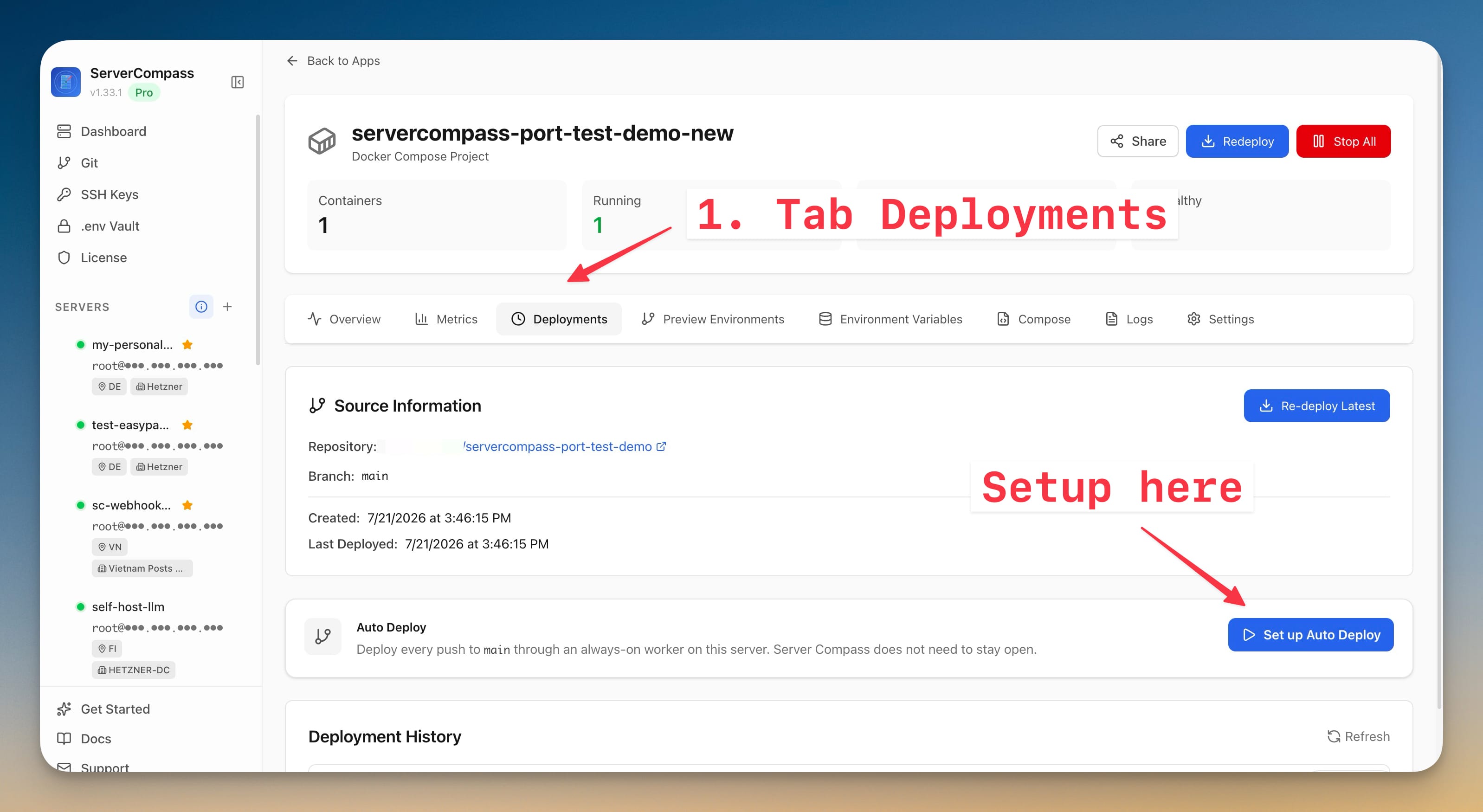
- เปิดแอปที่ deploy แล้วและไปที่ Deployments
- หาการ์ด Auto Deploy แล้วคลิก Set up Auto Deploy
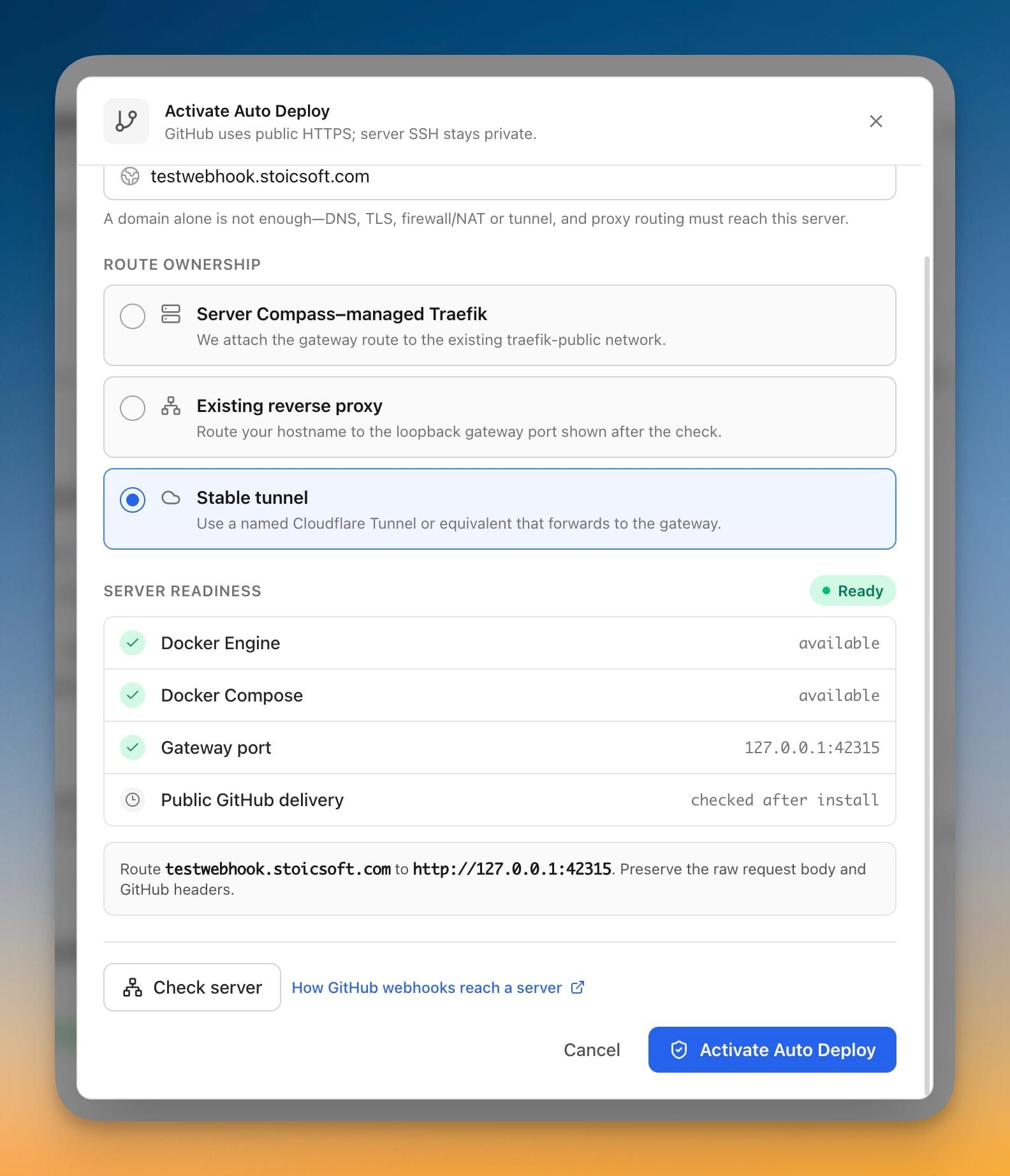
- กรอก hostname ของ webhook สาธารณะ ใช้เฉพาะ hostname หรือ HTTPS origin เท่านั้น เช่น
deploy.example.comหรือhttps://deploy.example.comอย่าเพิ่ม path, query string หรือพอร์ตกำหนดเอง
hostname คือทางเข้าสาธารณะสำหรับ GitHub การมีเพียงโดเมนอย่างเดียวไม่เพียงพอ: DNS, TLS, กฎ firewall หรือ NAT และ proxy หรือ tunnel ของคุณต้องประกอบกันเป็น route ที่สมบูรณ์ไปยัง gateway บนเซิร์ฟเวอร์
เลือกวิธีที่ GitHub เข้าถึงเซิร์ฟเวอร์
ตัวเลือก route ทั้งสามใช้ signed webhook และ deployment worker แบบส่วนตัวเดียวกัน ต่างกันเพียง route สาธารณะเท่านั้น
Server Compass-managed Traefik
ใช้ตัวเลือกนี้เมื่อ Server Compass-managed Traefik เป็น reverse proxy สาธารณะบนเซิร์ฟเวอร์อยู่แล้ว ชี้ DNS record ของ hostname ไปยังเซิร์ฟเวอร์ และตรวจสอบให้แน่ใจว่าพอร์ต inbound 80 และ 443 เข้าถึงได้ Server Compass จะแนบ webhook gateway เข้ากับเครือข่าย Docker traefik-public ที่มีอยู่ และกำหนดค่า route โฮสต์ HTTPS
โดยปกติแล้วนี่เป็นตัวเลือกที่ง่ายที่สุดสำหรับ VPS สาธารณะ และยังใช้ได้กับเซิร์ฟเวอร์ LAN เมื่อ router forward พอร์ต 80 และ 443 ไปยังเซิร์ฟเวอร์นั้น และ hostname resolve ไปยัง public IP ของ router
Existing reverse proxy
ใช้ตัวเลือกนี้เมื่อ Nginx, Caddy, Traefik, HAProxy หรือ proxy อื่นจัดการ hostname อยู่แล้ว คลิก Check server เพื่อรับ loopback target ที่สร้างขึ้น จากนั้น route hostname ของ webhook ไปยังที่อยู่ที่แสดง เช่น http://127.0.0.1:42315
Proxy ต้องรักษา raw request body และ header ของ GitHub webhook ไว้ เพื่อให้ gateway สามารถตรวจสอบ HMAC signature ได้ อย่าวาง login middleware, Cloudflare Access หรือหน้า authentication แบบโต้ตอบอื่นไว้หน้า route นี้
หาก proxy ทำงานใน Docker โปรดจำไว้ว่า 127.0.0.1 ภายใน container ของ proxy หมายถึง container นั้นเอง ให้ใช้ host networking, ที่อยู่ host-gateway หรือเครือข่าย Docker ที่ใช้ร่วมกันที่เหมาะสมแทน
Stable tunnel
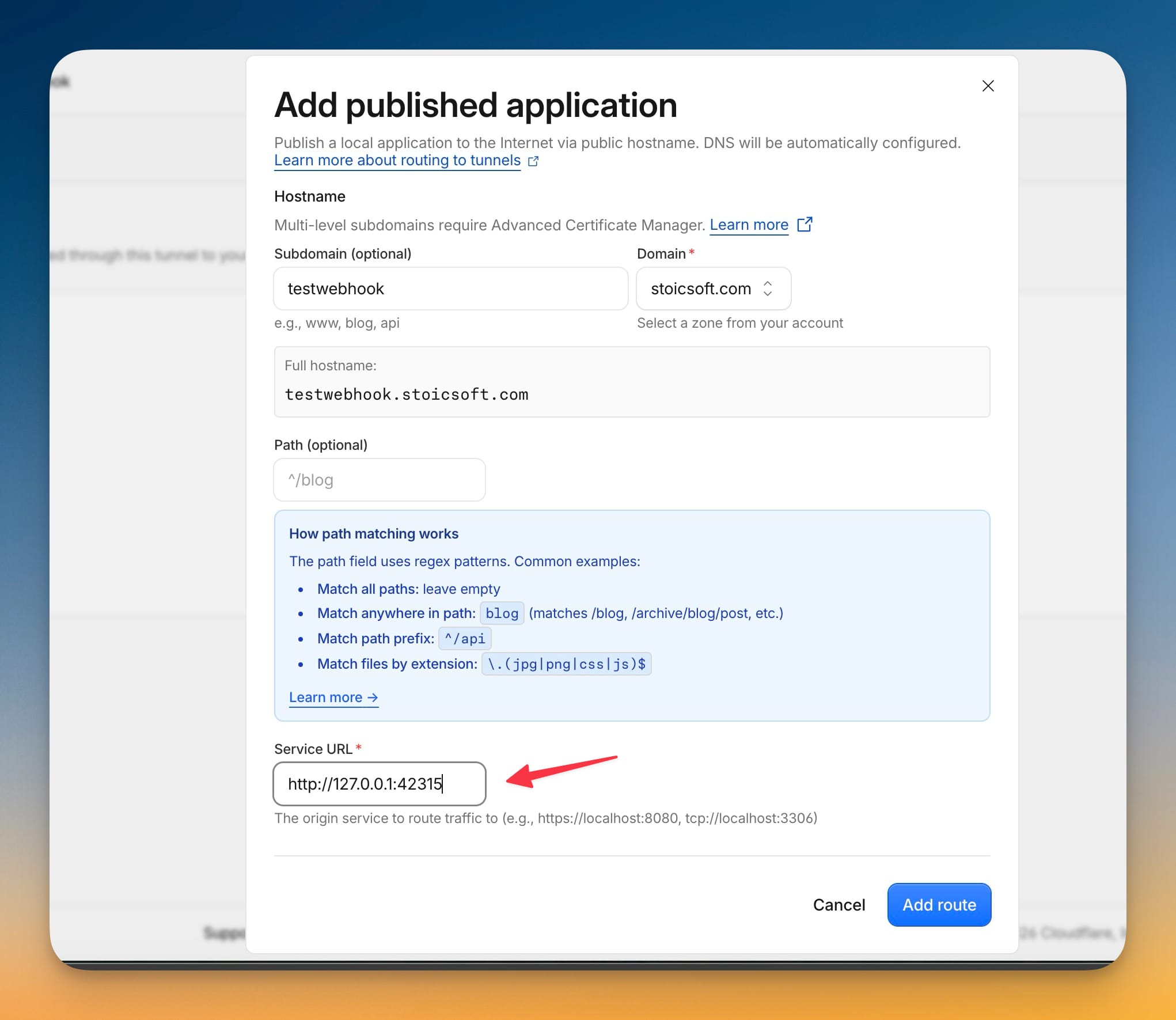
ใช้ตัวเลือกนี้สำหรับเซิร์ฟเวอร์ LAN, VPS ส่วนตัว, การเชื่อมต่อ CGNAT หรือเซิร์ฟเวอร์ใดก็ตามที่คุณไม่ต้องการเปิดพอร์ต inbound สร้าง named Cloudflare Tunnel แบบถาวรหรือ tunnel ที่เทียบเท่า เรียกใช้ connector บนเซิร์ฟเวอร์ และแมป hostname สาธารณะไปยัง loopback target ที่ Check server แสดง เช่น http://127.0.0.1:42315
Tunnel ต้องเสถียรและเริ่มทำงานโดยอัตโนมัติหลังจาก reboot Quick Tunnel ชั่วคราวหรือ URL ของ ngrok ที่เปลี่ยนเมื่อ restart ไม่เหมาะสม เพราะ GitHub จะเก็บ URL ของ webhook ไว้ หาก connector ทำงานใน Docker ให้ host networking หรือ route อื่นที่สามารถเข้าถึง gateway บน host ได้จริง
ตรวจสอบเซิร์ฟเวอร์และเปิดใช้งาน
- คลิก Check server
- ยืนยันว่า Docker Engine, Docker Compose และพอร์ต gateway ที่แนะนำผ่านการตรวจสอบความพร้อม
- หากคุณเลือก managed Traefik ให้ยืนยันว่าเครือข่าย
traefik-publicผ่านด้วยเช่นกัน - หากคุณเลือก proxy ที่มีอยู่หรือ stable tunnel ให้ทำ route ภายนอกไปยังพอร์ต loopback ที่แน่นอนที่แสดงในผลลัพธ์ให้เสร็จ
- คลิก Activate Auto Deploy
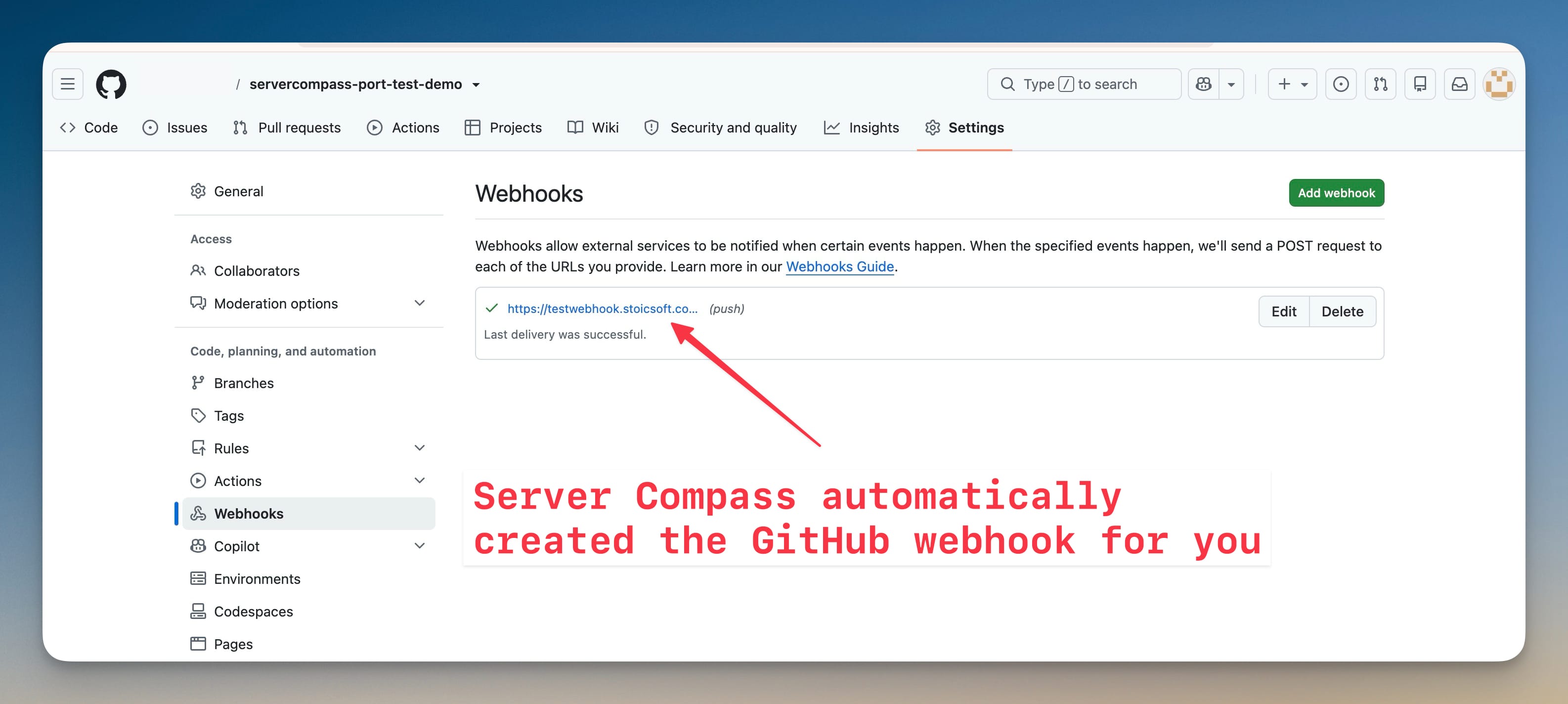
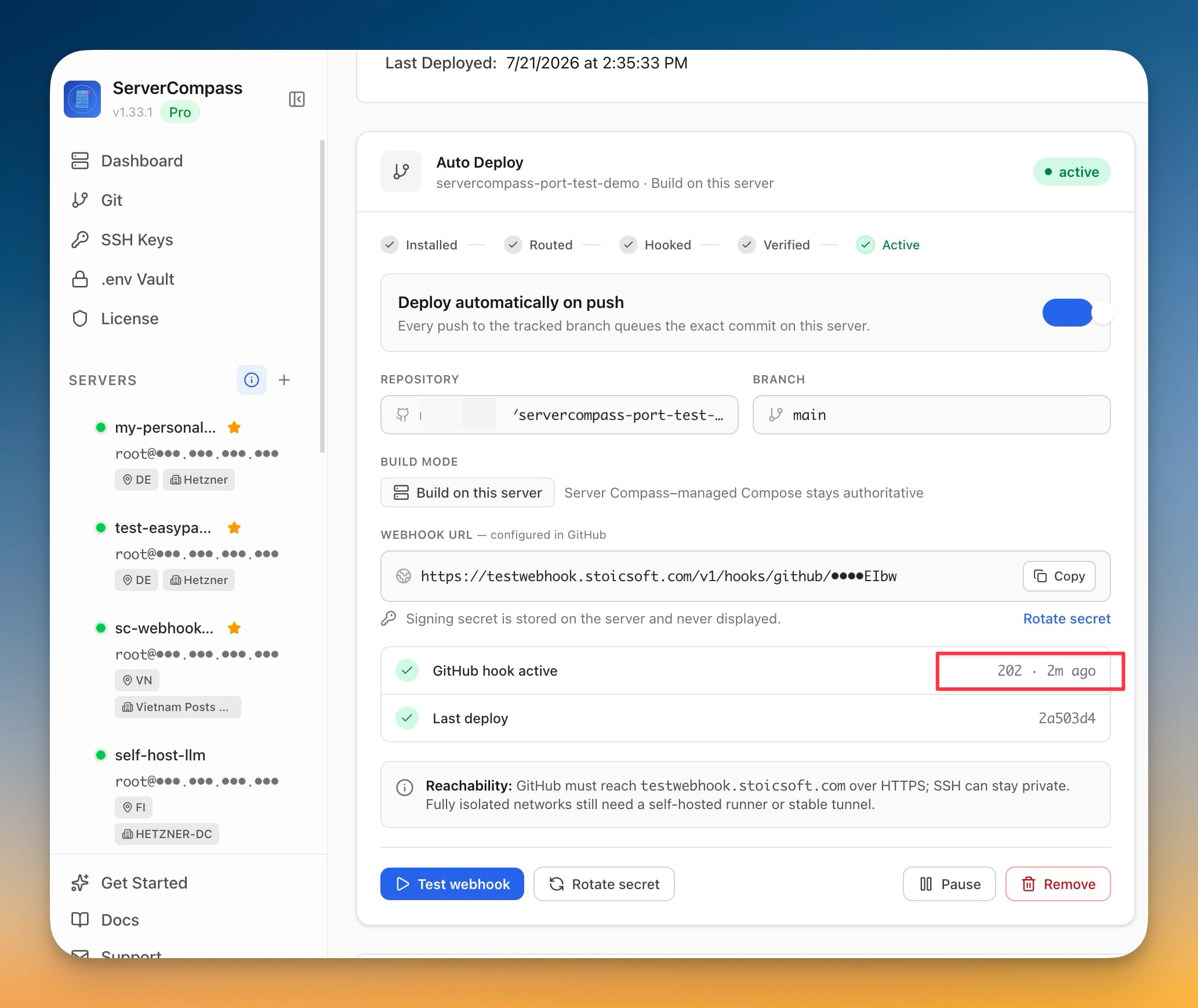
Server Compass จะติดตั้ง gateway และ worker สร้าง URL ของ webhook แบบส่วนตัว เก็บ signing secret ไว้บนเซิร์ฟเวอร์ สร้าง webhook ใน GitHub ส่ง ping ของ GitHub และรอ signed delivery ที่สำเร็จ สถานะจะดำเนินไปตาม Installed, Routed, Hooked, Verified และ Active
หากการตั้งค่าหยุดที่ Awaiting route แสดงว่า runtime ถูกติดตั้งแล้วแต่ GitHub ยังเข้าถึงไม่ได้ ทำ route ของ DNS, TLS, firewall/NAT, proxy หรือ tunnel ให้เสร็จหรือแก้ไข จากนั้นคลิก Continue setup คุณไม่จำเป็นต้องติดตั้งแอปใหม่
ตรวจสอบ Auto Deploy
ก่อนอื่นให้ยืนยันว่า health endpoint สาธารณะเข้าถึง gateway ของ Server Compass ได้:
curl -fsS https://deploy.example.com/healthz
จากนั้นตรวจสอบ flow การ deploy ทั้งหมด:
- ใน GitHub ให้เปิด repository และไปที่ Settings > Webhooks
- เปิด webhook ที่ Server Compass สร้างขึ้น และยืนยันว่า delivery ล่าสุดตอบกลับด้วย
2xx - Push commit เล็ก ๆ ไปยัง branch ที่ติดตาม
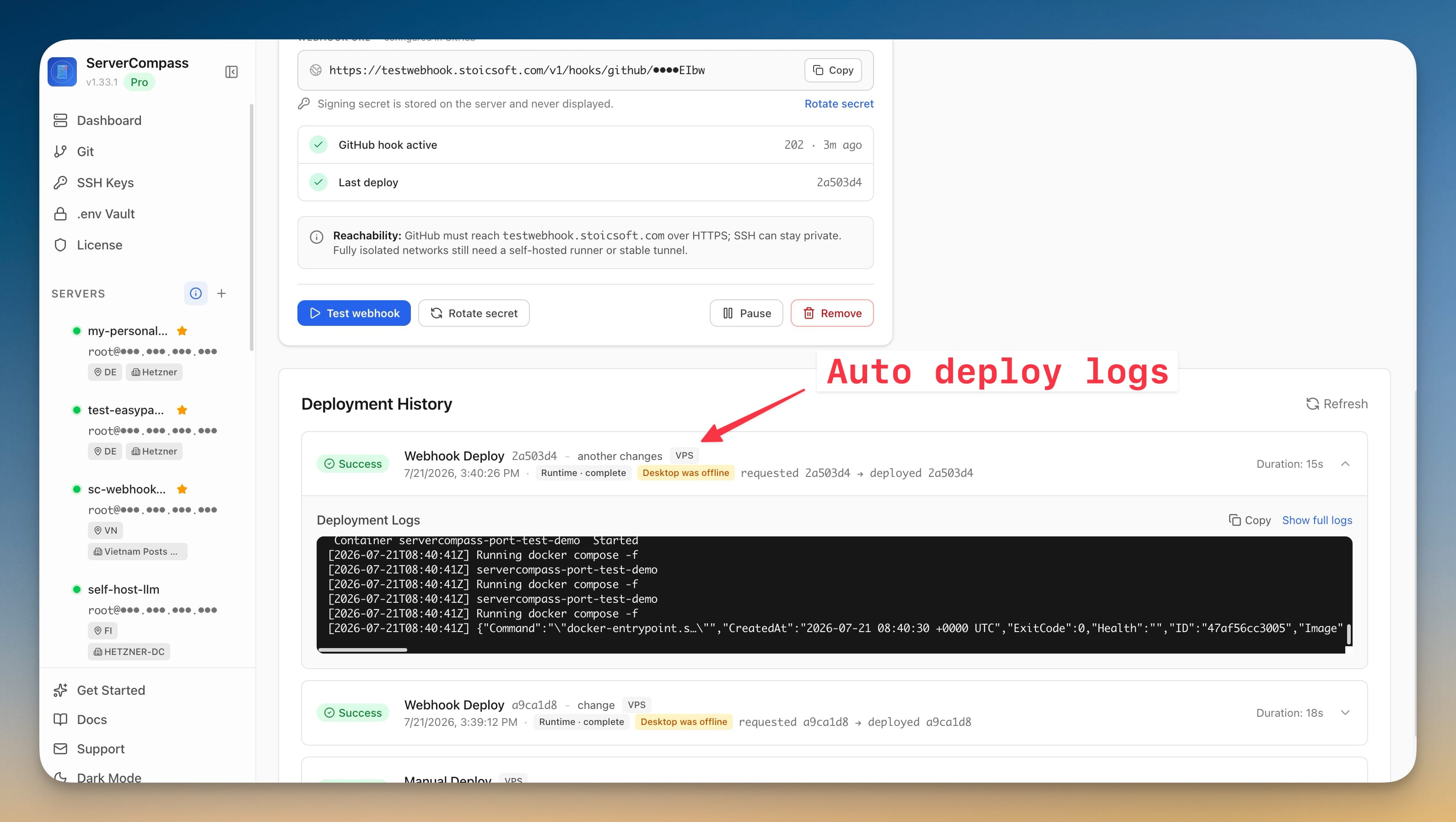
- ใน Server Compass ให้เปิดประวัติการ deploy ของแอป และยืนยันว่า webhook job ใช้ commit ที่ push
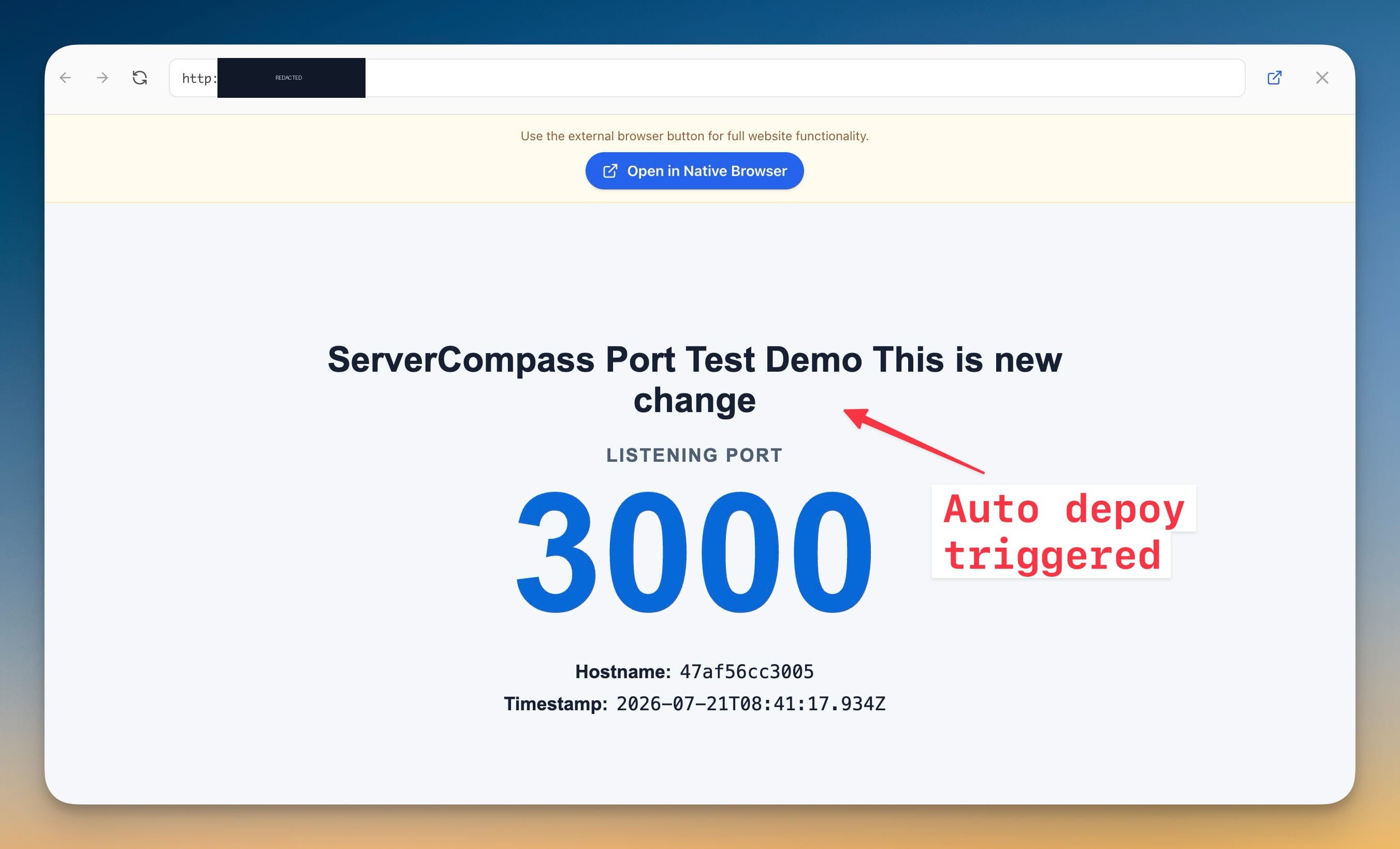
- ยืนยันว่าแอปพลิเคชันที่ deploy มีการเปลี่ยนแปลงนั้น
สำหรับการทดสอบขั้นสุดท้าย ให้ออกจาก Server Compass ทั้งหมด push commit อีกครั้งไปยัง branch ที่ติดตาม และตรวจสอบแอปพลิเคชันอีกครั้ง การ deploy ควรยังคงเสร็จสมบูรณ์ เพราะ gateway, คิว และ worker ทำงานบนเซิร์ฟเวอร์
จัดการ webhook ที่ใช้งานอยู่
การ์ด Auto Deploy มีการดำเนินการเหล่านี้:
- Test webhook ส่ง test delivery ของ GitHub อีกครั้งและรีเฟรชสถานะ
- Rotate secret แทนที่ signing secret ทั้งบนเซิร์ฟเวอร์และบน GitHub webhook
- Pause เก็บ target และประวัติไว้ แต่หยุดการ deploy อัตโนมัติ; Resume เปิดใช้งานอีกครั้ง
- Remove ลบ GitHub webhook และ remote target policy ของมัน โดยยังคงเก็บประวัติการ deploy ไว้
หากต้องการเปลี่ยน repository หรือ branch ที่ติดตาม ให้ Remove Auto Deploy ก่อน อัปเดตและ redeploy แอปด้วย repository หรือ branch ใหม่ จากนั้นตั้งค่า Auto Deploy อีกครั้ง
การแก้ปัญหาและความปลอดภัย
- Health endpoint ล้มเหลวหรือคืนค่า 502/404: ตรวจสอบ DNS และ TLS ยืนยันว่า proxy หรือ tunnel ชี้ไปยังพอร์ต loopback ปัจจุบัน และตรวจสอบว่า container ของ gateway กำลังทำงานอยู่
- Delivery ของ GitHub ไม่ใช่
2xx: ตรวจสอบ delivery ล่าสุดของ webhook ยืนยันว่าไม่มี authentication layer ปิดกั้น GitHub และตรวจสอบว่า proxy ไม่ได้เปลี่ยน raw body หรือลบ header ของ GitHub - Push แล้วไม่ deploy: ยืนยันว่า Auto Deploy อยู่ในสถานะ Active ไม่ใช่ Paused และการ push ทำไปยัง branch ที่ติดตามอย่างแน่นอน
- Tunnel ทำงานได้จนกระทั่ง reboot: กำหนดค่า named tunnel connector เป็น system service หรือ container ที่ restart ได้ อย่าใช้ URL ชั่วคราว
- เดสก์ท็อปปิดอยู่และการ deploy ล้มเหลว: ตรวจสอบว่าเซิร์ฟเวอร์ออนไลน์ และ container ของ gateway และ worker ของ Server Compass กำลังทำงานอยู่
URL ของ webhook มี private route token และไม่ควรเผยแพร่ Delivery ของ GitHub ได้รับการยืนยันด้วย HMAC signing secret ที่สร้างและเก็บไว้บนเซิร์ฟเวอร์ และไม่เคยแสดงใน UI คุณไม่จำเป็นต้องเปิดเผย SSH, Docker socket หรือ private worker สู่อินเทอร์เน็ต
Screenshots
Ready to try Server Compass?
Download the app and deploy your first application in under 5 minutes.
Download Server Compass