返回文档


数据库
使用数据库管理界面
无需外部工具即可可视化查询、浏览和管理数据库。
Intermediate7 min readUpdated 2024-02-01
访问数据库管理
对于具有数据库容器的应用:
- 在 Server Compass 中打开应用
- 前往"数据库"标签页
- Server Compass 自动检测支持的数据库
- 点击"打开管理"启动界面
支持的数据库
Server Compass 支持:
- SQL:PostgreSQL、MySQL、MariaDB
- NoSQL:MongoDB、Redis、CouchDB、Cassandra
- 搜索:Elasticsearch、OpenSearch
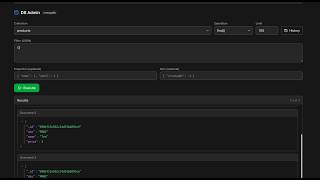
运行查询
使用内置查询编辑器:
- 选择数据库/集合
- 编写 SQL 或特定数据库查询
- 点击"运行"或按 Cmd/Ctrl + Enter
- 在格式化的表格中查看结果
- 导出结果为 CSV 或 JSON
浏览数据
可视化浏览数据:
- 选择表/集合
- 在类似电子表格的界面中查看数据
- 排序和过滤列
- 编辑单个单元格(对于支持的数据库)
Screenshots
Video Tutorials
Related Features
Database Admin Interface
Full database management UI for SQL and NoSQL databases. Query, browse tables, and manage data visually.
SQL Query Editor
Execute SQL queries directly on connected databases. Syntax highlighting, results table, and query history.
NoSQL Query Editors
Specialized query editors for MongoDB, Elasticsearch, CouchDB, and Cassandra. Native query syntax support.
Tables & Schema Browser
Browse database tables, view schemas, column types, and relationships. Understand your data structure visually.
Ready to try Server Compass?
Download the app and deploy your first application in under 5 minutes.
Download Server Compass