กลับไปยังเอกสาร


ฐานข้อมูล
ใช้ Database Admin Interface
Query, เรียกดู และจัดการ databases ของคุณแบบ visual โดยไม่ต้องใช้ tools ภายนอก
Intermediate7 min readUpdated 2024-02-01
เข้าถึง database admin
สำหรับแอปที่มี database containers:
- เปิดแอปใน Server Compass
- ไปที่แท็บ "Database"
- Server Compass ตรวจจับ databases ที่รองรับโดยอัตโนมัติ
- คลิก "Open Admin" เพื่อเปิด interface
Databases ที่รองรับ
Server Compass รองรับ:
- SQL: PostgreSQL, MySQL, MariaDB
- NoSQL: MongoDB, Redis, CouchDB, Cassandra
- Search: Elasticsearch, OpenSearch
รัน queries
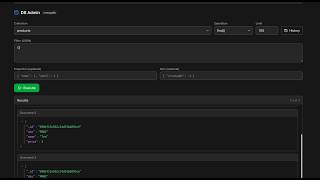
ใช้ query editor ในตัว:
- เลือก database/collection ของคุณ
- เขียน SQL หรือ query เฉพาะ database ของคุณ
- คลิก "Run" หรือกด Cmd/Ctrl + Enter
- ดูผลลัพธ์ในตารางที่จัดรูปแบบ
- ส่งออกผลลัพธ์เป็น CSV หรือ JSON
เรียกดูข้อมูล
เรียกดูข้อมูลแบบ visual:
- เลือก table/collection
- ดูข้อมูลใน interface เหมือน spreadsheet
- เรียงลำดับและกรองคอลัมน์
- แก้ไขเซลล์แต่ละเซลล์ (สำหรับ databases ที่รองรับ)
Screenshots
Video Tutorials
Related Features
Database Admin Interface
Full database management UI for SQL and NoSQL databases. Query, browse tables, and manage data visually.
SQL Query Editor
Execute SQL queries directly on connected databases. Syntax highlighting, results table, and query history.
NoSQL Query Editors
Specialized query editors for MongoDB, Elasticsearch, CouchDB, and Cassandra. Native query syntax support.
Tables & Schema Browser
Browse database tables, view schemas, column types, and relationships. Understand your data structure visually.
Ready to try Server Compass?
Download the app and deploy your first application in under 5 minutes.
Download Server Compass