กลับไปยังเอกสาร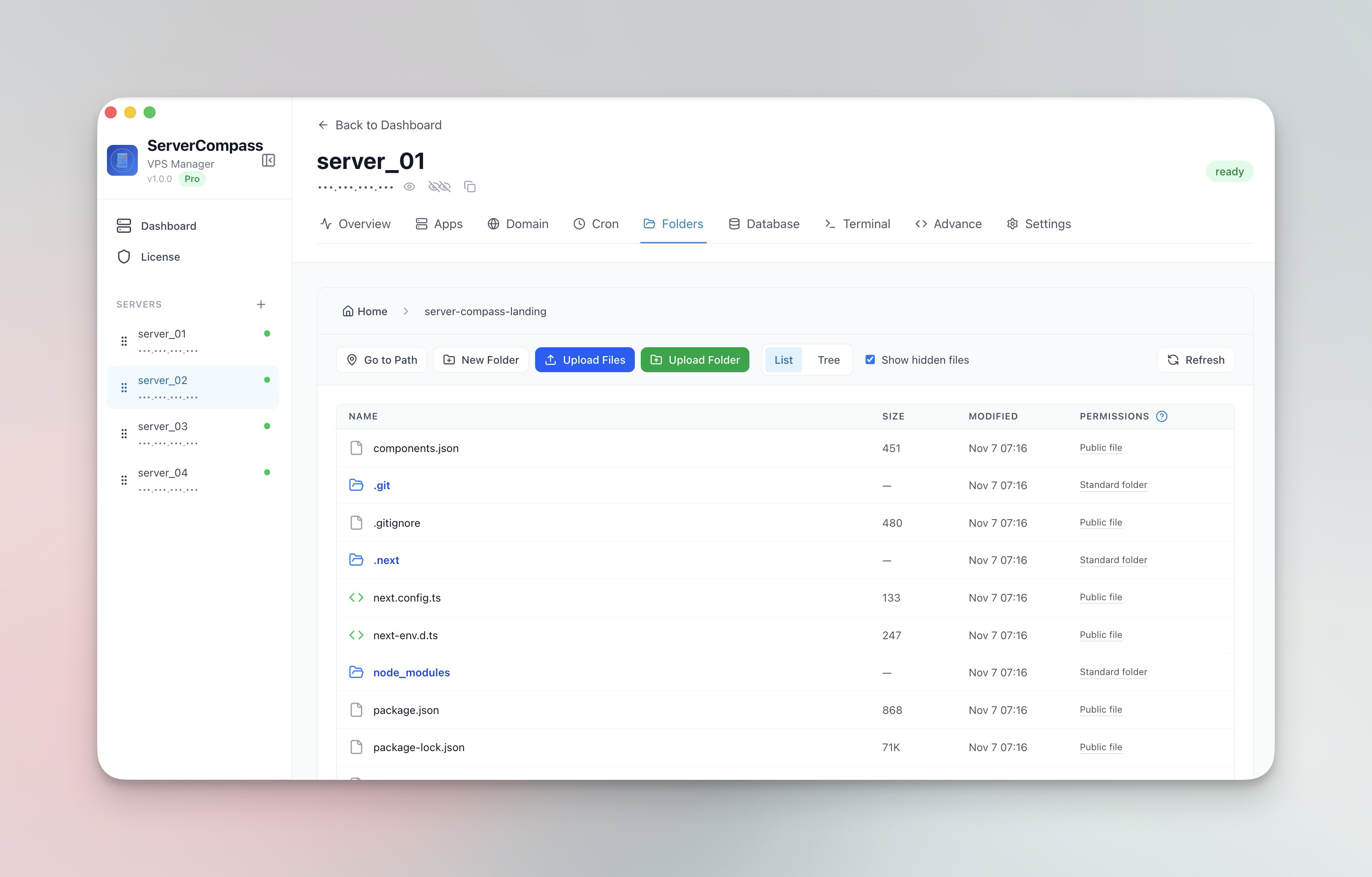


การจัดการไฟล์
จัดการไฟล์ Server
เรียกดู แก้ไข อัปโหลด และดาวน์โหลดไฟล์บน server ของคุณ
Beginner5 min readUpdated 2024-02-01
File browser
นำทางระบบไฟล์ของ server ของคุณ:
- ไปที่แท็บ Files
- เรียกดู directories เหมือน file manager
- สลับระหว่างมุมมองรายการและ tree
- แสดง/ซ่อนไฟล์ที่ซ่อนอยู่
แก้ไขไฟล์
แก้ไขไฟล์โดยตรง:
- คลิกที่ไฟล์เพื่อเปิด
- แก้ไขใน editor ในตัว
- Syntax highlighting สำหรับไฟล์ code
- คลิก "Save" เพื่อบันทึกการเปลี่ยนแปลง
อัปโหลดและดาวน์โหลด
โอนไฟล์:
- อัปโหลด: ลากและวางไฟล์/โฟลเดอร์
- ดาวน์โหลด: คลิกขวา > ดาวน์โหลด
- การติดตามความคืบหน้าสำหรับการโอนขนาดใหญ่
- การบีบอัดอัตโนมัติสำหรับการอัปโหลดที่เร็วขึ้น
การดำเนินการไฟล์
การดำเนินการที่มีอยู่:
- สร้างไฟล์และโฟลเดอร์ใหม่
- เปลี่ยนชื่อไฟล์และโฟลเดอร์
- ลบด้วยการยืนยัน
- คัดลอก paths ไฟล์
Screenshots
Related Features
Visual File Browser
Navigate your server filesystem with list or tree view. Toggle hidden files and browse directories like a local file manager.
In-App File Editor
View and edit server files directly in the app. Syntax highlighting and save directly back to the server.
File & Folder Upload
Upload files and entire folders with progress tracking and automatic compression. Drag and drop support.
File Download
Download files from your server to your local machine with progress tracking. No SCP or SFTP tools needed.
Ready to try Server Compass?
Download the app and deploy your first application in under 5 minutes.
Download Server Compass