ドキュメントに戻る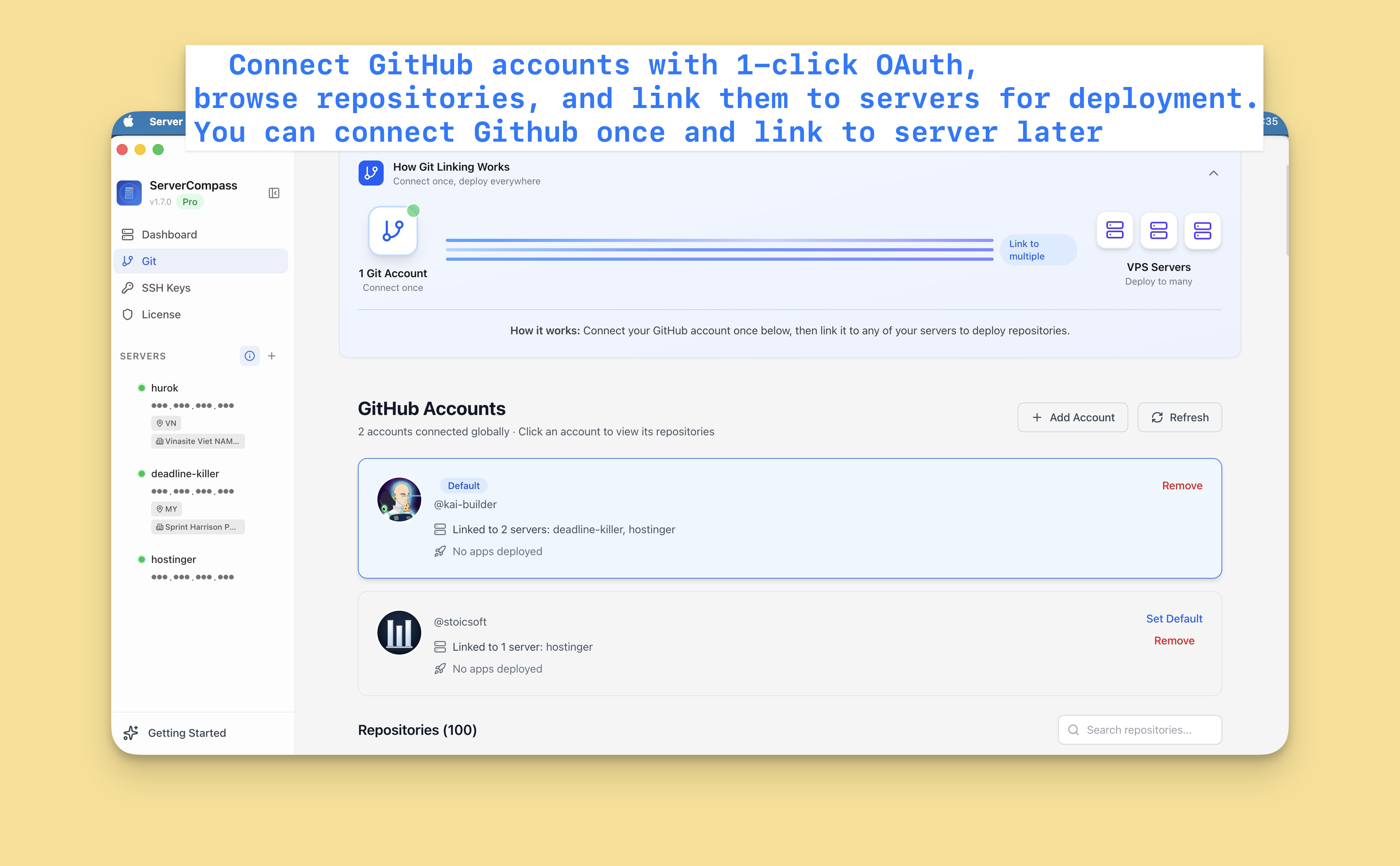

GitHub連携
GitHub 統合を設定
GitHub アカウントを接続してリポジトリをデプロイし、自動デプロイを有効にします。
Beginner4 min readUpdated 2024-02-01
GitHub アカウントを接続
- 設定 > GitHub に移動
- 「GitHub を接続」をクリック
- GitHub にリダイレクト
- Server Compass を認証
- 接続完了!
GitHub アプリやパーソナルアクセストークンを作成する必要はありません。
複数のアカウント
複数の GitHub アカウントを接続:
- プロジェクト用の個人アカウント
- チームリポジトリ用の組織アカウント
- 複数の組織
各アカウントはデプロイソースセレクターに表示されます。
接続を管理
GitHub 接続を管理:
- 設定 > GitHub に移動
- 接続されたすべてのアカウントを表示
- 不要なアカウントを削除
- 必要に応じて新しいアカウントを追加
Screenshots
Video Tutorials
Related Features
Ready to try Server Compass?
Download the app and deploy your first application in under 5 minutes.
Download Server Compass