Back to Changelog
v1.34.0July 21, 2026

Auto Deploy on git push, even with the app closed and SSH private

Deploy on every git push even with the desktop app closed and SSH kept private, using an always-on worker you can manage from the app.

Download v1.34.0

Get this version from GitHub Releases

Download

What's Changed

New Features

13
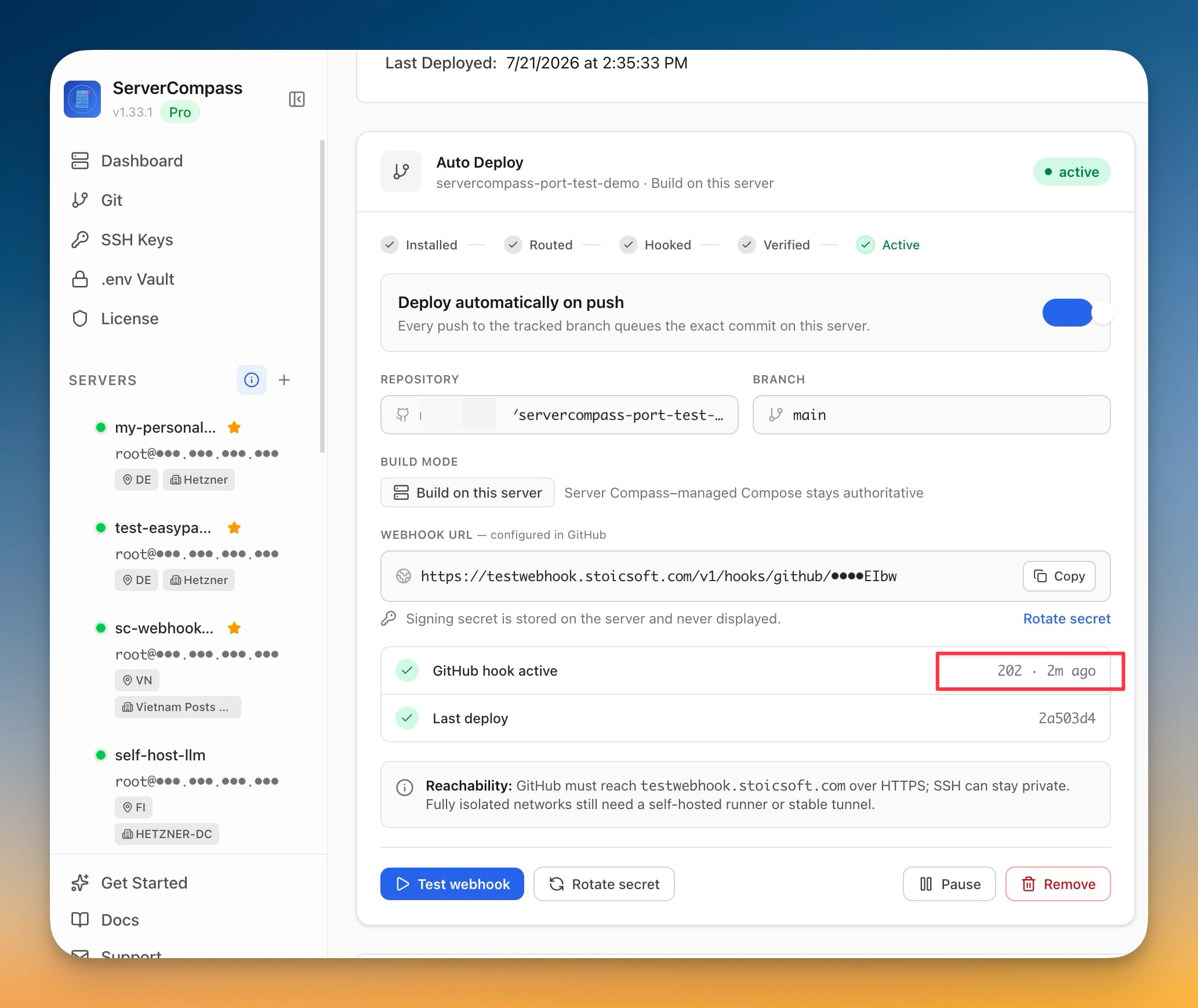
  • Deploy automatically on every push — turn on Auto Deploy for a GitHub-connected app that builds on your server, and every push to its tracked branch (like main) deploys that exact commit on its own
  • Works while Server Compass is closed — a small always-on service runs on your server and handles the deploy, so you don't need to keep the desktop app open or your computer awake
  • No need to expose SSH — GitHub reaches your server over a normal HTTPS web address instead of your private SSH port, so pushes can deploy even to servers whose SSH isn't publicly reachable
  • Choose how GitHub reaches your server — route the webhook through Server Compass–managed Traefik, your existing reverse proxy, or a stable tunnel like Cloudflare Tunnel
  • Guided setup with a readiness check — before installing, Server Compass checks your license, disk, memory, and ports, then walks you through connecting the webhook to GitHub
  • Secure by design — the signing secret is stored on your server and never shown, you can rotate it anytime, and the public piece that receives webhooks has no access to your Docker or shell
  • Watch it come online — send a test webhook and follow the setup from Installed → Routed → Hooked → Verified → Active, with the last delivery result and last deployed commit shown at a glance
  • Pause, resume, or remove anytime — switch Auto Deploy off to stop deploying on push without uninstalling, or remove it entirely (your deployment history is kept)
  • See everything in one card — check whether the service is running, whether GitHub can reach it, its version, how many apps use it, and how many deployments are running or queued
  • Keep it healthy — restart the service, view its recent logs, re-sync deployment history, and see free disk from one place
  • Emergency stop — instantly stop accepting new webhook deployments while keeping the queue and full deployment history intact, then resume when you're ready
  • One shared history — deployments triggered by a push appear right alongside the ones you start yourself, all in the same Deployments list
  • Uninstall when you're done — remove the service from a server in a single step
Related Topics
auto deploy on git pushGitHub webhookprivate SSHdeployment service