दस्तावेज़ पर वापस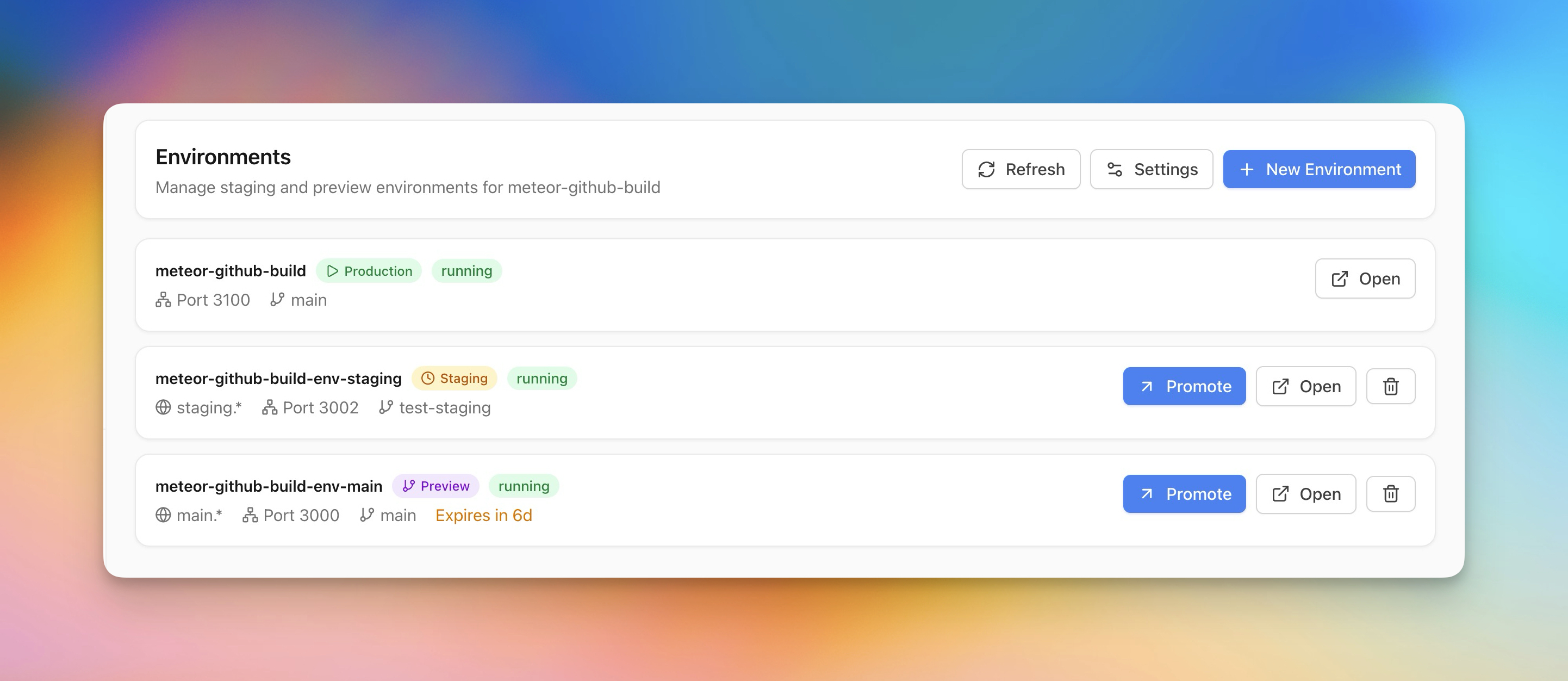
Deploy करें
Staging और Preview Environments
Safe testing के लिए production के साथ staging और preview environments बनाएं।
Intermediate5 min readUpdated 2026-03-29
Preview environment बनाएं
Preview environments आपको live जाने से पहले changes test करने देते हैं:
- अपना ऐप खोलें और Environments section पर जाएं
- Create Preview Environment पर क्लिक करें
- Deploy करने की branch चुनें
- Server Compass अपने domain के साथ isolated container बनाता है
- Preview branches configurable timer पर auto-delete हो जाती हैं
Staging बनाम Preview
- Staging — एक persistent environment जो production mirror करता है। QA और integration testing के लिए use करें।
- Preview — Branches से tied temporary environments। Push पर auto-create, timer के बाद auto-delete।
दोनों अपने environment variables और domains के साथ separate containers के रूप में run होते हैं।
Production पर promote करें
जब preview या staging environment validated हो:
- Promote to Production पर क्लिक करें
- Server Compass वही image/branch production पर redeploy करता है
- अगर zero-downtime enabled है तो swap बिना interruption होता है
Screenshots
Related Features
Ready to try Server Compass?
Download the app and deploy your first application in under 5 minutes.
Download Server Compass