กลับไปยังเอกสาร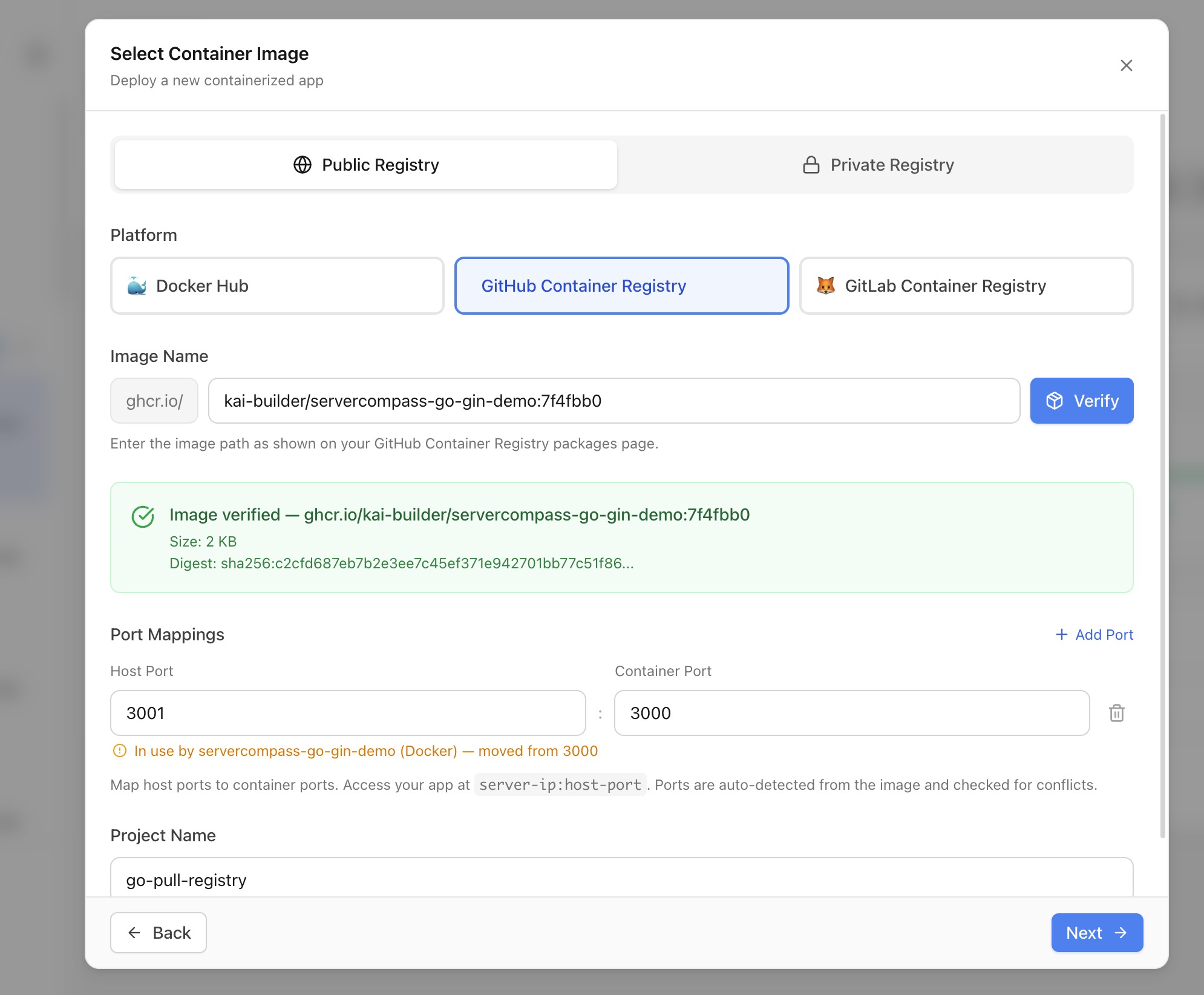
การปรับใช้
Deploy จาก Docker Registry
Pull และ deploy images ที่สร้างไว้ล่วงหน้าจาก Docker Hub, GHCR, GitLab, ECR, GCR หรือ private registries โดยไม่ต้อง build
Intermediate7 min readUpdated 2026-03-29
Registries ที่รองรับ
Server Compass รองรับ pulling images จากประเภทรายการ 6 ประเภท:
- Docker Hub — images สาธารณะและส่วนตัวพร้อม access tokens
- GitHub Container Registry (GHCR) — เชื่อมต่อบัญชี GitHub ของคุณสำหรับการเข้าถึง OAuth ที่ราบรื่น
- GitLab Container Registry — access tokens หรือ deploy tokens
- Amazon ECR — login tokens (หมดอายุใน 12 ชั่วโมง)
- Google Container Registry (GCR) — การยืนยันตัวตนด้วยไฟล์ JSON key
- Custom registries — registry ใดๆ ที่เป็นไปตาม OCI
Deploy image สาธารณะ
- เปิด Stack Wizard และเลือก Pull from Registry
- ใส่ image reference (เช่น
nginx:latestหรือghcr.io/owner/app:v1.2) - Server Compass ตรวจจับพอร์ตที่เปิดอยู่โดยอัตโนมัติสำหรับ images ยอดนิยม 30+ (Nginx, PostgreSQL, Redis, Grafana ฯลฯ)
- ตรวจสอบพอร์ตที่ตรวจจับได้และแก้ไขข้อขัดแย้งกับ containers ที่กำลังทำงานอยู่
- กำหนดค่า environment variables และ restart policy
- คลิก Deploy — มีการสร้างไฟล์ compose และ pull image โดยตรง
Deploy จาก private registry
- เพิ่มข้อมูล registry ในแผง Registry Selector
- ประเภทรายการแต่ละประเภทมีคำแนะนำการตั้งค่า (เช่น ขอบเขตที่ต้องการสำหรับ tokens GHCR)
- ทดสอบการเชื่อมต่อก่อนบันทึก
- เลือกข้อมูล registry เมื่อ deploy — Server Compass ยืนยันตัวตนผ่าน
docker loginโดยอัตโนมัติ - สำหรับ GHCR คุณยังสามารถเชื่อมต่อบัญชี GitHub ของคุณสำหรับการเข้าถึงแบบ OAuth โดยไม่ต้องใช้ tokens ด้วยตนเอง
Redeploy แบบคลิกเดียว
แอปที่ deploy จาก registry รองรับ redeploy ทันที:
- เปิดแท็บ Deployments ของแอป
- คลิก Redeploy — Server Compass pull image digest ล่าสุดและ restart container
- ไม่ต้อง build ใหม่ — image ที่อัปเดตถูก pull และสลับเข้าที่
- image tags แสดงในประวัติ deployment ของคุณเพื่อการติดตามที่ง่าย
Screenshots
Video Tutorials
Related Features
Ready to try Server Compass?
Download the app and deploy your first application in under 5 minutes.
Download Server Compass