Kembali ke dokumentasi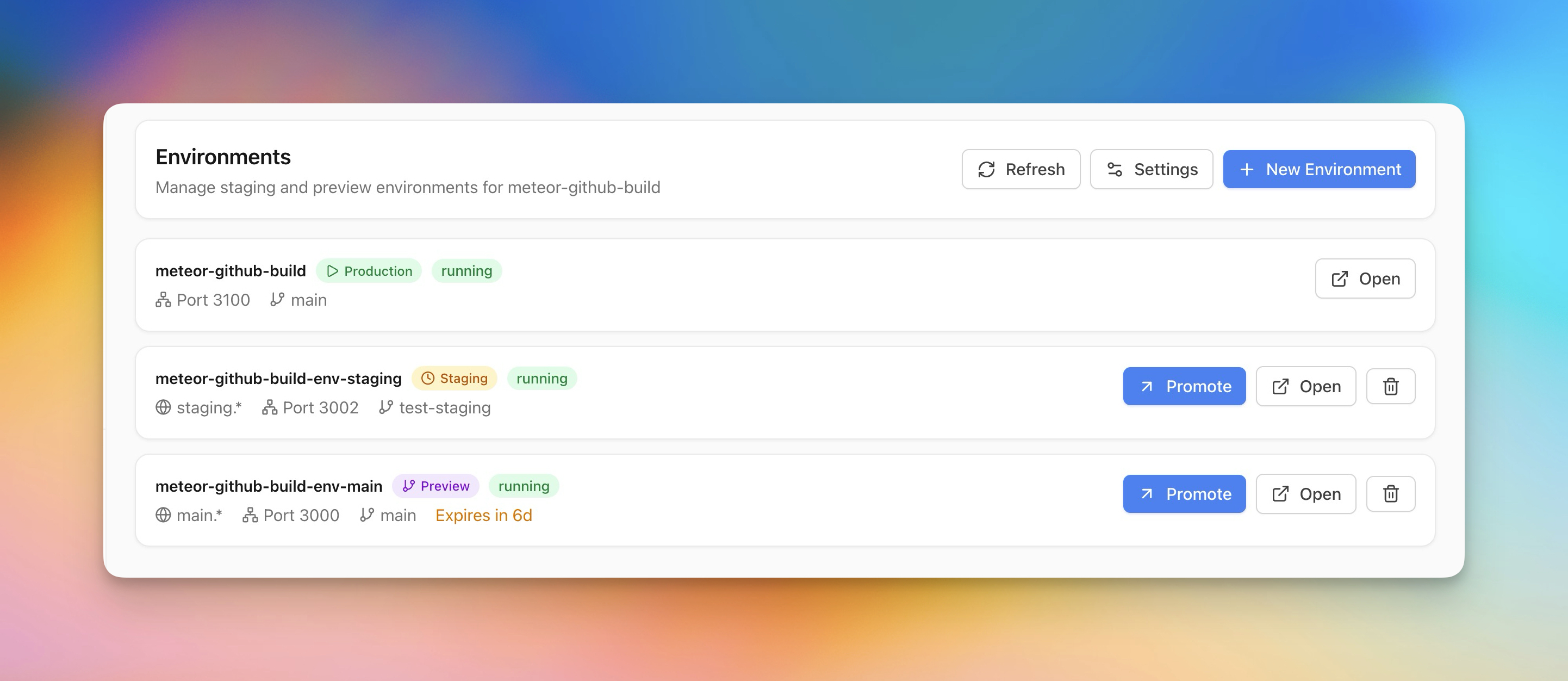
Deployment
Staging & Preview Environments
Buat staging dan preview environments bersama production untuk testing aman.
Intermediate5 min readUpdated 2026-03-29
Membuat preview environment
Preview environments memungkinkan test perubahan sebelum live:
- Buka aplikasi dan buka bagian Environments
- Klik Create Preview Environment
- Pilih branch untuk deploy
- Server Compass membuat container terisolasi dengan domain sendiri
- Preview branches auto-hapus pada timer yang dapat dikonfigurasi
Staging vs preview
-
Staging — Environment persisten yang mencerminkan production. Untuk QA dan integration testing.
- Preview — Environment temporary terikat ke branch. Auto-dibuat saat push, auto-dihapus setelah timer.
Keduanya berjalan sebagai container terpisah dengan environment variables dan domain sendiri.
Promoting ke production
Saat preview atau staging environment tervalidasi:
- Klik Promote to Production
- Server Compass redeploy image/branch yang sama ke production
- Jika zero-downtime diaktifkan, pertukaran terjadi tanpa interupsi
Screenshots
Related Features
Ready to try Server Compass?
Download the app and deploy your first application in under 5 minutes.
Download Server Compass